
Gemini 3: The Most Powerful AI Tool for Images, Video & Coding
Gemini 3 Review:A Fun, Real-World 
In this Gemini 3 Review, we explore how Google’s newest creative AI transforms workflows for designers, developers, marketers, and everyday creators. Unlike other tools that specialize in a single task, Gemini 3 provides a complete multimodal creative system, offering image generation, video creation, animation, coding, and text generation all in one platform. This Gemini 3 Review will highlight its strengths, weaknesses, and real-world applications.
Introduction & Background
This Gemini 3 Review begins by examining its foundation. Released by Google in 2025, Gemini 3 represents a major evolution in Google’s AI lineup. Unlike previous AI tools that focused on either text or images, Gemini 3 is fully multimodal, capable of:
Generating high-quality images across multiple styles
Creating short-form videos and animations
Writing scripts, articles, and long-form content
Building and debugging code
Animating photos with realistic effects
Supporting everyday workflow tasks
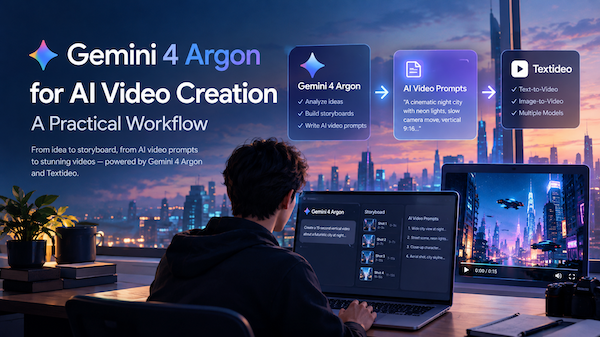
Thanks to its deep-learning architecture and large multimodal dataset, Gemini 3 understands context exceptionally well. As this Gemini 3 Review demonstrates, this versatility is a key reason creators are increasingly switching to it. For those exploring additional storytelling or productivity tools, platforms like Textideo complement Gemini 3 in multimodal creative workflows.
Features & Highlights (A Key Section of This Gemini 3 Review)
Gemini 3 provides an impressive suite of creative tools. A major finding in this Gemini 3 Review is that it allows creators to switch seamlessly between images, video, audio, animation, coding, and text—all within one ecosystem.
Highlight 1: Coding Assistance
Gemini 3 excels in coding tasks, generating functional code based on simple instructions and even fixing bugs automatically. Beginners and non-technical creators can quickly prototype without deep programming knowledge. Supported languages include Python, JavaScript, and C++.
Evaluation: Ideal for rapid prototyping or debugging. While the generated code is generally accurate, complex or large-scale applications may still require human review. This makes Gemini 3 a strong tool in creative and development workflows, as highlighted throughout this review.
Highlight 2: AI Image Generation
Gemini 3’s image generation feels almost magical. With a single text prompt, it can produce high-quality visuals across multiple styles — watercolor, oil painting, cartoon, photorealism, and more. The results are detailed, stylistically consistent, and versatile enough for designers, branding teams, and content creators.

Evaluation: Perfect for creators who need fast, high-quality visuals — social media managers, marketers, illustrators, and more. The generation speed and quality are impressive, though complicated compositions may require some manual fine-tuning.
Highlight 3: AI Video Generation (“Flow”)
The video generator, known as Flow, is one of Gemini 3’s standout features. Provide a text description and a few images, and Flow will automatically create short videos complete with transitions, animations, and music. It’s ideal for social content, product videos, or quick promotional clips. Evaluation: Flow dramatically speeds up short-form video creation. It’s very convenient, but for longer or highly complex videos, the automatic output may need extra human edits for full creative control.
Highlight 4: AI Image Animation
This feature brings still images to life — adding subtle animations like blinking, smiling, or environmental motion (wind, water, light, etc.). It’s perfect for creating engaging social posts, ads, or quick animated loops without needing advanced editing skills.

Evaluation: Super fun and easy to use, especially for short videos, GIFs, and social-ready animated content. However, complex scenes or unusual compositions may require more processing and won’t always animate perfectly.
Highlight 5: Gemini Agent
Gemini 3 also includes Gemini Agent, an intelligent assistant that helps automate everyday tasks — from writing copy to building presentations to analyzing data. It’s designed not only for creative workflows but also for boosting productivity across the board. Evaluation: Gemini Agent is a huge time-saver for busy creators, freelancers, and business owners. It automates repetitive tasks and supports a wide range of content creation needs. That said, highly specialized or deeply technical tasks may still require manual adjustments.
Performance Review (Core Findings of This Gemini 3 Review)
Performance is one of the most important factors creators look for, and in this Gemini 3 Review, the system’s speed, responsiveness, and output consistency became clear highlights. Whether generating images, building animations, or rendering video sequences, Gemini 3 delivers reliable results with impressive efficiency. Below, we break down the three core performance areas that stood out throughout this Gemini 3 Review.
Speed & Efficiency
During testing for this Gemini 3 Review, Gemini proved extremely fast: Images generate in seconds.
Short videos: 10–90 seconds.
Long-form video: slower, depending on hardware.
Versus competitors: Faster than MidJourney (no queue)
Faster than Runway Gen-2 for short clips
Slightly slower for long videos unless using strong hardware
Image Quality
Gemini 3 stands out with: natural lighting
strong detail
high texture quality
accurate prompt interpretation
These findings consistently appear in community Gemini 3 Reviews as well.
Processing Power
Gemini 3 handles: high-res image generation
long video sequences
batch processing
multimodal workflows
This is one of the platform’s core technical strengths.

User Experience
A major highlight of this Gemini 3 Review is how polished and user-friendly the overall experience feels. Gemini 3 combines a clean interface, intuitive controls, and flexible workflows that make it welcoming for beginners while still offering the depth professionals need. Whether you're designing visuals, producing videos, planning marketing assets, or simply experimenting creatively, the user experience remains smooth, modern, and efficient. Below, we break down the core areas of Gemini 3 that shaped the user experience in this Gemini 3 Review.
Interface
Modern and minimal, making Gemini 3 easy for beginners yet powerful for experts.
Ease of Use
A recurring theme in most Gemini 3 Reviews is how beginner-friendly the system feels: Templates
Smart prompt suggestions
Guided examples
Professionals get batch mode, style control, and advanced tuning.
Use Cases & Real Examples
Creative Industry
Designers use Gemini 3 to: create concept art
storyboard scenes
produce animated ads
generate brand assets
Business & Marketing
Gemini 3 supports: product visuals
promo campaigns
social media videos
advertising materials
Personal Use
Even non-designers can instantly generate high-quality visuals using Gemini 3.
Pros & Cons (A Balanced View in This Gemini 3 Review)
Pros
⭐ Top-tier image quality ⭐ Full multimodal capabilities ⭐ Beginner-friendly ⭐ Great for professionals
Cons
⚠️ Long videos can be slow ⚠️ Best performance needs strong hardware ⚠️ Pricing may be high for casual users
Competitor Comparison (Important Section of This Gemini 3 Review)
| Feature / Tool | Gemini 3 | DALL·E 2 | MidJourney | Adobe Firefly |
|---|---|---|---|---|
| Image Quality | ⭐⭐⭐⭐⭐ | ⭐⭐⭐⭐ | ⭐⭐⭐⭐⭐ | ⭐⭐⭐⭐ |
| Style Variety | ⭐⭐⭐⭐⭐ | ⭐⭐⭐⭐ | ⭐⭐⭐⭐⭐ | ⭐⭐⭐⭐ |
| Video Generation | ✔ | ✖ | ✖ | ✖ |
| Image Animation | ✔ | ✖ | ✖ | Limited |
| Code Generation | ✔ | ✖ | ✖ | ✖ |
| Text Generation | ✔ | Medium | Medium | ✔ |
| Commercial Output | High | Medium | Medium | High |
| Multimodal Level | Very High | Low | Low | Low |
| Ease of Use | Easy | Medium | Higher learning curve | Easy |
Comparison Summary As emphasized throughout this Gemini 3 Review, Gemini is not merely an image AI—it’s a complete creative system. Competitors excel in specific categories but lack multimodal depth.
FAQ (From This Gemini 3 Review)
How do I start using Gemini 3? Visit the official site, create an account, and choose a plan. Gemini 3 begins working instantly—no setup required.
Do I need a powerful computer? Basic tasks run fine on normal hardware. For high-resolution images or longer videos, Gemini 3 performs best on systems with GPU acceleration.
Can I customize my creations? Yes—Gemini 3 allows full control over style, lighting, characters, tone, and composition.
Can I export my work? You can export in JPG, PNG, MP4, MOV, and text formats.
Can I use Gemini 3 for commercial work? Most paid plans allow it. Always review the latest license.
Final Thoughts (Closing the Gemini 3 Review)
This Gemini 3 Review concludes that Gemini 3 is one of the most complete AI creative systems available. From images and videos to animations, code, and text, Gemini 3 delivers exceptional performance. Creators, designers, marketers, and developers can boost workflow efficiency, accelerate ideation, and produce polished results faster than ever.
If you’re searching for an all-in-one AI tool, Gemini 3 is the benchmark for multimodal creative intelligence, as consistently highlighted in this review and across community feedback.
✏️Leave a Comment