
One clear portrait
A head-and-shoulders shot facing the camera with eyes, mouth, and hairline visible. Skip heavy filters, sunglasses, or anything that hides the edges of your face.
Make an Enzo Fernandez Celebration video from one photo: drop your face into the hands-behind-the-ears pose, send the kiss to the crowd, and let AI stage the packed stands around you — ready for TikTok, Reels, and Shorts in minutes.
Web-based tool · No editing skills required · Nothing to install

Everything an Enzo Fernandez Celebration clip needs fits inside a single frame. Line up these three things before you upload and your first take is usually the one you post.
A head-and-shoulders shot facing the camera with eyes, mouth, and hairline visible. Skip heavy filters, sunglasses, or anything that hides the edges of your face.
A well-lit photo gives the model enough detail to hold your features steady frame after frame. Shoot near a window or outdoors in open shade rather than under a harsh overhead bulb.
Long enough to generate an Enzo Fernandez Celebration clip, watch the preview, and ask for another take if the first one misses. Nothing else — no timeline software and no clips to source.
The idea usually dies in the group chat. Every manual way of faking an Enzo Fernandez Celebration clip falls apart long before anyone actually posts anything.
You cannot book a packed home end or borrow a camera team for a joke about a weekend result. Filming it for real means gear, access, and a stadium you simply do not have.
A CapCut template pastes a face onto broadcast clips you have to hunt down, trim, and sync by hand. The editing app quietly becomes the job, and the match footage was never yours to use.
Both hands cupped behind your ears with your tongue out reads as a shrug when it is done badly. Holding the gesture while someone films you is awkward and rarely looks like the real thing.
Animating a pose is easy; dropping a familiar face into a moment everyone reads at a glance is what makes an Enzo Fernandez Celebration clip worth sharing. Here is what people are making from one photo on Textideo.
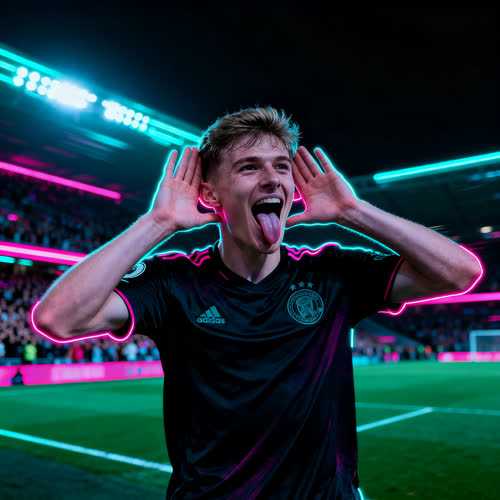
Put your own face on the touchline with both hands behind your ears. A plain selfie turns into a confident Enzo Fernandez Celebration reaction anyone can screenshot.
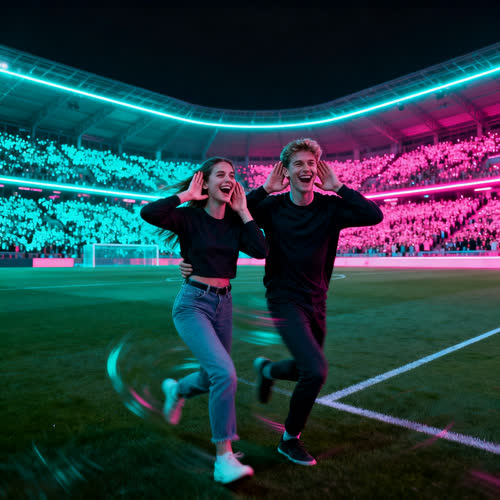
Upload a selfie with a friend and watch both of you spin and cup your ears in sync. Group-chat jokes land the second the hands go up.
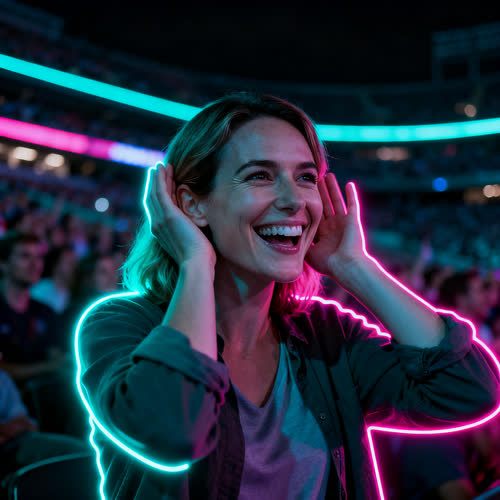
Passed an exam, beat your rivals, finally shipped the project? Give a small personal win the attitude of a highlight reel.
One photo goes in, a ready-to-post Enzo Fernandez Celebration video comes out. These three pieces are what make that jump work without you touching a timeline.
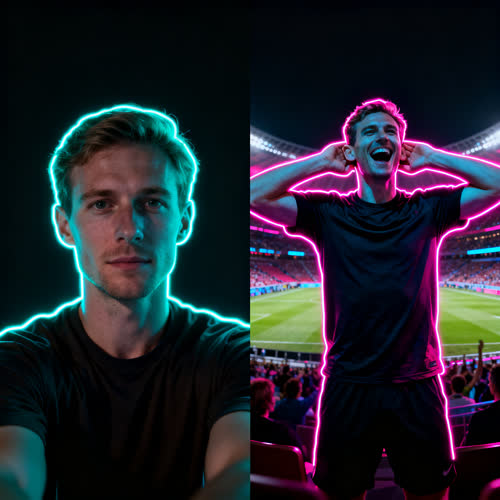
The generator reads your face, hair, and clothes from a single portrait and places that identity into the prepared routine, so the finished Enzo Fernandez Celebration video is unmistakably you.
Identity-preserving face swap keeps you front and center while the reference performance drives the movement. Hands lift behind the ears, the head turns with a teasing expression, and the kiss to the crowd lands on your face in every frame.

The stands, the spin, and the Topo Gigio pose are generated around your photo, so an ordinary win suddenly looks like a highlight-worthy moment.
A full stadium moment comes together from a single portrait in a few taps. Pick the photo, watch the Enzo Fernandez Celebration play out around your face, then post it where your friends are watching.

Pick a selfie, a casual portrait, or a head-and-shoulders shot with your face and upper body visible. A front-facing, well-lit image lets the effect lock onto your features so the motion stays sharp from the first frame to the last.

Apply the celebration template and Textideo drops your identity into the Enzo Fernandez Celebration routine — hands cupped behind the ears, tongue out, kiss to the crowd — inside a generated stadium. You do not film, pose, or edit anything yourself.

Watch the result, ask for a clearer take if something looks off, then download and publish to TikTok, Reels, or Shorts. Add the trending sound inside the app and join the conversation.
Football is only the entry point. Any moment worth a confident pose becomes a clip, and each occasion asks for a slightly different photo.
Turn the final whistle into your own reaction for the group that watched it together. Use a portrait of yourself, then add a caption about the moment you loved.
Give the winner of a prediction game an Enzo Fernandez Celebration that matches their confidence. With their permission, a solo portrait becomes a visual joke the whole chat understands instantly.
Finished an exam, hit a training goal, survived a brutal week? An Enzo Fernandez Celebration clip gives that achievement a bit of drama without a production schedule.
Build a short reaction around the pose and give your feed a recognizable personal moment. Keep the crop simple so your face and hands stay readable on a small phone screen.
Fans, creators, and friend groups reach this generator for different reasons, but every Enzo Fernandez Celebration video starts the same way: one photo and something worth celebrating.
Make a clip for the group chat that watched the match. From last-minute winners to prediction comebacks, the Enzo Fernandez Celebration effect turns a fan's photo into a recognizable stadium reaction without filming anything.
Post a fresh take to TikTok, Reels, or Shorts in minutes. Riding a trend while it is still hot matters more than polish, and keeping your own face at the center of the pose is what makes it yours.
Reward the mate who won the argument with something they can screenshot. Use one photo of them, with permission, and a shared joke becomes a personalized video.
Celebrate a small win or a funny moment. No editing app, no CapCut template, and no match footage to source — just one photo and a few minutes on Textideo.
A good Enzo Fernandez Celebration clip should not cost you an afternoon. The celebration template, identity-preserving face swap, and a short three-step flow are designed to get you from photo to post in one sitting.
A single clear portrait is the whole input for an Enzo Fernandez Celebration video — no pitch, no camera team, no acting. Upload it and AI handles the touchline, the spin, and the stands around you.
Identity-preserving face swap keeps your face, hair, and clothes in the Enzo Fernandez Celebration result while the celebration sequence drives the motion. It comes out looking like you, not a stranger.
Skip the editing app. The hands-behind-the-ears routine, the head turn, and the playful expression are baked into the template, so you only choose a photo and a scene.
Every export renders in a vertical 9:16 frame that fits TikTok, Instagram Reels, and YouTube Shorts. Render once and post wherever your friends are watching.
Preview the clip, regenerate a clearer take, or adjust the scene with the built-in editor. You stay in control from the first upload to the final export.
Your projects stay private unless you choose to share them. The photo you upload is used to build your clip and is not shown publicly without your action.
Everyday takes from the community — the before was manual and messy, the after is one photo and a few minutes.
“Before, a match win meant a group-chat screenshot that nobody saved. I dropped my face into the Enzo Fernandez Celebration and the whole chat lost it — one photo, a few minutes, done.”
“I used to stitch CapCut templates and hunt for usable footage. Now the stadium and the Enzo Fernandez Celebration pose render for me, and I just post the 9:16 clip while the trend is still alive.”
“We turned a silly prediction bet into a clip with both of us cupping our ears. It became our go-to reply whenever someone is confidently wrong about a match.”
Illustrative examples written from community feedback — not verified endorsements.
Answers to what people ask before uploading their first photo.
It turns a single photo into a short clip where your face performs the signature routine: both hands pressed behind the ears, tongue out, and a kiss sent to the crowd inside a roaring stadium. You supply the portrait, the effect supplies the motion, so the result is clearly you rather than a look-alike.
Three steps on Textideo. Upload one clear photo with your face and upper body visible, apply the celebration template so AI drops your identity into the pose, then generate, preview, and download or share it to TikTok, Reels, or Shorts. No filming and no editing app are needed.
It is the Topo Gigio: both open palms pressed behind the ears with fingers spread, a tongue-out expression, and a kiss aimed at the stands. It reads as “I can’t hear you” — a reply to critics or the other side’s fans. Enzo Fernández made it famous after his equaliser, and this effect copies the pose, not the player.
No. One photo is enough. AI builds the touchline, the spin, the hands-behind-the-ears pose, and the crowd around your image, so nothing about the Enzo Fernandez Celebration needs to be performed or recorded by you.
Often those work best. The gap between an ordinary portrait and a confident stadium routine is what makes people laugh. A serious shot gives a dramatic result and a playful selfie gives a lighter one — both work as long as your face is clearly visible.
No. You are the one in the frame, wearing the clothes from your photo, and the stadium is generated — there is no real footballer, no club badge, and no broadcast footage in it. Present it as a creative edit rather than match footage.
Use one sharp, front-facing portrait with visible eyes, mouth, and hairline, ideally including your upper body. Avoid heavy blur, faces hidden by accessories, or busy group shots with several equally prominent people.
Every export renders in a vertical 9:16 frame built for short-form platforms. TikTok, Instagram Reels, and YouTube Shorts all work as-is, and you can add the trending sound inside whichever app you post from.
A template pastes your face onto existing broadcast footage you still have to find, trim, and sync. This effect generates the whole scene — your face, your clothes, a packed home end, and the pose written into the prompt — so the editing step disappears entirely.
Once you see how an Enzo Fernandez Celebration video handles your photo, these tools take the same one-photo idea in other directions.
One photo, a few minutes, and your own match-day moment is ready to post.
Web-based tool · No editing skills required · Nothing to install