
AI Hair Color Changer: See the Shade on Your Own Hair First
An AI hair color changer puts a new shade on your own portrait, so the decision stops being a guess. Upload one daylight photo, name the colour you keep thinking about, and compare copper, ash brown or pastel pink against your skin tone in about a minute. Your cut, face and light stay as they were, and the renders you keep are ready to hand a colourist.
Rated by people who preview a shade before they book a colour appointment No credit card required - no salon booking needed - your photo stays yours
Put an AI Hair Color Changer Between the Idea and the Appointment
Box dye and salon colour are both hard to undo. An AI hair color changer gives you somewhere cheap to be wrong: try platinum, mushroom ash or cherry red on your own face tonight, sleep on it, and turn up with two saved renders instead of an adjective, made on Textideo.
Try Hair Colors NowThe Hard Part an AI Hair Color Changer Removes Is the Guesswork
Hair dye is the least reversible beauty decision you can make in an afternoon.
Make an AI Hair Color Changer Work in Three Steps
One portrait, one shade direction, then a side-by-side you can actually judge.
Upload a Daylight Portrait
Choose a sharp photo, hair down, no hat, even window light, because daylight shows a shade the way the street will. An AI hair color changer maps the hair itself, so nothing needs painting by hand.
Name the Shade Direction
Pick a family first, warm copper or cool ash, before agonising over two neighbouring ash tones. Then add a note on placement: root shadow, money piece, brighter ends. Salon wording makes the handoff easier later.
Compare, Save and Take It In
Generate three or four candidates, keep them in one folder and look again the next morning, because colours compete differently side by side. Keep the two you would book and show them with your dye history.
What an AI Hair Color Changer Gives You Beyond a Pretty Picture
Three things decide whether a preview is worth showing to a professional at all.
AI Hair Color Changer Examples on a Single Portrait
Same face, same window light, four directions people actually book.
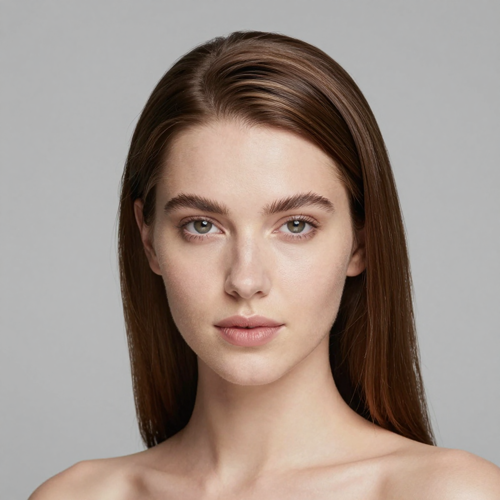
Expensive Brunette and Glossy Espresso
Dark, dimensional colour lives in the shine rather than the swatch. On a good render you still see the highlight band wrapping the crown instead of one solid mass.
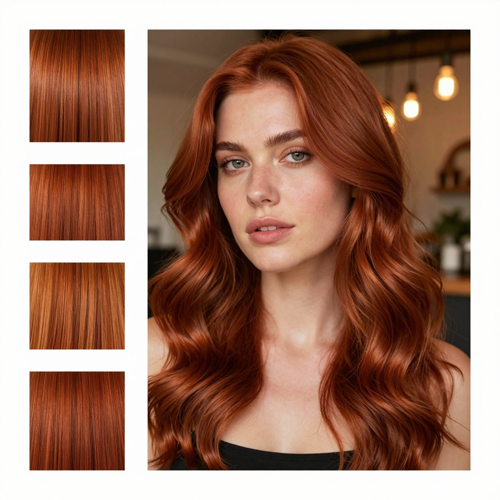
Cowboy Copper, the Shade People Preview Most
Warm and burnished, somewhere between auburn and true copper, and the colour most people are scared to commit to. Render it twice, once in daylight and once under warm bulbs, because copper shifts dramatically between the two.
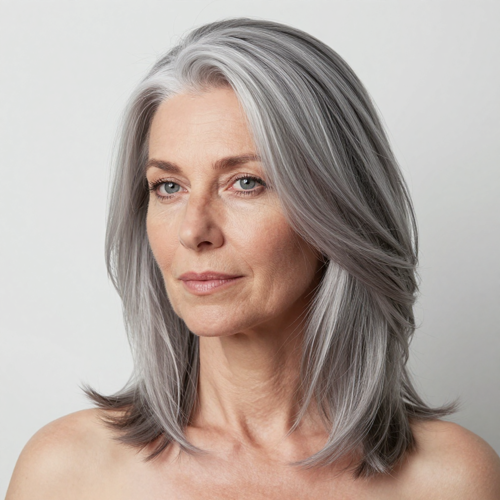
Silver Blending and Full Grey Coverage
Two opposite jobs: erase the grey evenly, or soften the contrast and let it read as salt-and-pepper. Preview both, since an AI hair color changer will happily show you the flat version of coverage.
Where an AI Hair Color Changer Fits: Salon, Camera and Feed
One render rarely stays in one place. It usually ends up in a consultation, a profile picture and a content plan.
Who Struggles Most With Hair Colour, and How an AI Hair Color Changer Helps
Four situations bring people to a shade preview, each with a different deadline and a different fear.
First-Timers Considering a Big Jump
Black to blonde, brown to copper, or a first fashion colour at forty. An AI hair color changer shows the destination before they agree to the sessions it takes.
An AI Hair Color Changer for Grey Coverage Decisions
Cover it evenly or blend it and grow it out. Seeing both on the same portrait settles what a printed swatch cannot.
Regulars Tracking Regrowth and Upkeep
Roots come back every six to eight weeks and toner fades sooner. Previewing the grow-out and the colour you would retreat to makes the upkeep honest.
Creators, Stylists and Product Teams
Seasonal boards, campaign drafts and client previews cost far less as renders than as a reshoot, as long as you own the portraits.
AI Hair Color Changer at a Glance
- TikTok
- Shopify
- Canva
Why an AI Hair Color Changer Beats Guessing at a Colour Chart
A printed swatch answers what a shade is called; an AI hair color changer answers whether it suits your face, which is the question people are stuck on.
An AI Hair Color Changer Answers a Whole-Face Question
A strand test tells you what the chemistry will do. It says nothing about whether platinum flatters your skin or cherry red fights your eyebrows. Only your own portrait answers that.
Warm and Cool Stop Being Abstract
Undertone charts are a starting point, not a verdict. Put honey blonde and ash brown on the same photo and the winner is obvious in seconds, faster than another article about vein colour.
The Brows Stay Exactly Where They Are
Brows and lashes keep their colour in the render. That mismatch is what people forget to imagine when they picture themselves blonde.
An AI Hair Color Changer Previews the Retreat Too
Render the colour you would retreat to if you hated it. If that looks bad too, the maths changes before anything is mixed.
Placement Gets Settled Before the Chair
Root shadow, money piece and balayage ends are placement choices rather than colour choices. Agreeing on them from an image means the appointment opens with what your hair can safely do.
Fewer Corrective Sessions Down the Line
Corrective colour is the most chemically aggressive work a head of hair can take. Narrowing the field first is the cheapest damage control available, and it costs one photograph.
What People Say About an AI Hair Color Changer
“I spent two winters talking myself into copper and two more talking myself out of it. Seeing it on my own face under window light ended the argument in one evening, and my colourist spent the appointment on how to get there instead of what I meant.”
“My old routine was a screenshot folder full of strangers, none of whom had my skin tone. Three renders of my own portrait did more for the decision than all forty of them, and I only needed one appointment in the end.”
“Clients arrive with a colour in mind and no vocabulary for placement. Two renders from an AI hair color changer plus a note on what they liked has noticeably shortened my consultations, because we start from what the hair can safely do rather than from adjectives.”
AI Hair Color Changer Questions People Ask Before Booking
Ten questions that come up in the gap between thinking about a colour and sitting in the chair.
What is an AI hair color changer?
It repaints the hair in your own photo with another shade while leaving the cut, face, skin and background as they are. People use an AI hair color changer to compare colours before any dye is mixed, and to hand a colourist something specific.
How is an AI hair color changer different from a hairstyle changer?
One changes colour, the other changes cut and shape. Run them separately: deciding length, bangs and shade together makes it impossible to tell what you dislike.
How close is the preview to a real salon result?
Tone and placement carry over well. What it cannot predict is chemistry: your starting level, porosity, bleach history and the formula decide the result, so let a professional price the route.
Can an AI hair color changer show what grey coverage would look like?
Yes. An AI hair color changer renders a coverage shade such as ash brown to see how much depth returns, or a silver blend if you would rather grow the grey out. How evenly a formula saturates resistant grey is a salon question, not a render question.
Does it work on curly, coily or very dark hair?
It does, with two caveats. Curls and coils leave gaps where the background shows through, so judge the outline rather than the shade. Very dark hair going light is a multi-session lift, and the preview shows the destination rather than the process.
Which photo gives the most honest AI hair color changer result?
A recent, sharp portrait in daylight, hair down, hairline visible, no hat and no beauty filter. Window light shows the shade the way the street will, which is why indoor bulbs flatter every copper.
Can I preview balayage, ombre or highlights instead of one flat colour?
Yes, and a dimensional result usually looks more real than one flat level. An AI hair color changer handles placement as well as pigment: money piece, root smudge, babylights or brighter ends.
What if the render changes parts of the photo I wanted to keep?
Use a cleaner source photo and a simpler request. Heavy bangs, accessories and odd camera angles make identity preservation harder, and slight drift around flyaways is normal.
Is an AI hair color changer useful if I am not dyeing my hair at all?
Often. Profile photos, thumbnails and character references all benefit from testing a colour visually: no bleach, no grow-out, no six weeks of doubt.
What should I bring to the salon afterwards?
Two or three saved renders rather than fifteen, the same shade under two lighting conditions, a note on what you liked about each, and an honest dye and bleach history. Box colour from eight months ago is still in your hair.
Try an AI Hair Color Changer Before You Book the Chair
Upload one daylight portrait, name the shade you keep thinking about, and set it against your own skin tone tonight. Two saved renders, a note on placement and no chemical commitment, available on Textideo.
No credit card required - no salon booking needed - your photo stays yours