
Brighten Image: Bring A Dark Photo Back Without Flattening It
Brighten image lifts the shadows of a photo that came out too dark without blowing out what was already bright. It works after the shot, on the file you already hold, when a reshoot is no longer an option. The result reads as proper lighting rather than as a filter, and it runs in a browser on Textideo.
Rated highly by sellers, photographers and agents who rescue dark photos every week No credit card required - no sign-up - your files stay yours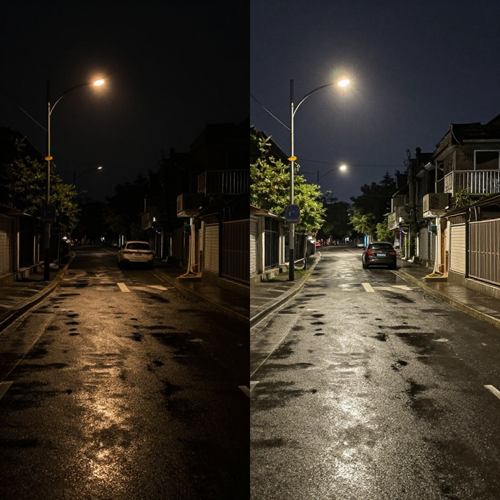
Brighten Image Turns One Dark Photo Into A Usable One
Most dark photos are not ruined, just underexposed: the camera metered for the bright window and let everything in front fall into shadow. Brighten image lifts the dark regions hardest, eases the midtones, and leaves what was already bright alone. Upload a JPG, PNG or WebP and get a file you can post.
Brighten A PhotoThe Hard Part With Brighten Image Is Everything Around It
Lifting the exposure is easy. Keeping the photo believable is not.
Brighten Image In Three Steps, Not Thirty
One upload, one brighten image pass, one download. The only decision left is how far the shadows should be pushed.
Upload The Dark File You Already Have
JPG, PNG and WebP go in exactly as they are. No RAW conversion, no pre-edit, no export out of another program first.
Let Brighten Image Find Where The Dark Actually Is
Exposure balance, shadow regions and anything close to clipping are checked, then each is lifted by a different amount. You see both versions before anything is written.
Dial It Back, Then Download At Full Resolution
If a face reads too bright or grain starts to show, pull the lift down a notch and put contrast back. Export keeps the original resolution.
What Brighten Image Gives You Beyond A Slider
Three controls decide whether a brighten image result looks lit or processed: where the lift lands, what it does to colour, and how much surface detail survives.
Three Photos That Brighten Image Actually Rescues
The same correction behaves differently depending on why a photo is dark in the first place. Three cases come up most often.

Brighten Image On A Backlit Portrait
The camera metered for the bright window and the person standing in front of it became a silhouette. The lift concentrates on the face while the window is held back, so the background keeps reading as a window instead of collapsing into a white rectangle.
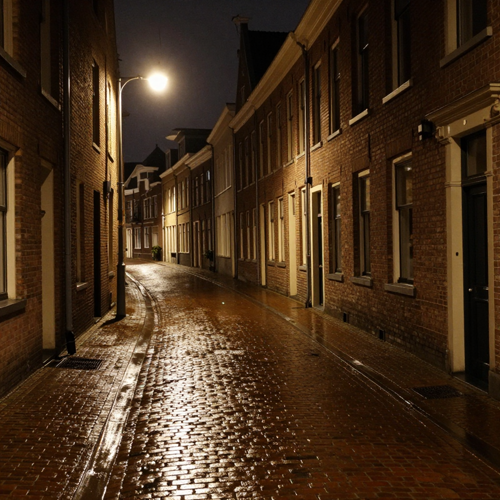
A Night Street Shot Full Of Grain
Phone sensors gather very little light after dark, and what they do gather sits next to a lot of noise. Correction lifts those regions while reduction is applied at the same time, so the frame brightens without the grain getting louder with it.
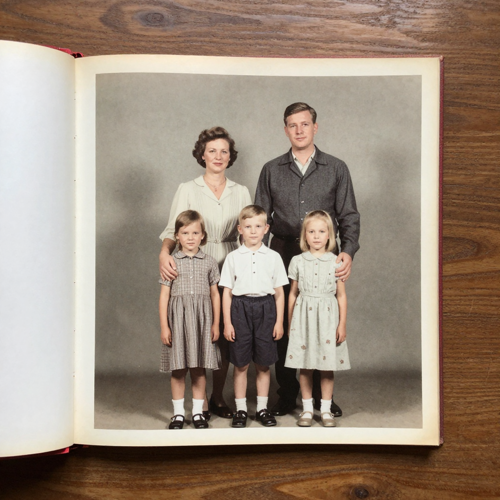
A Faded Scan Sitting In A Family Archive
Old paper prints and early scans come back grey, flat and slightly yellow. Brighten image rebuilds the tonal range first and corrects the colour balance second, which is the order that keeps a restoration from looking like somebody dragged a filter across it.
Which Kind Of Dark Brighten Image Handles Best
Not every dark photo is dark for the same reason, and brighten image expects something different out of each of them.
Who Struggles With Brighten Image, And What They Needed
Four groups reach for brighten image because each is missing the same thing: light that arrived too late.
Sellers Photographing A Catalogue At Home
Two hundred items shot under one ceiling light, and every dark frame reads as a cheaper product than the one being shipped.
Photographers Holding One Bad Reel
A reception, a ceremony or a night shoot where half the set came back underexposed. Nobody can ask the client to repeat it.
Agents And Hosts With Dark Interiors
Rooms photographed on an overcast day look like caves, and a cave does not get a viewing booked. Brighten image lifts the corners and keeps the window view intact.
Anyone Building A Deck Or A Resume
A scanned certificate, a headshot taken in a dim office, a screenshot that came out grey. None of it needs gallery quality, only to be legible on a projector.
Brighten Image At A Glance
- Shopify
- Amazon
- Etsy
- Airbnb
Where Brighten Image Beats A Global Brightness Slider
Six differences decide whether a corrected photo comes back looking lit or looking washed out.
Brighten Image Reads The Frame Before It Lifts Anything
A slider treats every pixel identically. This one lifts shadows, midtones and highlights by different amounts.
Highlights Stay Put While Shadows Come Up
The usual failure is the sky and the white shirt turning flat. Protection holds those back so nothing looks washed out.
Brighten Image Works After The Shot Is Already Lost
A wedding or a discontinued product cannot be reshot. Correction happens on the file you already hold.
Noise Is Handled Where The Lift Happens
Grain lives in the dark regions, so brighten image ties reduction to how dark each region was.
Colour Casts In The Shadows Get Corrected Too
Underexposed areas carry a blue or green cast that survives a plain brightness change. Tonal balance is restored alongside the lift.
One Adjustment Carries Across A Whole Batch
A catalogue needs consistency more than one perfect frame. The same profile travels across a set.
What People Say About Brighten Image
“I photograph stock on a table under one ceiling light, so every listing came out looking like it was shot at dusk and buyers scrolled past. Brighten image brought the labels back to legible and the white backgrounds back to white, and the catalogue finally reads as one store.”
“Half a reception came back underexposed and nobody could ask the couple to do it again. I used to give each frame an evening in an editor and still hand over grey faces. Now the set returns evenly lit in one pass.”
“A north-facing flat photographed like a cave and viewings were slow. Brighten image lifted the corners without turning the windows into white holes, so the rooms still look like rooms people could live in.”
Questions About Brighten Image, Answered Plainly
Straight answers on how the correction works, what it cannot rescue, and how it differs from the brightness control already sitting in every photo app.
What does brighten image actually mean?
It means raising the exposure of a photo that came out too dark, after the photo already exists. Dark regions get lifted most, midtones get a lighter touch, and highlights are held back so windows and white shirts stay intact. It is a correction made on a file, not a camera setting you go back and change.
What does brighten image do that a brightness slider cannot?
A slider applies one uniform change to every pixel, so dark areas brighten while bright areas blow out and the frame goes flat. Brighten image is region-aware: shadows receive the most lift, midtones less, and highlights are protected. That single difference decides which result looks lit and which looks washed out.
Is brighten image the same as exposure correction?
Not quite. Exposure correction belongs to the shooting stage, where exposure is measured in stops and read off a histogram. Brighten image is the after-the-fact version, applied to a file you already hold. The terms get used interchangeably, but only one of them applies to a picture that cannot be retaken.
Will brightening make my photo grainy?
Lifting shadows reveals noise already hiding in the dark regions; it belongs to the original file, not to the correction. Reduction runs where the lift happens, so mild underexposure comes back clean. A frame several stops under will show grain.
Can it rescue a photo that is almost completely black?
Partly. If the sensor captured almost no data in the dark regions there is very little to recover. Mild underexposure comes back with full detail and clean colour; the extreme cases get brighter but stay soft and noisy. A rescue is not a resurrection.
Does it work on backlit portraits?
Yes, and it is the most common case by a wide margin. The camera exposed for the bright background, so the person in front of it dropped into shadow. Correction targets the subject while holding the background back, and skin tone is handled separately.
Which file formats does brighten image accept?
JPG, PNG and WebP go in directly, which covers phone photos, web downloads and most scanner output. RAW files should be exported out of a converter at neutral settings first. Export keeps the original resolution, so the corrected file is the one you post rather than a smaller preview.
Will brightening wash out the colours in my photo?
It should not. Underexposed regions carry a blue or green cast that survives a plain brightness change, so colour balance is corrected alongside the exposure. Vibrance is used rather than global saturation, which leaves skin tones where they are.
Can I run it on a whole batch at once?
Yes, and for listings, galleries and catalogues that is the whole point. Each file is analysed on its own, then the same correction profile carries across the set, so one photo does not end up brighter than the one beside it. Consistency beats squeezing the last detail out of one frame.
Do I need editing experience to use brighten image?
No. There is no curve to draw, no mask to paint and no layer stack to manage. You upload, compare before and after, and pull the lift back if it went too far.
Run Brighten Image On Your Darkest Photo First
Take the worst photo on your drive and run brighten image on it, through Textideo. If the shadows come back clean and the highlights hold, the rest of the set will follow.
No credit card required - no sign-up - your files stay yours