
Turn One Ordinary Photo Into a Boardroom Portrait With an Executive Portrait Maker
An executive portrait maker turns one well-lit photo into the kind of leadership image that used to need a studio day. Upload a front-facing shot, describe the suit, the backdrop and the light you want, and the result comes back ready for a team page or a profile. No booking, no travel, no waiting on somebody else's calendar.
Rated on the two things that decide a portrait: whether the face still reads as the person, and whether the frame survives a thumbnail crop No credit card required - no studio booking - your source photo stays yours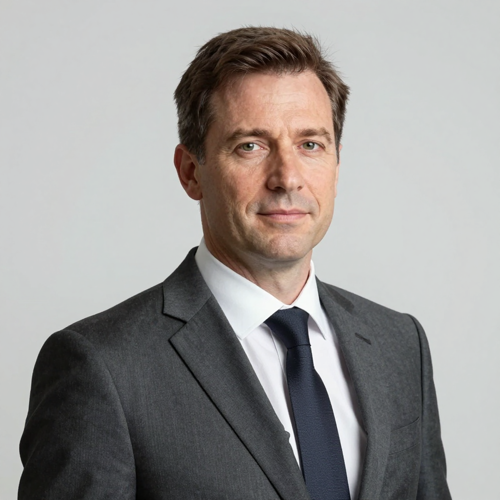
The Suit Is Optional, the Light Is Not
Most portraits fail long before any model sees them: harsh overhead light, a busy wall, shoulders clipped at the edge. Fix those in the photo you already own and an executive portrait maker available on Textideo has far less to guess.
Make My PortraitThe Hard Part With an Executive Portrait Maker Is Never the Camera
Three failure points account for most disappointing results.
Make an Executive Portrait Maker Work in Three Steps
Three moves, no crew. The order matters less than the input: one clean reference photo does more for an executive portrait maker than any amount of prompt tuning afterwards.
Pick the reference photo
Choose one front-facing photo with even light on the face and a plain wall behind. Skip sunglasses, hats, heavy backlighting and anything cut from a group shot. Eyes sharp and shoulders in frame is the whole bar.
Describe the room and the light
Say what the subject wears, what sits behind them and where the light falls. A line that works: `executive portrait, charcoal suit, white shirt, no tie, softly blurred glass office behind, soft key light at 45 degrees, rim light on the shoulder, 4:5 vertical crop`. Change one variable per run, never four at once.
Generate, then crop per platform
Generate a short batch, keep the frame where the eyes are sharpest, then export one square master and cut copies per destination. Identical composition everywhere is what keeps a face recognisable across accounts.
What an Executive Portrait Maker Gives You
Three capabilities decide whether an executive portrait maker is usable on a real page: identity that survives a batch, light you can steer, and output that holds after a circular crop.
Three Portrait Setups That Read as Leadership
Each card below is a setup you can hand to an executive portrait maker as it stands: subject, wardrobe, background, light, crop. Copy the line, swap the person, hold the rest. `distinguished executive portrait, tailored charcoal suit, corner office with blurred city glazing, key light with soft fill, 4:5 vertical framing`.

The corner-office portrait
A Caucasian man in his fifties, silver at the temples, tailored charcoal wool suit and pale blue shirt, three-quarter to camera. Floor-to-ceiling windows blur behind him, key light from camera left with soft fill.
The board-page portrait
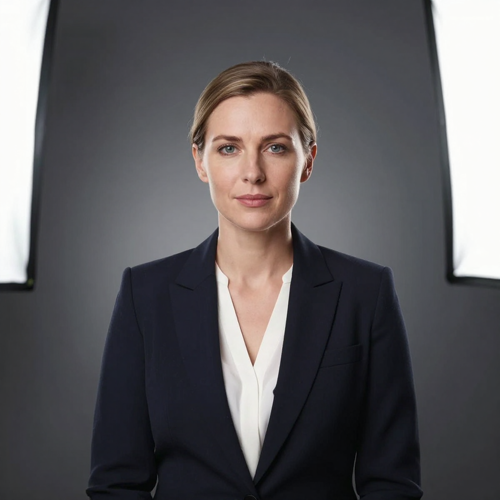
A Caucasian woman in her forties in a dark navy blazer over a white silk blouse, seated square to the lens against a flat grey gradient wall. Two softboxes, a faint rim on the shoulder, head and shoulders with headroom.
The founder portrait
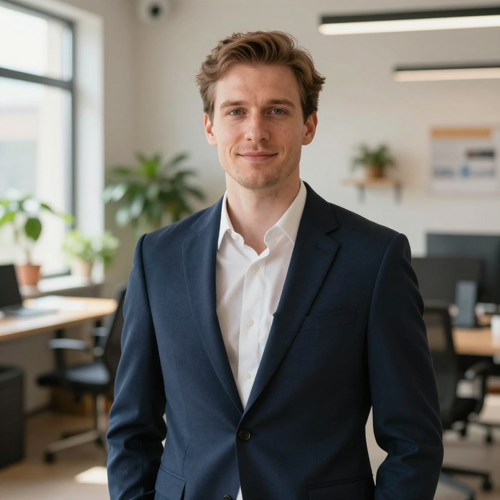
A Caucasian man in his thirties in a navy blazer with no tie, arms relaxed, in an open-plan studio. Warm daylight from a side window, plants blurring behind him, shot at eye level, warmer than a board shot.
Where the Finished Portrait Actually Gets Used
A portrait is never one file: a profile circle, a slide, a badge and an email avatar all crop differently. An executive portrait maker produces the master, and you cut the copies.
Who Struggles Most Without an Executive Portrait Maker
Four groups hit the same wall from different directions: a page that has to look deliberate, and no budget, no calendar and no photographer free.
Founders and small leadership teams
A five-person team page shot on three different phones reads as an accident. One shared prompt hands the whole group the same backdrop and light without booking anything.
HR and people operations
Directories go stale the week somebody joins. A matching frame from a day-one selfie keeps the roster complete between formal photo days.
Consultants and independent advisors
Solo operators sell credibility first. One clean executive portrait maker output, used identically on a site, a profile and a proposal deck, beats five loosely related pictures.
Anyone whose last portrait looked synthetic
Over-smoothed skin and plastic hair are the two complaints that come up most. The fix is rarely a different model; it is a textured reference photo plus a prompt asking for pores.
An Executive Portrait Maker at a Glance
- Slack
- Zoom
- Gmail
- Notion
Why Choose Boardroomplate to Run an Executive Portrait Maker
Six things decide whether an executive portrait maker survives contact with a real company page. Check them before you commit a whole leadership team to one workflow.
Identity holds across a batch
The same face has to survive ten variations. Reference conditioning keeps bone structure and expression stable, so a finished set reads like one shoot.
An executive portrait maker that reads the brief
Name the role, the room and the mood, and the framing follows: shoulder angle, headroom, catchlights, background falloff. Concrete nouns beat decorative adjectives.
Backdrops you can standardise
One backdrop description, reused verbatim, is what stops a board page looking accidental. Write it into a shared prompt and every later addition inherits the same wall.
Retouching stays optional
Heavy smoothing is what makes a portrait read as synthetic once it shrinks to avatar size. Natural texture does more for credibility than polish.
Consent before publication
A portrait of a real colleague is biometric data with a name attached. Get written permission for the upload and the published use, and keep the source file access-controlled.
Where an executive portrait maker beats a studio day
A studio day costs a booking, a commute and half a morning per person. Working from a reference photo costs one upload and covers late joiners.
What People Say About an Executive Portrait Maker
“I had one decent conference photo and nothing else. After four weeks of putting off a studio booking, I ran it through and had a portrait fit for the company page. The backdrop stayed plain, which is exactly what I wanted.”
“Our leadership page had six people shot by six different photographers across three years. Rebuilding all of it around one lighting setup and one backdrop took an afternoon, and the page finally looks deliberate.”
“The part I underestimated was the crop. My old photo fell apart at avatar size. Once the eyes sat in the upper third and the shoulders had margin, the same face read clearly inside a comment thread.”
Questions People Ask Before They Commit
Short answers to the ten questions that come up before anyone uploads a colleague's photo. If yours is missing, the diagnosis is the same: fix the input first.
Is an executive portrait maker the same thing as an AI headshot generator?
Close, but the intent differs. An AI headshot generator is tuned for a recognisable face inside a profile crop. An executive portrait maker aims higher up the formality scale: fuller framing, structured light, board pages.
What kind of source photo gives the most stable result?
Pick the frame where the face is evenly lit and square to the camera, with nothing busy behind it. Glasses, hats and crops lifted out of a group photo cost accuracy. Angle decides the outcome, not megapixels.
Can an executive portrait maker output go into an annual report?
Yes, provided the person photographed has agreed. Generate a separate formal version for print rather than upscaling the relaxed one: business formal, deeper contrast, tighter crop, background out of the way.
How do I keep a whole board page visually consistent?
Fix the backdrop, the lighting and the framing inside one prompt template, then reuse it word for word. Vary only the subject.
Do I need written consent before publishing a colleague's portrait?
Yes, and a casual nod in a meeting is not enough. Two permissions are needed: one to feed the face in as input, one to publish the finished image. Keep the original upload off shared drives.
Can I copy a prompt instead of writing my own?
Yes, and it is faster. Start from `executive portrait, charcoal suit, plain grey backdrop, soft key light at 45 degrees, rim light on the shoulder, eyes in the upper third, 4:5 vertical, natural skin texture`, then change one variable at a time.
Why does my portrait look airbrushed?
Because the prompt asked for flawless skin, and an executive portrait maker honours that literally. Ask for visible pores, real hair edges, no smoothing.
What export sizes should I prepare?
Keep one square master at 1000x1000 or larger, then cut copies: 400x400 for a profile, 1024x1024 for meeting tools. Always downscale.
Is it cheaper than hiring a photographer?
For one person wanting a single frame, a photographer is often better value. The economics flip at volume: a twenty-person leadership page, or a directory that changes monthly, is where an executive portrait maker wins.
Can I edit an executive portrait maker result afterwards?
Yes. Swap the backdrop, change the suit, add headroom or upscale the master. Regenerate just that frame rather than the whole set, so the portraits people already approved stay identical.
Start Your Executive Portrait Maker With the Photo You Already Have
Pick one front-facing shot with even light, describe the room and the suit, and generate a short batch. Keep the frame that still reads at thumbnail size, then cut the sizes each platform stores. One photo in, one portrait out.
No credit card required - no studio booking - your source photo stays yours