
Put a Braces Filter on Your Own Smile Before You Commit to Anything
A braces filter adds realistic brackets, an archwire and band colour to the teeth already visible in a photo you own, so the smile you study is your own. Upload one clear, front-facing portrait and the edit lands inside the mouth while your face, hair, lighting and background stay as shot. Compare metal, ceramic and clear on the same picture through Textideo before any appointment or any hardware goes near your teeth.
Rated on the two things that decide a braces filter preview: whether the brackets sit on real teeth, and whether the face is still yours. No credit card required - one photo - the rest of your face stays untouched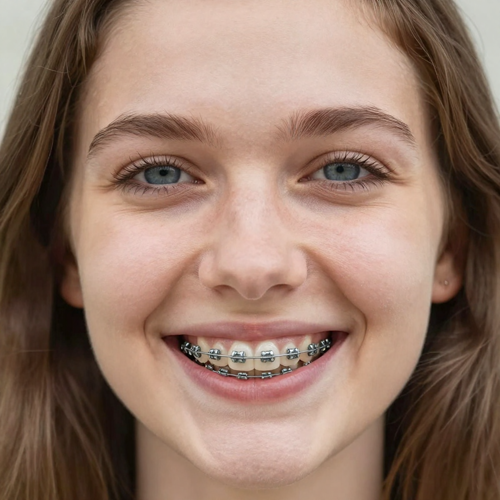
A Braces Filter Only Looks Real When the Smile Gives It Room
Guessing how braces will sit on your own face is the part nobody enjoys, and other people's smiles do not settle it. A braces filter replaces the guessing with one image of your own teeth, under the light you were actually standing in.
Try The Braces FilterThe Hard Part With a Braces Filter Is the Photo, Not the Effect
Braces previews rarely fail at the brackets; they fail at what the camera gave them.
Make a Braces Filter Preview in Three Steps
No masks to draw and no layers to stack. Start with one photo, name the look, and read the result against the original.
Upload a Front-Facing Photo With Teeth Visible
Pick a sharp, evenly lit portrait with the upper teeth showing. A head-and-shoulders crop beats a full-body shot, and heavy beauty filters hurt.
Name the Braces Filter Look You Want
Tell the braces filter what to build: metal with a silver archwire, ceramic, a clear aligner tray, or a band colour you name.
Compare and Download the Braces Preview
Read the result beside the original before saving. Check that every bracket lands on a tooth and that the lips look untouched.
What a Braces Filter Gives You Beyond Brackets and Wire
Three things matter once the novelty wears off: whether the teeth stay yours, whether the hardware holds up at full size, and whether one photo serves a second experiment.
Silver, Softened and Invisible: Three Ways to Wear the Same Smile
Style is the part people underestimate. Run one portrait through a braces filter three times and the differences turn concrete: how visible the hardware reads, how much enamel shows through.
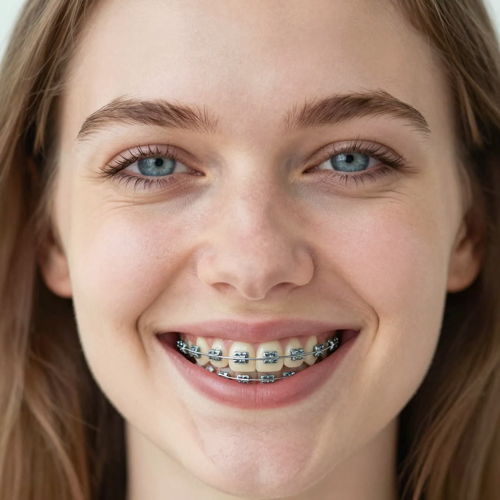
Metal Braces With a Silver Archwire
Silver brackets on each visible tooth, linked by a wire that follows the arch and picks up the existing light. Prompt: place realistic metal braces on the visible teeth, keep the face unchanged.
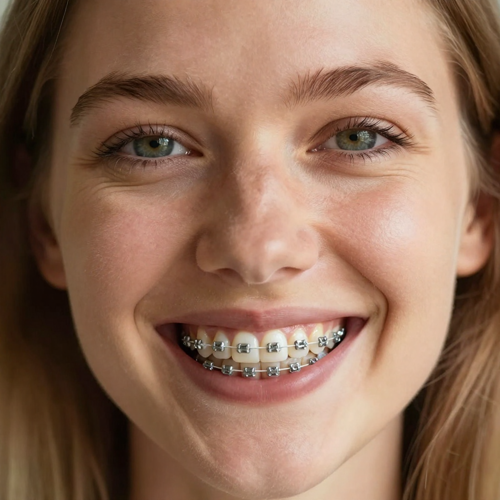
Metal Braces With Tooth-Coloured Ties
The same silver brackets held by clear or enamel-toned elastic ties, so the hardware reads softer inside a smile while the wire still follows the dental arch. Prompt: keep the metal brackets, give them tooth-coloured ties, preserve lip shape.
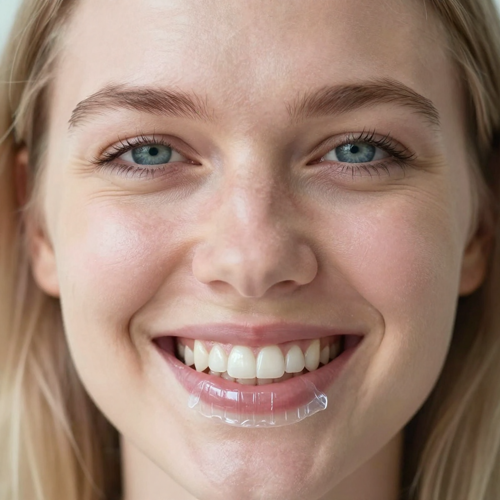
A Clear Aligner Tray Over Natural Enamel
A thin transparent tray suggested through delicate edges and restrained reflections, with the natural shade underneath. Prompt: fit a clear aligner over the teeth, no brackets or wires.
Which Smiles Give the Filter Enough to Work With
A braces filter can only build on teeth it can see. Four input types cover most uploads.
Who Struggles Most Before a Braces Filter Preview
Four groups arrive at the braces filter with the same problem in different clothes: each needs it on a real face first.
Teenagers With a Fitting Coming Up
The worry is social, not clinical. Seeing braces on your own face takes the surprise out, and picking a band colour makes the first visit your decision.
Adults Weighing Metal Against Clear
Adult treatment is usually a visibility question in disguise. Running both on one portrait shows how much hardware reads at conversational distance.
Parents Answering the Same Question Nightly
A child who has seen braces on their own smile asks fewer questions at bedtime. Let them pick the photo and the colour.
Creators Building a Before-and-After Reveal
Braces are a dependable reaction image. Put the untouched photo on the first slide, reveal the edited one next, keep the caption short.
What One Braces Filter Run Involves
- TikTok
- Snapchat
- YouTube Shorts
Six Things That Decide Whether Braces Look Real
Most braces previews fail in the same three places: the brackets float, the teeth change shape, or the face gets rebuilt around the mouth.
The Braces Filter Follows Teeth It Can See
A braces filter reads the visible enamel first and places brackets along that contour. Closed, angled or covered smiles leave nothing to anchor to.
A Braces Filter Keeps Bracket Scale Honest
Oversized brackets are the fastest way to spot a fake. Each fitting is sized against its tooth, and the wire curves with the arch.
Your Expression Survives the Edit
Cheeks, lips and chin hold their original geometry. The work stays inside the smile, which keeps the preview recognisable as you.
Light Is Matched, Not Repainted
Metal picks up the highlight direction already in the photo, ceramic the softer falloff.
Band Colour Is a Choice, Not a Default
Name the elastic shade and compare it on the same photo. Real bands change at every adjustment visit, so the colour is worth previewing.
Nothing Outside the Mouth Moves
Skin, hair, clothing and background stay as they were. Only the smile changes, which is what makes a before-and-after pair honest.
What People Say About Braces Filter Previews
“My daughter had a consultation in two weeks and asked the same question every night. One braces preview on her own school photo answered it, and she picked the band colour herself.”
“I put this off for a year because every picture of adult braces I found belonged to somebody else. Seeing metal and ceramic on my own face, same crop and same light, is what let me choose.”
“Braces reveals are our most reliable reaction format, but cheap apps kept rebuilding the whole face around the mouth. Keeping the edit inside the teeth made the reveal land.”
What People Ask Before Their First Braces Preview
The questions that come up before the first upload: what a braces filter changes, what photo it needs, and where the line between preview and advice sits.
What is a braces filter?
A braces filter is a photo effect that adds realistic brackets, an archwire and optional band colours to the visible teeth in a portrait. It answers what you would look like with braces using your own face. Everything outside the mouth stays as shot.
What kind of photo gives the best braces filter result?
A sharp, front-facing portrait with teeth showing and even light on the face. Daylight reads better than overhead flash, which shadows the mouth. Crop closer than feels natural.
Does the effect work on a closed-mouth photo?
Not convincingly. The braces filter needs visible enamel to anchor to, so with the lips together there is nowhere for the hardware to sit. Retake with an open smile.
Can I compare metal, ceramic and clear on the same photo?
Yes, and it is the most useful way to use it. Every version starts from the same file, so any difference you notice is the hardware, not a different crop.
Is a braces filter the same thing as a smile makeover or teeth straightening filter?
They overlap and do different jobs. A straightening or smile makeover effect moves, reshapes or brightens the teeth, while a braces filter leaves them as they are and adds hardware. Choose the straightening effect to see aligned teeth, the braces filter to see braces.
Can I show the result to an orthodontist as a treatment plan?
No, and it is worth being clear about that. The image is a cosmetic preview, not a diagnosis, and it says nothing about how your teeth will move. Take clinical advice from the clinician.
Why do brackets sometimes look too big or float off the teeth?
The source photo is almost always the cause. Blur, shadow, a side angle or a hand near the mouth leave too little to measure, and the hardware gets sized wrong. Try a brighter, closer shot.
Does a braces filter change the rest of my face?
It should not. The edit is confined to the mouth, so skin, hair, clothing and background stay as shot. A different jaw or eyes means the upload was too soft.
Can I use a braces filter on someone else's photo?
Only with their permission, and only in fun. Turning a friend's smile into a joke without asking is how this effect earns a bad reputation. With a child in frame, the parent decides.
Can braces be taken back out of a photo as well as added?
Plenty of braces tools run in both directions, and the same upload serves either one. Removal is harder, because large brackets cast shadows and leave gaps. Start from small hardware.
Put a Braces Filter on the Smile You Already Have
Upload one clear portrait, name metal, ceramic or clear, and download a preview that leaves your face, hair and background exactly as photographed, available on Textideo.
No credit card required - one photo - the rest of your face stays untouched