
AI Blad Filter: See The Bald Version Of You Before Anything Gets Shaved
The AI Blad Filter rebuilds one portrait of you without the hair, leaving your face, ears, skin tone and the light already in the picture exactly as they were. People spell this a dozen ways and still want the same answer, which is what they would look like bald. Upload a shot with your whole head visible, name the version you mean, and compare it against the original on Textideo.
Rated on the two things that decide a bald preview, meaning whether the face still reads as you and whether the scalp survives full-size zoom. No razor, no commitment - one photo - delete whatever you generate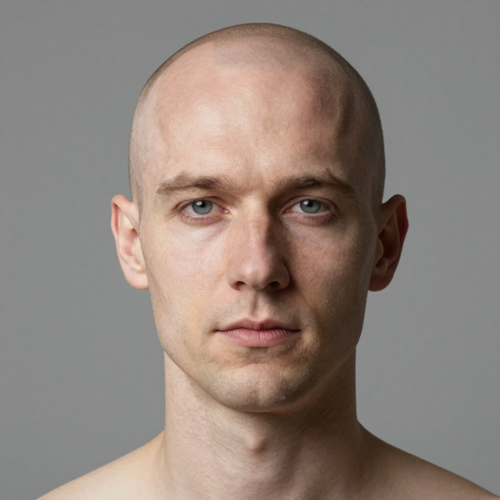
The AI Blad Filter Answers What A Mirror Never Will
Shaving is fast to do and slow to undo, so the decision deserves better evidence than a guess over the bathroom sink. Upload one portrait, describe the bald version you want, and set it next to the original at full size. Clean shave, close buzz, receding hairline and bald-with-beard all come from that single photo, on Textideo.
Try AI Blad FilterThe Hard Part With AI Blad Filter Results Is Not The Hair
Taking hair off takes one click, and a preview worth trusting takes more care.
Make AI Blad Filter Previews In Three Steps
No layers to build, no masking tool to learn, no tutorial to sit through. Each step removes one source of guesswork from the result.
Give The AI Blad Filter One Honest Photo
Pick a shot where the whole head fits, both ears show and light is even, with no hat and nothing cropping the crown. JPG, PNG and WebP upload fine.
Say Which Bald Look You Mean
Write one sentence instead of tapping a preset. Try: remove all hair and rebuild a smooth shaved head, keeping my face, ears and background exactly as they are.
Compare At Full Size, Then Keep Or Re-run
Set the render beside the original and check the hairline edge, the shadow under each ear, and whether scalp tone matches your forehead. A skull reading too round usually settles itself on another pass.
What Rebuilding A Bald Head Actually Involves
Taking hair off is the easy half. Everything the hair was hiding, meaning head shape, scalp tone, highlight and shadow, is what the AI Blad Filter rebuilds.
Three AI Blad Filter Looks Built On One Portrait
Same face, same lighting, same shirt, and only the hair decision moves. Seeing two of these together usually settles the argument in the group chat.
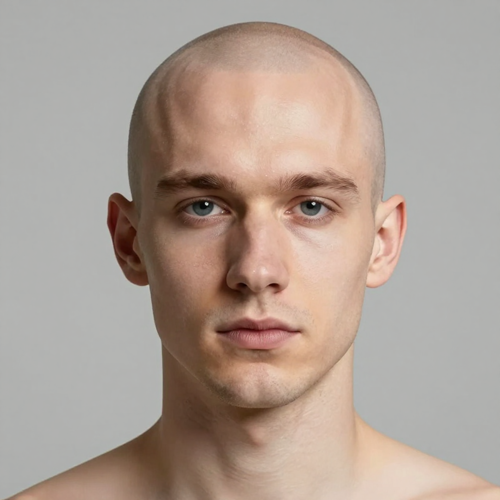
Clean Shave Under Even Light
Everything above the hairline comes off, leaving a scalp tuned to forehead and cheek tone. This is the version that answers whether your head shape carries a bare look at all.
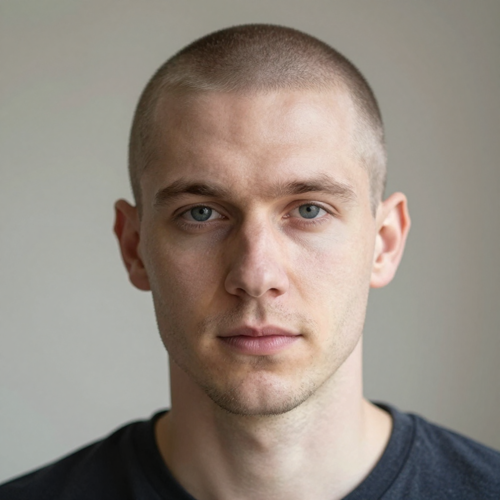
Buzz Cut With Visible Stubble
A number one buzz keeps fine stubble and a soft shadow that stops the scalp looking polished. Plenty of people land here instead of going all the way to skin.
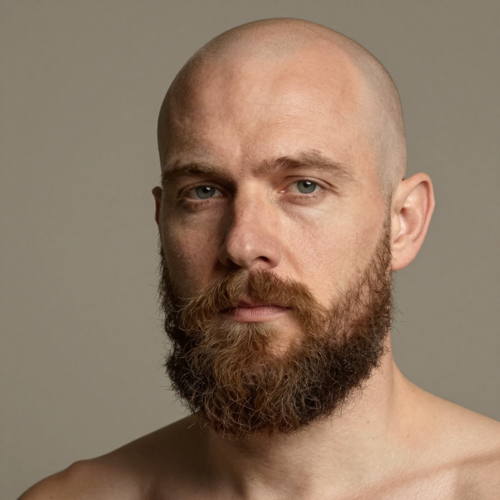
Bald With A Full Beard
Keeping facial hair changes the proportions, and the beard becomes the frame around a bare head. Worth generating even after the shave itself has been decided.
What Your Photo Needs To Survive The Edit
The AI Blad Filter handles most portraits, but your photo decides most of the quality. Four common inputs, and what each one gives the model.
Who Struggles With This Question, And Who Just Wants The Laugh
An AI Blad Filter sits between two very different people, one lying awake over a hair decision and one building a joke for the group chat. Both need a face that stays recognisable.
Men Deciding On The Clippers
A group-chat vote is not evidence. Your own shaved head beside your own current hair turns a month of hesitation into something short enough to show the barber.
People Watching A Changing Hairline
Once the temples start moving, the choice is usually a full shave or a short buzz. Running both AI Blad Filter versions on one photo shows how each reads.
Barbers, Stylists And Hair Consultants
Printed previews explain shorter on the sides far better than words do. Clients arrive with a reference and leave with considerably fewer surprises.
Writers, Costume Designers And Casting Notes
A bald or balding reference beats describing one inside a call sheet. Use a photo you have permission to edit and keep the render private to production.
AI Blad Filter At A Glance
- TikTok
- Snapchat
- YouTube
Why This AI Blad Filter Keeps The Face You Recognize
Plenty of bald tools chase the laugh and stop being useful once clippers become real. Six choices keep this one worth trusting for a decision.
Face-aware Edits Beat Stick-on Lenses
Live lenses track your face but never read the hairline, so they paste a hairless shape overhead. An edit rewrites that area using your real outline, tone and light.
No App To Install, No Hair To Mask
The old way meant tracing your own hairline by hand and blending the gap. One upload and one sentence replace it, and nothing lands on your home screen.
Before And After In The Same Frame
Every render arrives next to your original, which is the only fair way to judge a change this strange. Zoom into the hairline edge before believing any of it.
Honest About What A Photo Cannot Show
Crown shape, scalp tone and anything under hair are estimates, stated here rather than promised away. Knowing the guesses makes the reliable parts worth more.
AI Blad Filter Uploads Stay In Your Hands
You choose the picture, which means choosing the least revealing one you own. Check how long uploads are kept, then delete the render once it has answered you.
Prompts You Can Copy Rather Than Guess At
Sliders rarely describe what somebody means. Three worked sentences covering clean shave, close buzz and bald-with-beard handle most requests, each editable in plain words.
What Creators Say About AI Blad Filter
“I spent years asking for it shorter without being able to say what shorter meant. Three printed previews ended that conversation almost immediately, and my barber clipped straight to the version with visible stubble.”
“My temples were moving and I kept picturing the worst version of myself instead of the real one. Running the shaved and short-buzz looks on the same photo calmed me down, and the buzz is what I went with.”
“The joke only works if everybody still recognises the face. Earlier attempts came back as a wax model of my brother, while the AI Blad Filter kept his expression and his terrible shirt, so it went straight into the group chat.”
AI Blad Filter Questions People Actually Type
Ten things people ask before handing a portrait over: what changes, how far to trust it, which photo to pick, and how to ask in one sentence.
Is blad simply a misspelling of bald?
Usually yes, and that is what the AI Blad Filter answers here. The same string also turns up meaning a Hasselblad medium-format colour look, so check whether a page removes hair or restyles colour before you upload anything.
How accurate is an AI blad filter?
Head outline, hairline and ears read well, because all three show through most hairstyles. Crown shape and scalp tone stay educated estimates, and anything sitting under your hair is invisible to any photo based tool.
What photo should I upload?
A front-facing shot with your whole head and both ears in frame, taken in even light, with no hat or hand near the hairline. Leave space above the crown, and avoid lighting that drops one half of your face into shadow.
Does the bald look work on women and long hair?
Whatever hair sits in the frame comes off. Long styles give the model far more surface to rebuild, so those results drift more often and a second pass is normal. Ask for the scalp to match forehead and cheeks.
What sentence gets a realistic shaved head?
Three versions cover most cases, and each can be pasted as written. Clean shave: remove all scalp hair and rebuild a smooth shaved head, keep the face, ears, eyebrows and background unchanged, and match scalp tone to the forehead. Close buzz: keep a number one buzz with visible stubble shadow. Bald with beard: make the head bald and leave all facial hair exactly as it is.
Which one do I want, an AI blad filter or a balding preview?
Two different questions. One shows a deliberate shave today, while the other imagines thinning years ahead, and they can read like separate stages of life. Picking clippers this month means running the shaved version.
Will the bald look change my face?
Not if you say otherwise. Ask for your identity, expression, ears, clothing and background to stay put. A render with a strange jaw or eyes you do not recognise has drifted, so re-run it rather than sharing.
Can I run it on a photo of someone else?
Technically yes, and often convincingly. Ask first. Identity edits travel further than people expect, and a shaved-head joke posted without consent lands nothing like one you chose to post about yourself.
Is there a bald filter inside TikTok, Instagram or Snapchat?
Effects do exist there, mostly built by other creators, searched by name and pulled without notice, so any list of names goes stale within a season. A still photo reads your whole frame instead of a real-time mesh.
Do I need to install anything, and what happens to my photo?
It runs in a browser, so there is no app and no tracing around your own hairline. Before sending a face anywhere, read how long uploads are kept and whether they touch model training.
Try The Bald Version Before You Commit To It
Put one honest portrait into the AI Blad Filter, compare the version without hair at full size, and keep a result that still looks like you, available on Textideo.
No razor, no commitment - one photo - delete whatever you generate