
YouTube Profile Picture Maker: An Icon That Still Reads at Fingertip Size
A youtube profile picture maker has one job: produce a channel icon that survives being shrunk into a circle beside every comment you leave. The square you upload and the circle viewers meet are not the same shape, so corners vanish and fine detail turns to mush. This tool works from a described brief and holds one subject centred, high in contrast and simple enough to name at a glance.
Rated on the only test that decides a channel icon: whether it still reads beside a comment at thumbnail size No credit card required - no sign-up - check one square at comment size before you upload
A YouTube Profile Picture Maker Built Around the Circle Crop
A channel icon is judged twice: once in the editor, and again as a thumbnail beside a comment nobody meant to read. A youtube profile picture maker that respects the second test builds the artwork inside the circle first.
Make a channel iconThe Hard Part With Most YouTube Profile Picture Makers
Every icon gets approved at full size and then judged at its smallest.
Make a YouTube Profile Picture in Three Steps
The tool does not ask for a photograph or an existing logo. It asks for a description narrow enough to draw: one subject, one colour idea, one surface.
Write the Brief a YouTube Profile Picture Maker Can Use
Name the channel, the audience and the one thing you want recognised. Describe the picture, not the quality: subject, crop, background, exclusions. A line like original adult host, head-and-shoulders, direct gaze, deep teal field, no text, no props gives the tool something to draw.
Keep One Focal Shape Inside the Circle
Score the result as a youtube profile picture maker would: one shape, one face, one letterform. If two things compete, cut one. The outer band is padding that disappears in the circular crop.
Shrink the Result, Then Export the Square
Halve the preview until it is the size of a fingernail, then hold it against a light interface and a dark one. Anything that stops reading there is decoration. Once the small version holds, a youtube profile picture maker has done its job; export the square.
What a YouTube Profile Picture Maker Gives You
Three things separate an avatar from a channel identity: the brief a youtube profile picture maker can read, the frame it composes into, and what it refuses to add.
Three Channel Icon Directions That Survive the Crop
A youtube profile picture maker is only as good as the brief behind it, so each direction starts with words you can paste and edit. What should a viewer recognise in half a second?
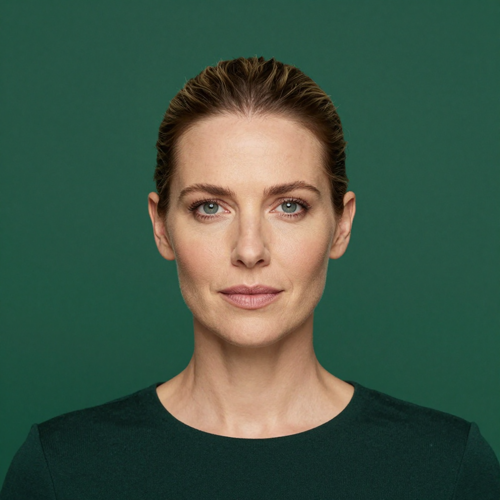
Face-Led Portrait for a YouTube Profile Picture Maker
For hosts, teachers and reviewers whose face is the channel. Paste: head-and-shoulders crop of a woman in her thirties, direct gaze, plain deep green background, soft front light, no text, no props, square 1:1. The empty band above the hair is what saves it.
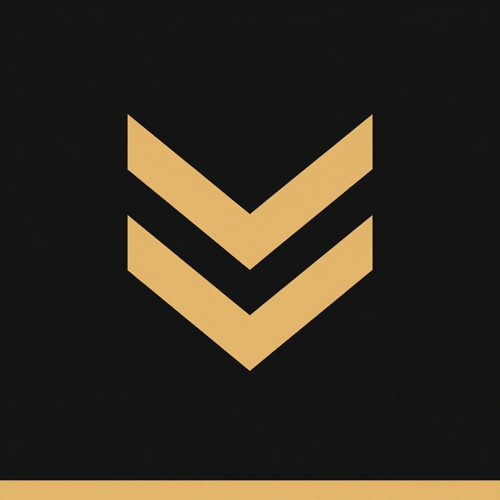
Monogram Mark That Holds at Comment Size
For brand channels and anyone whose name is the promise. Paste: single letter M in a heavy geometric sans, near-black field, one amber accent bar, generous margin, flat vector, no second letter, square 1:1. One letter survives shrinking.
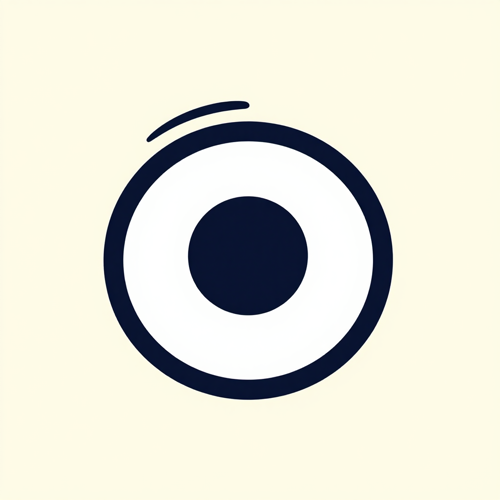
Mascot With One Signature Shape
Gaming and education channels often get more recall from a character than a portrait. Paste: friendly round mascot head, one oversized feature, two flat colours, thick outline, plain pale field, no scene, no text, square 1:1. Subtraction keeps a youtube profile picture maker readable.
What Goes In Before Anything Comes Out
The input decides more of the result than the style setting does. Four kinds of starting material cover almost every channel.
Who Needs a YouTube Profile Picture Maker Most
Different channels fail at different sizes. These four groups are where a youtube profile picture maker pays for itself.
New Channels With No Artwork Yet
A channel showing a default grey avatar reads as abandoned before the first upload lands. Starting from a described brief gives it something worth keeping.
Gaming and Commentary Channels Need a YouTube Profile Picture Maker
These channels live in comment threads, so the icon is seen in miniature more often than at full size. Paste circular badge, single controller silhouette, charcoal field, electric lime edge, thick line, no text, square 1:1.
Media Brands and Studio Channels
Where the host changes but the channel does not, a mark outperforms a face. The icon stays identical across presenters, which makes simplicity a requirement.
Creators Moving to a New Look
Rebrands go wrong when avatar, banner and thumbnails arrive from three places. One description keeps palette and line weight aligned while the subject changes.
YouTube Profile Picture Maker Numbers Worth Knowing
- YouTube
- YouTube Studio
- YouTube Shorts
- Live Chat
- Community Posts
Why the Smallest Size Decides the Design
A large preview flatters almost anything. What matters is what a youtube profile picture maker leaves legible when the icon is barely bigger than a full stop.
A YouTube Profile Picture Maker That Draws for the Circle
The frame is composed toward the middle, the only part guaranteed to survive. Nothing important sits where the mask lands, so the crop is a design decision, not a repair.
One Subject, Chosen on Purpose
Two focal points halve each other once the image is reduced. One subject is the only thing a viewer can name after a glance.
Contrast Tested Against Both Interfaces
An icon that only works on white vanishes in dark mode, and the reverse is common. Checking both catches that before upload.
No Words Baked Into the Picture
Letters collapse into texture faster than anything else. Leaving them out keeps the name in the interface, at full size.
Aligned With the Banner and Thumbnails
Recognition comes from repetition across surfaces. One shared description keeps colour and weight consistent while the formats differ.
Iteration Instead of a Single Take
The first result is a draft. Changing one line and comparing at small size beats rewriting everything.
What Creators Say About a YouTube Profile Picture Maker
“My headphones sat right at the edge of the frame and half of them were gone in comments. Rebuilding it as a centred portrait on a plain field was the first time people matched my replies to my videos.”
“Our old logo had the studio name under the mark, and at comment size it was just a grey line. The mark alone, thicker and centred, fixed something we had stopped noticing.”
“I kept regenerating until the brief said something specific about the background instead of just clean. The shelves behind me were what made the icon unreadable.”
YouTube Profile Picture Maker Questions, Answered Plainly
Most of what goes wrong with a channel icon is settled before upload: the frame shape, the level of detail, the lettering. Ten questions a youtube profile picture maker should answer.
What size should a YouTube profile picture be?
Upload a square and let the platform shrink it. YouTube renders the channel icon in a circle at roughly 98 pixels, so creators commonly export a square master around 800 pixels. The design has to read at its smallest size, not its largest.
If I upload a square, why does the icon appear round?
Because the circle is applied at display time. The file stays square and every corner is hidden, so anything near an edge is detail you never see. A youtube profile picture maker that composes toward the middle works with that mask.
Why does my channel icon look blurry next to comments?
Almost always because it was approved at large size. Fine strokes, thin type and busy backgrounds lose their shape when reduced, and a bigger upload does not fix it.
Should the channel name be inside the picture?
Usually not. The name already appears beside the icon, and inside the circle it becomes a second element nobody can resolve. If you want lettering, keep it to one heavy initial.
Face or logo, which works better for a channel?
Faces are recognised faster, marks scale more predictably. Host-led, teaching and commentary channels gain from a tight portrait; studio and multi-host channels do better with one bold shape.
What prompt should I paste into a youtube profile picture maker?
Start with subject, crop, background, light and exclusions. For example: head-and-shoulders portrait, direct gaze, plain deep teal field, soft front light, no text, no props, square 1:1. A youtube profile picture maker needs those five lines before it can draw anything useful.
Is this an official YouTube tool?
No. A youtube profile picture maker prepares the artwork; the picture is only changed inside the platform's own branding settings, with your account and your upload. Nothing here is connected to or endorsed by YouTube.
How do I keep the icon consistent with my banner?
Reuse one description across every asset: same palette words, same light, same level of detail. Formats differ, so the images never match exactly, but a shared brief makes an icon and a banner look like one channel.
Can I use the same square on other platforms?
Yes. Most services crop avatars into a circle, so a centred, high-contrast square travels well, and one file keeps you recognisable wherever a viewer finds you.
What should I avoid in a channel icon?
Group photos, full-body shots, tiny taglines, thin outlines and heavy filters must all be enlarged to be understood. Over-editing is the quieter mistake, since a retouched face dates faster than a plain one.
Make the Icon Before the Next Comment Lands
Write one honest line about the channel, generate a square, and look at it at fingernail size. If it reads, upload it.
No credit card required - no sign-up - check one square at comment size before you upload