
AI Glow Up Filter: One Selfie, Shot on Your Best Day
An ai glow up filter takes one ordinary selfie and finishes it like a retouched studio frame, while your face, expression and background stay exactly as they were. Skin tone evens out without losing texture, eyes sharpen, dark circles soften, and dim yellow indoor light turns into soft directional light. Upload a photo, compare before and after on the slider, and download whatever you actually want to post.
Rated useful by creators posting before and after selfies on Textideo No credit card required - no sign-up - export one full-size frame before you share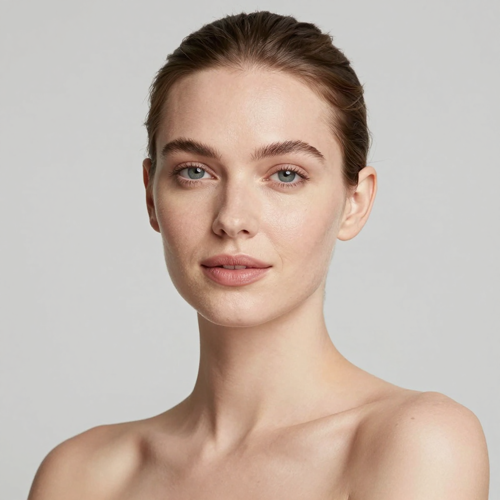
Try the AI Glow Up Filter on One Ordinary Selfie
Dim hallway light, tired eyes, yesterday's hair — that photo is the right input here. One pass handles skin, eyes, hair edges and colour at once, so there is nothing to mask, layer or heal by hand. Keep the result or start over with another frame; the original upload stays untouched while you decide.
Open the glow up toolThe Hard Part With Most AI Glow Up Filter Apps
Beauty apps promise polish and deliver plastic: blurred skin, enlarged eyes, a different jawline.
Three Steps to Run an AI Glow Up Filter
No layers, no masking, no colour theory to learn. The whole job is one upload, one written instruction and one download.
Upload One Front-Facing Photo
Pick the selfie you would normally skip, with both eyes visible to the camera. Dim night frames beat good ones here, because the starting condition is what makes the change visible.
Describe How Far the Glow Up Goes
Write the finish you want in ordinary words: even skin and brighter eyes, soft window light, light evening makeup, groomed brows and hair. Add a restraint when you need one, such as keeping it no-makeup natural or leaving the background exactly as shot.
Compare, Then Download
The finished frame arrives beside your original with a slider between the two. Check the eyes at full size and again at thumbnail size, then export the version you want.
AI Glow Up Filter Controls Worth Adjusting
Three dials decide nearly everything about how a result lands, and each one is set with words rather than sliders.
AI Glow Up Filter Results People Post
Three frames that arrive in most queues, and what one finishing pass does to each of them.
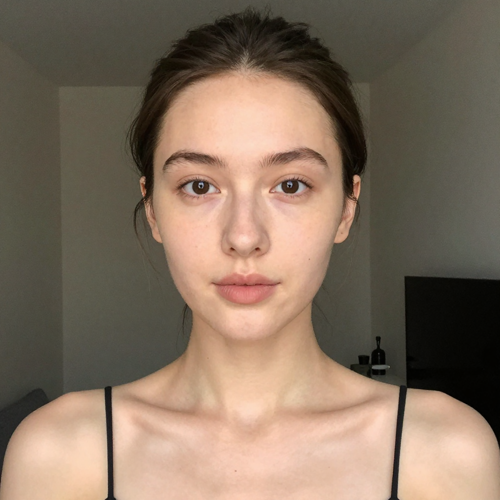
The Evening Indoor Selfie
Shot under a warm ceiling bulb late at night, so the original carried a yellow cast and heavy eye shadows. The finished frame keeps the same room and outfit while skin reads neutral and catchlights return to the eyes.

AI Glow Up Filter on a Tired Morning Frame
Grey commuter light and no preparation whatsoever. This before version is what makes a transformation obvious: uneven tone settles down, under-eye shadows recede, hair stops frizzing into the background, and not one feature has been redrawn.
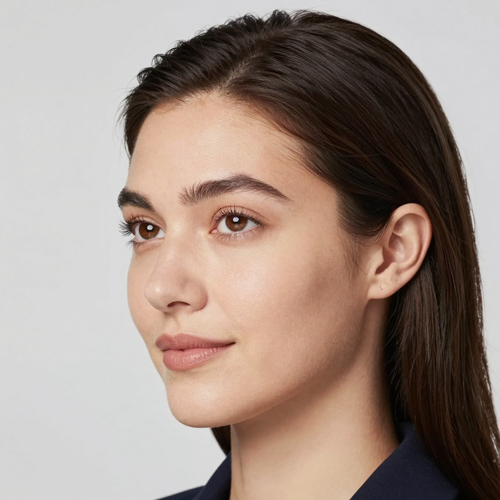
The Profile Picture Refresh
A three-year-old avatar cropped out of a group holiday photo. It comes back sharp enough for a small profile frame, the colour no longer looks muddy, and people who know you still recognise the face immediately.
AI Glow Up Filter Input Types Explained
Four source photos and how each one behaves during the pass.
Who Struggles to Get an AI Glow Up Filter Right
Four situations where finishing work solves an actual problem rather than adding another effect.
Creators Posting Before and Afters
The reveal only lands when viewers recognise one person in both frames. A pass that keeps features and background intact gives you that contrast without the comments asking which face-swap app you reached for.
People Refreshing Profile Photos
Team pages, directories and dating profiles all want a photo that looks like an ordinary good day. Even tone and corrected light read as a good picture, while dramatic glamour edits tend to raise questions nobody wants to answer.
Event and Wedding Guests
Someone always photographs the table under mixed light, leaving one face orange while everybody else looks fine. Running that single crop through the ai glow up filter evens it out without moving you an inch from where you stood.
Anyone Done With Manual Retouching
Frequency separation, spot healing and hand-dodged light eat an hour per photo inside a full editor, where one written instruction covers the same finishing ground in seconds.
AI Glow Up Filter Numbers Worth Knowing
- TikTok
- Snapchat
Why This AI Glow Up Filter Still Looks Like You
Most beauty apps blur until the face turns plastic. This one works on finishing instead — light, tone, grooming and hair — so the person in the frame keeps every feature they arrived with.
Skin Keeps Its Real Texture
Redness and patchy tone even out while pores, lines and the small marks people recognise stay put, so nothing smears into a smooth mask.
AI Glow Up Filter Light Gets Rebuilt
Flat flash and warm bulbs are why a selfie looks tired, and the pass replaces that cast with a soft directional fall across the face, leaving your own room intact behind you.
Eyes, Brows and Hair Get Attention
Dark circles lift, catchlights return to the eyes, brows tidy up and stray hairs settle back into place, with beard edges and necklines handled on request.
AI Glow Up Filter Strength Stays in Your Hands
Say how far it goes in plain words: no-makeup natural, everyday polish, or full evening makeup with salon hair. Softer wording pulls the effect back, stronger wording pushes it further, and both versions come from one unchanged upload.
Face Shape Is Left Alone
Nothing about your nose, jaw, proportions, skin tone or apparent age is redrawn. The ai glow up filter only touches finishing — tone, light, grooming and hair — which is why a side-by-side comparison stays believable enough to post.
Backgrounds Are Never Swapped
No studio backdrop replaces your kitchen and no furniture gets invented around you. Softening happens through light and colour grade on the subject, so the frame keeps proving where and when the picture was really taken.
What Creators Say About the AI Glow Up Filter
“Running the dim hallway selfie instead of the good one doubled how obvious the before and after looked.”
“Asking for natural light instead of glamour makeup stopped the result looking airbrushed on my profile.”
“The unfiltered original always beat the version already smoothed by another app.”
AI Glow Up Filter Questions, Answered
Ten questions that come up most often before somebody uploads a first photo.
What does an ai glow up filter actually change?
It finishes a photo instead of redrawing it: even skin tone, softer under-eye shadows, brighter eyes, tidier hair and better light. Face shape, proportions, apparent age and background all stay exactly as they were, so the pair still reads as one picture taken on two different days.
Will my face shape or skin tone change?
No. Only clarity, tone and light are touched, so nothing about your nose, jawline or skin colour gets reshaped, which is why results stay usable on professional profiles.
What photo should I upload for the best ai glow up filter result?
A front-facing selfie with both eyes visible to the camera, shot in whatever light you actually had. The flatter and dimmer the original, the bigger the visible change, and ordinary phone files work perfectly well. Skip sunglasses and wide-brimmed hats, since covered features cannot be finished.
Does the ai glow up filter work on men?
Yes. On men the pass concentrates on skin clarity, under-eye shadows, brow shape, beard edges and hair, alongside the same lighting correction. None of that touches underlying structure, which is why the finished frame still looks like the person who uploaded it.
Can I use it on photos taken in bad indoor light?
Bad indoor light is the ideal use case rather than a problem, because yellow bulbs leave a cast over skin and correcting it accounts for most of what a transformation looks like.
How is this different from a regular beauty filter?
A beauty filter blurs: it smooths skin, enlarges eyes and quietly reshapes whoever is in frame. An ai glow up filter corrects tone and light while letting texture stay visible, so a side-by-side comparison reads as lighting and grooming rather than a different person entirely. It also leaves accessories alone: necklaces, glasses and earrings stay exactly where they were, which is where blunt filters usually give themselves away.
Can I make the result stronger or softer?
Describe the finish in words and the pass follows. Ask for no-makeup natural to stay very close to your original, or evening makeup with salon hair to push toward a red-carpet look. Re-running with different wording from the same upload gives you a range to pick from.
What should I know before uploading someone else's face?
Get their agreement first, and read the privacy terms of whichever service you choose before sending any identifiable file. Group photos are the common mistake here, because every face in the frame belongs to somebody who may not want it processed.
Can I post the result on LinkedIn or a dating profile?
Yes, provided it still looks like you on an ordinary day. That is the argument for keeping the ai glow up filter conservative on professional pages, where even tone and corrected light read as a good photo while dramatic edits read as misrepresentation.
What does it cost to try one ai glow up filter pass?
New accounts usually start with enough free credit for a first result, so you can judge the finish before spending anything. Later generations cost credits, which makes batching a few variations worth it.
Run One AI Glow Up Filter Pass Today
Take the selfie you would normally delete, write the finish you want in plain words, and compare it beside the original before choosing. Conservative versions are the ones that survive profile pages, group chats and prints alike.
No credit card required - no sign-up - export one full-size frame before you share