
Mini Toon: One Photo Becomes a 3D Character
A mini toon takes one photo and rebuilds the person as a small 3D character, with a big head, a rounded little body, large expressive eyes and soft cinematic lighting. Face shape, hair, skin tone and outfit colours carry over from the upload, so friends still recognise who it is. Below are the framing choices that decide how much of you survives the conversion, the two edits worth making in the prompt, and the checks to run before you use it as an avatar.
Field notes rated useful by makers turning photos into a mini toon for avatars, stickers and gifts No credit card required - no sign-up - export one full-size character before you post
Start Your First Mini Toon With One Photo
A mini toon runs on one decision made up front, which is how much of the body sits in the original shot. A head-to-toe photo carries the whole outfit through, whereas a tight crop means the model has to guess everything below the shoulders. It then comes down to three things, how far the proportions stretch, whether the background stays, and whether the character still reads once shrunk to an avatar.
Open the character makerThree Steps to a Mini Toon
The sequence holds whether the result is a profile picture or a printed sticker: choose the framing, set any scene changes, then check the export.
Pick Selfie, Half-Body or Full-Body
A clear photo with the face well lit is the one shared requirement. Head-to-toe framing carries shoes and clothing through, while a close-up leaves the model to invent the rest.
Add a Scene or Outfit Change
The default prompt keeps the original background and clothes. Add a line if you want a different setting or wardrobe, keeping it short so nothing else drifts.
Check, Export and Use
Read the mini toon at full size for stray fingers or merged limbs, then again at avatar size to confirm the face still leads. Export and use it as an avatar, a sticker, or a couple picture.
Mini Toon Controls Worth Knowing
Three settings account for most of the difference between a character that looks modelled and one that looks stretched.
Mini Toon Notes People Shared After Posting
Three workflow notes gathered from people turning photos into characters, summarised rather than quoted, each one describing a change that improved the result.
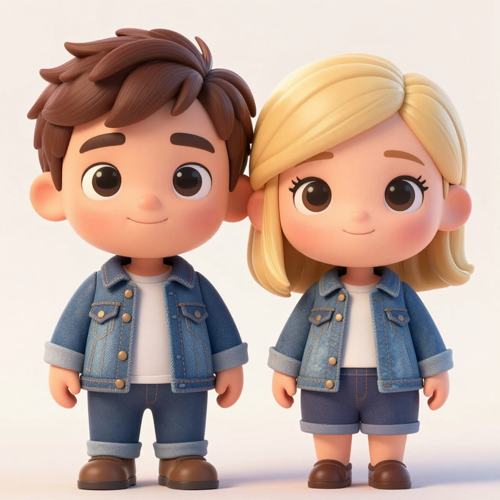
The Couple Avatar
A full-body shot kept both outfits and the shoes, which a waist-up crop lost. Matching characters mattered more to them than a closer view of the face.
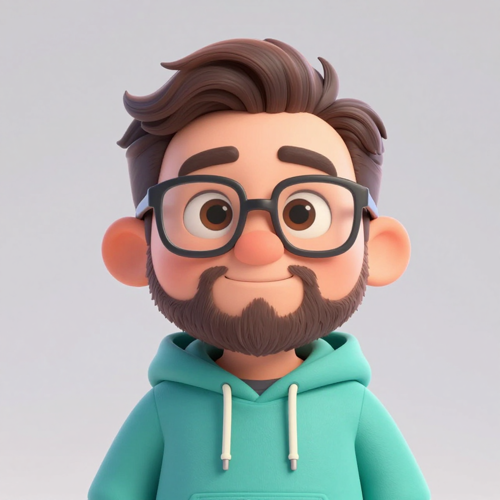
The Profile Picture
Pulling the head proportion back one step made the mini toon recognisable again. The first pass was cute, but nobody could tell who it was meant to be.
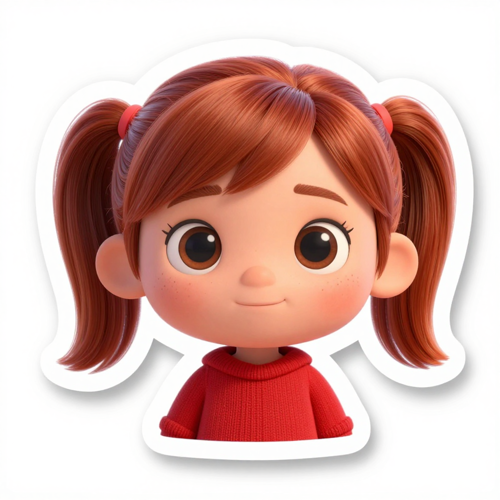
The Printed Sticker
Naming the jumper colour already in the photo kept the character tied to the original shot, so the sticker read as that person rather than a generic figure.
Mini Toon Input Types Explained
Four kinds of source photo behave differently once the character conversion runs.
Who Struggles With a Mini Toon
Four situations where a character conversion gets requested, and what each one actually needs from the upload.
Avatar and Profile Picture Makers
A mini toon has to survive being shrunk to a circle, so the face needs to sit large and the head proportion needs to stay moderate.
Couples and Friend Groups
Matching characters for two or more people need one photo with everyone at a similar distance, otherwise one figure ends up with noticeably less detail.
Sticker and Merchandise Makers
Printed stickers and small merch need a clean outline, so a plain background in the original shot helps the character separate from the scene.
Gift and Keepsake Buyers
A character of a child or a pet printed as a gift is a common request. The trade-off is that very young faces shift more, so start from the best-lit photo.
Mini Toon Numbers Worth Knowing
- Discord
- TikTok
- Redbubble
Why a Mini Toon Still Reads as You
Character conversions fail in predictable ways: proportions that erase the face, flat shading that kills depth, and lighting that fights the original photo. These six points cover what a pass has to get right.
Mini Toon Proportions Done Properly
The head grows, the body rounds off and the eyes enlarge, while the face shape stays yours. Following proportion rules rather than squashing the frame is what separates a modelled character from a cheap filter.
Skin, Hair and Fabric Rendered in 3D
Smooth shading on the skin, separate strands in the hair and real texture in the clothing give the result a rendered look. Flat cel-shading is the shortcut most tools settle for instead.
Lighting Borrowed From Animation
Warm, soft, directional light replaces whatever the original photo had, so a phone snapshot ends up lit like a still from an animated film.
Mini Toon Background and Outfit Swaps
The scene and the wardrobe are prompt text, so a snowy forest or a cape is a one-line addition. Keeping the original colours is what preserves the likeness.
Couple and Group Photos in One Pass
Two or more people in a single upload each become a mini toon inside the same scene. Keep everyone at a similar distance so no one gets less modelling detail.
Avatar and Print Sizes in One Render
The same export works as a chat avatar and as a printed sticker, so one mini toon covers both uses without a second pass through the model.
What Creators Say About the Mini Toon
“Switching to a full-body shot kept the shoes and the outfit, which the waist-up crop threw away.”
“Pulling the head proportion back a step was the only change that made the character recognisable again.”
“Naming the jumper colour already in the photo kept the sticker tied to the person instead of a generic figure.”
Mini Toon Questions, Answered
Ten questions that come up before the first download, answered in the order people tend to ask them.
What is a mini toon?
It is a small 3D cartoon version of a person, built with a big head, a little rounded body and large eyes, and rendered with the polished lighting of an animated film still.
Will a mini toon still look like me?
Yes. Face shape, features, skin tone, hairstyle and outfit colours all come from your photo, so the result reads as a character of you rather than a random figure.
What photo works best?
A clear photo with the face well lit. Go head-to-toe if you want the outfit preserved, or close in if only the face matters and everything below it can be filled in.
Can I make a mini toon of a couple or a group?
Yes. Upload a photo with two or more people and each one becomes a mini toon in the same scene, as long as everyone sits at a similar distance from the camera.
Can I change the background or the outfit?
Yes. The setting and the clothes are both written into the prompt, so adding a forest or a cape takes one line. Keeping the colours already in the photo is what preserves the likeness.
Why does my character look stretched rather than modelled?
Very tight crops and low light are the usual causes. A wider shot with the face lit gives the model enough information to build proper 3D shading, and the mini toon stops looking like a squashed photo.
How far do the proportions actually shift?
The head grows and the body rounds off, which is what makes the style cute. Pulling that dial back keeps more of the real face, so it is the setting to change when recognition matters more than charm.
Are hands and fingers handled well?
Small extremities are the weakest part of most character conversions. Check the result at full size before printing, because merged fingers are common at this scale.
Can I use a mini toon as an avatar or print it?
Both work. One render holds up as a small chat avatar and as a printed sticker, though a plain background in the original shot helps the character separate from the scene.
How is this different from a cartoon filter?
A filter restyles the whole frame and stops there. A mini toon rebuilds the subject as a modelled character with its own proportions, shading and lighting.
Make One Mini Toon Today
Choose a well-lit photo with the framing that matches what you want kept, decide whether the background and outfit stay, and check the result at full size and again at avatar size before anything goes out.
No credit card required - no sign-up - export one full-size character before you post