
AI Portrait Photography: One Photo, a Full Studio Kit
Ai portrait photography turns one ordinary photo into a lit, composed studio frame without renting a room or hiring anybody. You name the light, the lens and the setting, and the model builds the same soft key, shallow depth and clean backdrop a real session would need. Upload one clear photo and keep the version that finally looks like a booked shoot.
Rated useful by people rebuilding one profile frame on Textideo No credit card required - no sign-up - export one full-size frame before you share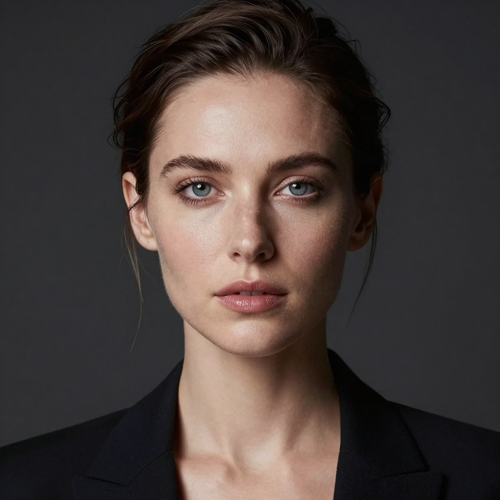
Try AI Portrait Photography on One Ordinary Photo
Nothing to hire and nothing to set up. Pick a clear forward-facing photo, write the lighting note you want, and put the result beside your original before deciding whether a second version earns another run.
Open the portrait studioThe Hard Part With Most AI Portrait Photography Results
Generated faces give themselves away in the same three places, and viewers notice all of them before reading anything.
Three Steps of AI Portrait Photography
One photo, one instruction written like a photographer's note, one export ready to publish.
Choose a Clean Reference Photo
Forward-facing, evenly lit, no sunglasses and no wide hats, with the face filling a decent share of the frame. Window light or outdoor shade beats office fluorescents, because neutral exposure gives the model something honest to build from.
Write the Shot as a Lighting Note
Follow the order photographers use: subject and mood, then lens and aperture, then the direction and quality of light, then clothing and backdrop. One line naming an 85mm lens at f/1.8 with soft window light beats any vague instruction.
Run a Batch, Then Export Lossless
Four to eight variations per run give you different micro-expressions, lighting angles and hair behaviour to choose between. Select the strongest one, upscale it, and export as PNG so compression cannot undo the eyes you fixed.
AI Portrait Photography Settings Worth Knowing
Three values decide how professional a frame looks, and all three are written straight into the instruction.
AI Portrait Photography Looks People Ask For
There are six or seven studio styles in circulation; these three cover most of what people need.
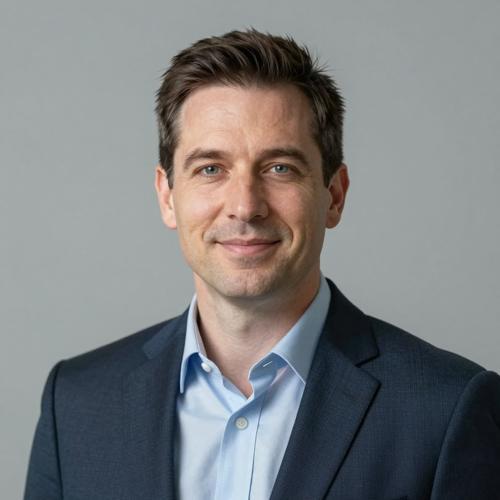
The Professional Headshot
Clean and approachable, built for a profile page, a speaker bio or a proposal document. Soft frontal key, neutral backdrop, restrained grading, and nothing anywhere in frame that pulls attention off the face.
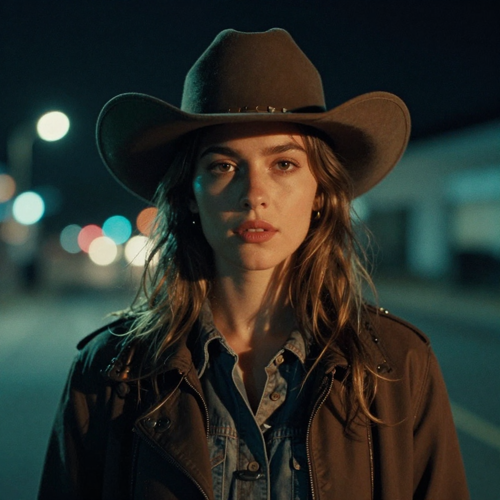
The Cinematic Night Frame
Moody teal-and-orange lighting, shallow depth and visible grain, reading like a still pulled from a film. It suits portfolio headers and creative projects far better than a company directory ever will.
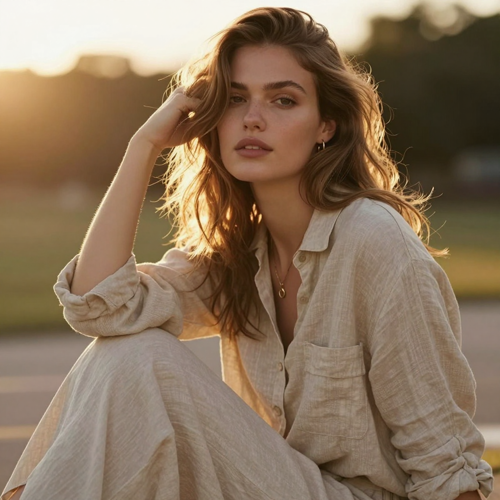
The Golden Hour Lifestyle Shot
Warm low sun, relaxed clothing and a real location blurred out behind the subject. Ideal for blog headers and personal branding, less suitable anywhere a suit and a neutral sweep are expected.
AI Portrait Photography Reference Files Compared
Four input types and how each behaves once the instruction lands.
Who Struggles to Get AI Portrait Photography Right
Four people who need one good frame and would rather not book a photographer for it.
Job Changers and Freelancers
A profile picture decides first impressions on directories and proposals. One believable frame is the difference between looking established and looking like whoever forgot to upload a photo.
Creators Building a Visual Identity
Channel art, banners and thumbnails all need variety from one consistent face. Locking a single lighting setup across a batch builds recognition instead of a folder of strangers.
Small Teams on a Tight Budget
Matching staff headshots normally mean a photographer for a day plus a retoucher afterwards. Generating them from existing phone photos keeps everyone consistent without anybody travelling.
People Who Dislike Being Photographed
Standing in front of a stranger holding a lens is uncomfortable for plenty of people. Working from one selfie removes that entirely and lets you retry until the result looks right.
AI Portrait Photography Numbers Worth Knowing
- Behance
- YouTube
Why AI Portrait Photography Reads Like a Real Session
Three things separate a frame that looks shot from one that looks generated: where light falls, how sharp the eyes are, and whether skin keeps its texture.
AI Portrait Photography Light You Name
Ask for a soft key from the left at forty-five degrees, classic Rembrandt triangles, or low-key single-source drama. Direction and quality of light change more about the finished frame than any other instruction you write.
Eyes Stay Sharp With Real Catchlights
Request sharp eyes with realistic catchlights and the improvement is immediate. Soft or glassy irises end the illusion faster than a bad wardrobe choice or an unconvincing backdrop ever could.
Texture Survives the AI Portrait Photography Pass
Asking for natural skin with visible micro-pores keeps a face anchored in reality. Heavily smoothed results read as synthetic, and that is the complaint most people make about generated portraits first.
AI Portrait Photography Ratios That Fit
Vertical 3:4 or 2:3 frames suit headshots, portfolios and nearly every profile crop. Generating wide and cropping afterwards discards facial detail that no amount of later work recovers.
Consistent Looks Across a Whole Set
Lock the lighting setup and backdrop first, then vary pose and clothing only. That one habit turns five results into a session rather than five unrelated pictures from five different photographers.
Print Sizes Without Compression
Generated frames look clean on screen yet reveal artefacts at large sizes. An upscale pass before printing keeps eyes and lips crisp, provided the export stays in a lossless format.
What Creators Say About AI Portrait Photography
“Naming the focal length and the light direction changed more than any other line in the instruction.”
“Locking the lighting first made five portraits look like one session instead of five different sets.”
“Checking the eyes at full size was the only way to catch the ones that came out glassy.”
AI Portrait Photography Questions, Answered
Ten questions that decide whether a generated frame survives real use.
What is ai portrait photography?
It rebuilds one photo into a lit, composed studio frame. You describe the lens, lighting, wardrobe and setting, and the model renders a result as though the session happened, with features taken from your reference file.
How close will the result look to me?
Very close when the reference photo is clear and front-facing, looser when it is dim, strongly angled or already filtered. Put both frames side by side at full size before trusting your reaction to either. Name anything distinctive you wear, glasses or jewellery especially, in the instruction so those details are kept rather than smoothed away.
What should I write in the instruction?
Build the line in four passes. Start with who is in frame and what mood they carry, move to the glass itself, usually 85mm at f/1.8, then say where the light comes from and how hard it is, and finish with clothing and setting. Concrete camera terms beat adjectives left standing alone.
Which focal length works best?
Eighty-five millimetres around f/1.8 flatters most faces and separates the subject from the background cleanly. Shorter focal lengths widen features at portrait distance, which almost nobody wants from a headshot.
Why do the eyes sometimes look wrong?
Missing catchlights and soft focus across the iris cause most failures. Ask explicitly for sharp eyes with realistic catchlights, and check them at full size rather than judging from a preview thumbnail.
Can I print ai portrait photography results?
Screens are forgiving, paper is not. Enlarge the chosen file with an upscaler, print it, and keep the export lossless so compression cannot sand down the eyes and lips on the way out.
Which aspect ratio should I generate?
Ask for a vertical file in the first place: 3:4 covers professional headshots and 2:3 covers portfolio crops. Anything generated wide and trimmed down afterwards throws away facial detail permanently, which is the one mistake you cannot edit your way out of.
How do I keep several portraits consistent?
Five frames read as a single session when only three things move between them: pose, expression and clothing. Hold the key light and the backdrop identical on every run, because redesigning the setup each time is exactly what produces a folder of unrelated strangers.
Is it honest to publish one on a professional profile?
Yes, when it still looks like you on a good day. Choose restrained grading and believable lighting, and never present a heavily altered frame as documentary proof of being somewhere or doing something.
Do I own what I generate?
Terms differ by service, so read them before publishing anything commercial. Each provider sets its own rules on commercial use, retention of uploads and how long finished files stay available.
Build One AI Portrait Photography Frame Today
Start from a clean window-lit photo, write the shot as a lighting note with a named lens and light direction, then compare several variations before exporting. Restrained versions are the ones that survive profile pages and print.
No credit card required - no sign-up - export one full-size frame before you share