
A Bloom Photo Effect Turns Hard Highlights Into a Soft Halo
A bloom photo effect gives a bright window or a low sun somewhere soft to bleed into instead of a hard edge. Only pixels above a brightness threshold are blurred into a halo and laid back over the sharp original. Upload one frame, name the reach, and review it on one screen.
Rated on how a bloom photo effect handles a bright edge: whether the glow spreads softly, and whether the shadows stay clean No card required - no app install - one frame at a time
A Bloom Photo Effect Is a Light Spill, Not a Coated Filter
Drag a soft-focus slider across a whole photo and it turns grey rather than glowing. A plain blur softens everything equally; a bloom photo effect picks only the brightest pixels and lets those spill, so the shadow side stays intact. For the warm, red-edged cousin, see the [halation effect](/image-tools/halation-effect) page.
Apply the Bloom Photo EffectThe Hard Part With a Bloom Photo Effect Is Knowing Where Light Stops
Spreading light is easy; picking the pixels that deserve it is the craft.
Make a Bloom Photo Effect Pass in Three Moves
Each step maps to one control and ends with a look at the brightest area. Nothing here needs a layer stack.
Find the Brightest Thing in the Frame
Open the photo and find one believable source: a window, a lamp, a low sun, a neon sign. That point is what the threshold latches onto; if the frame is evenly lit, pick another file.
Say How Far the Light Should Travel
State where the light sits, how far it should travel and how strong the pass feels, and list details that must stay readable: a white cuff, a pale horizon, an iris. Raise the cutoff before anything else.
Review the Bloom Photo Effect Before You Export
Inspect the hot spot before export and ease off the strength once texture disappears there. Scan the dark half next: greying shadows mean the cutoff sat too low. Save the pass that preserves fine detail.
What a Bloom Photo Effect Gives You Beyond a Blur
Three abilities matter once the highlights are isolated, each answering a problem a plain soft-focus layer creates.
Three Bloom Photo Effect Looks, Three Kinds of Light
One procedure, three unlike frames. The variable is which bright pixels cross the threshold first, not raw strength. A bloom photo effect needs a source more than a mood; the [glow effect](/image-tools/glow-effect) page maps the wider family.

Backlit Portrait, Sun Just Outside the Frame
The rim along a shoulder and hair is already brightest. Lift only that edge into a halo and the face stays cooler, so the glow reads as light wrapping around the subject.
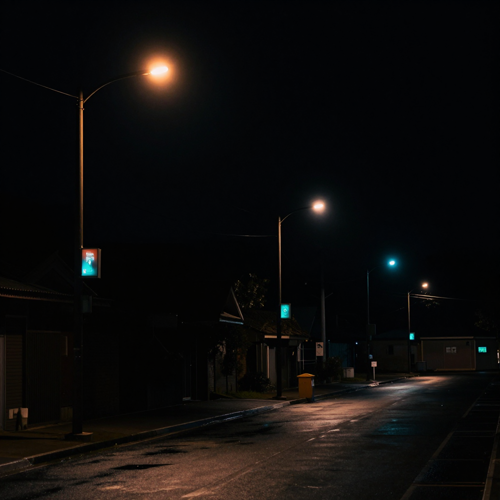
Neon Street After Dark
Streetlights and signs are clean, isolated bright points, exactly what a threshold likes. Keep the spread tight: each lamp holds its colour while the street stays dark.

A Bloom Photo Effect on Window Light at Noon
One bright window gives the pass an obvious source. Warm the halo gently, then check the wall behind it, because a cool wall turns green the moment the window starts to bloom.
Four Things a Frame Needs Before Any Halo Can Form
The halo is rebuilt from what the file already holds. Four ingredients a bloom photo effect checks, in order.
Who Struggles Most With Flat, Uneventful Light
These people reach for this look most: the photograph is worth keeping, yet the highlights do nothing. A bloom photo effect belongs where one bright edge waits to spread. The [image tools](/image-tools) hub links neighbouring effects.
Portrait Shooters With a Harsh Midday File
A face shot under hard overhead sun has a bright cheek and forehead and nowhere softer to go. Selecting just those zones and letting them bleed makes a clinical frame feel lit.
Wedding Photographers With a Grey Ceremony
Venue light is whatever the room gives, often even and unremarkable. A restrained halo around a window or candles can hand a flat aisle back the atmosphere the couple remembers.
Night and Street Photographers
City frames are full of point sources a threshold isolates cleanly. Keep the spread small and the signs glow while the pavement and the night sky stay dark.
Teams Matching a Bloom Photo Effect Across a Set
One description reused across a batch holds a gallery together. Applying the same threshold and radius pulls every frame into one register.
A Bloom Photo Effect in Plain Numbers
- Flickr
- 500px
- Behance
- Unsplash
Why a Bloom Photo Effect Reads as Light, Not Fog
Uniform softening weights every pixel alike and ends up hazy. Six contrasts explain how a bloom photo effect behaves when it selects highlights on its own.
A Bloom Photo Effect Only Touches the Brightest Pixels
A plain blur softens the whole file, shadows included. Starting from a threshold keeps the detail crisp and lets only the light itself move.
Deep Shadows Keep Their Density
Screen blending can only lighten, so an untreated glow lifts the blacks into grey. A high threshold leaves the dark half of the frame alone.
Warm Lights Stay Warm and Cool Lights Stay Cool
The halo is built from the real colours of the bright pixels, not a flat white sheet. A lamp keeps its amber and a monitor its blue.
No Second Shoot When the Sky Refused to Cooperate
Overcast conditions do not demand a reshoot. The file in hand can still supply the atmosphere the sky withheld.
A Short Description Beats a Long Recipe
Naming the source, the reach and the intensity replaces a panel of settings you would otherwise re-explain later.
One Look Is Enough to Judge It
Two checks settle it: whether the brightest area still holds texture, and whether the shadow side stayed dark. Both fit on one screen.
What Shooters Notice on the Second Look
“I kept stacking a soft-focus layer over the whole portrait and wondering why it looked like a dirty lens. Once I let only the window highlights spread and left the face sharp, the frame finally read like late afternoon instead of a smudge.”
“A whole wedding set came back from a grey ceremony and I was nudging sliders file by file until the gallery drifted. Describing the same halo once and reusing it pulled every frame back into one register without the grey cast I kept fighting.”
“Neon night shots were my problem, because the signs blew out to flat white the moment I added any glow. Switching to a highlight-only pass with a screen blend kept each sign its own colour and the street stayed properly dark.”
Bloom Photo Effect Questions Worth Asking Before You Upload
Common first-timer queries, answered directly with the boundaries stated first.
What exactly is a bloom photo effect?
A bloom photo effect spreads light out of a picture's brightest areas, the halo around a bright window or a bare bulb. Editing isolates those highlights, blurs them, and blends the glow back over a sharp original.
Bloom photo effect or halation: which one is which?
Halation is the warm, reddish ring hugging a high-contrast edge; a bloom photo effect is neutral and spreads wider. Halation stays tight and coloured, bloom broad and colourless. The [golden hour filter](/image-tools/golden-hour-filter) rebuilds the direction of warm light instead.
Is a bloom photo effect the same as the Orton effect or a plain glow?
Related, not identical. The Orton effect blurs the whole frame and screens it back, softening midtones and shadows too; a bloom photo effect glows only above a brightness threshold and keeps detail sharp. Lens flare makes streaks and orbs, not a soft halo.
Threshold, radius and amount: what does each control do?
Three controls do most of the work: threshold sets how bright a pixel must be, radius how far the light travels, amount how strongly the blurred layer blends back. Some editors call them Strength, Size and Range.
Why does nothing happen on my flat, evenly lit photo?
Because nothing is bright enough to select. A bloom photo effect runs on pixels above the threshold, so an evenly mid-lit frame gives no glow at any setting; find one brighter side first.
Can a bloom photo effect ruin a good frame?
Yes, and that is the usual way the look goes wrong. Push radius or amount too high and the glow lifts midtones, flattening contrast and smearing detail. Start with a high threshold, modest radius and low amount, then raise one control at a time.
Does the glow keep the colour of the light source?
It should, when built from real bright pixels rather than a flat white overlay. A warm sunset blooms warm and a cool sky blooms cool, because screen blending adds light without clipping to white; a forced tint is a separate grading choice.
When should I add a bloom photo effect in my editing order?
Last, after the tonal work. A bloom photo effect reacts to your highlights, so raising exposure afterwards inflates the glow; set shadows and brightest values first, then add the halo as a finishing move.
Will a bloom photo effect work on night scenes and neon signs?
Night frames are among the strongest cases: streetlights and neon give clean bright points. Keep the threshold high so the street stays dark and each sign keeps its colour.
Which images may I edit with a bloom photo effect?
Edit only material you have permission to modify. Commissioned work follows the agreement you signed; with a personal snapshot, get consent before publishing. Changing illumination never transfers rights.
Give a Flat Frame One More Reason to Glow
Start from the file already on your card: a bloom photo effect can widen its brightest edges into a halo while the dark half stays put. It works through a web page on Textideo, so there is nothing to download and no preset catalogue to learn. Apply the Bloom Photo Effect and judge the result on one screen.
No card required - no app install - one frame at a time