
Golden Hour Filter for Photos Shot at the Wrong Hour
A golden hour filter is asked to do one job: make a frame shot at two in the afternoon read like the last hour of light. That means warming the highlights, pulling them back before they clip, and keeping skin out of orange. Upload one photo, name where the sun should sit, and settle it in a single review.
Rated on the two things a golden hour filter has to get right: whether the highlights hold, and whether the skin still reads as skin No credit card required - no app install - the frame you upload stays yours
A Golden Hour Filter Is a Light Direction, Not a Color Wash
Most warm filters lay yellow over whatever light already exists. This one reads the shadow edge in the frame, decides where a low sun could plausibly sit, and warms along that axis. A gold mist filter does the same job optically, on the lens, before the shutter fires; a golden hour filter does it on the file you already have.
Try the Golden Hour FilterThe Hard Part With a Golden Hour Filter Is Not the Warmth
Warmth is the easy slider. Believable light is everything downstream.
Make a Golden Hour Filter Pass in Three Moves
Three decisions, one review. No layer stack, no preset library, no comparison export.
Start With the Frame's Own Light
Open the photo and look for a shadow edge. A face turned three-quarters, a wall falling off into shade, a window on one side: that edge is what a low sun can be hung on.
Say Where the Sun Sits
Name the hour and the side in plain words, then name what must survive: the white shirt, the pale sky, the eyes. That sentence is the whole prompt.
Review the Highlights, Then the Skin
Check the brightest area first and pull it back if it has gone blank. Then look at the face: if it reads orange rather than sunlit, the warmth was stacked twice.
What a Golden Hour Filter Gives You Past Warmth
Three things separate a relight from a tint, and each one answers a failure you have already seen in a warm preset.
Three Golden Hour Filter Looks, Three Kinds of Sun
The same pass, pointed at three kinds of frame. What changes is not the strength but the direction you name. A golden hour filter does not need a dial; it needs a side.

Backlit Portrait, Sun Behind the Shoulder
The rim already exists; the warmth is pushed into it while the face sits half a stop cooler. Haze stays at the edge of the frame instead of fogging the eyes.
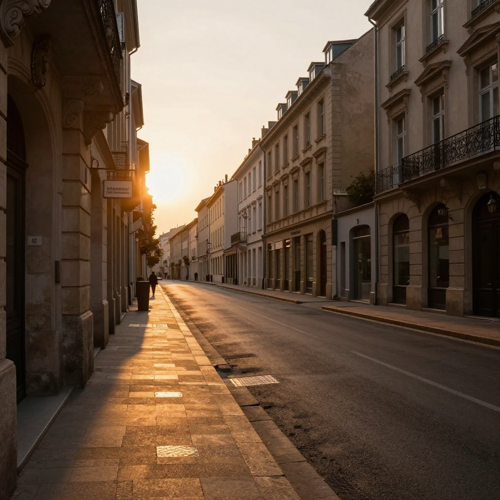
Overcast Street Warmed Into Late Afternoon
Grey, even light is the hardest case. With a curb line or a building corner to hang the sun on, long shadows can be implied and the pavement picks up the colour of six o'clock.

Golden Hour Filter on Window Light at Noon
Light from one side is already directional, which is most of the work done. Warm it toward the end of the day, then check the wall, because a cool wall reads green once the window goes gold.
What the Frame Has to Give Before the Warmth Lands
The pass works from evidence. These are the four things it looks for, in the order it looks for them.
Who Gains Most When the Light Was Wrong
Four groups keep arriving with the same file: the shoot happened, the light did not cooperate, and everything else about the frame is fine. A golden hour filter earns its place on photos that were already worth keeping.
Wedding Shooters With a Flat Ceremony
Ceremony light is whatever the venue gives you. A grey aisle and a four o'clock vow can still be delivered in the register the couple remembers standing in.
Catalogue Teams on a Fixed Studio Day
One booking, one light, forty products. Describing the sun per frame keeps a set coherent without paying for a second day in the room.
Creators Matching a Feed's Warm Palette
A grid drifts cool one post at a time. Reusing a single description pulls new frames back toward the same late-day register as the older ones.
Retouchers Handed a Cool, Underexposed Batch
The worst files have no direction at all. Recovering the bright values first and then naming a side is the only order that holds.
A Golden Hour Filter in Plain Numbers
- Behance
- Etsy
- TikTok
Why Choose a Golden Hour Filter Over a Warm Preset
A preset is a fixed recipe aimed at a moving target. These six differences are what a pass that can see the photo changes in practice.
The Golden Hour Filter Reads Light First
A preset cannot tell a north window from noon sun. A pass that locates the source warms one side of the face, not both.
One Warmth Control, Not Three
Stacking white balance, colour grading and saturation is how photos go orange. Set the register once and leave the rest alone.
No Reshoot Because the Sky Went Grey
Weather is not a reason to book the location again. The frame you already own can carry the hour you wanted.
A Sentence Instead of a Slider Chain
Describing the hour and the side replaces a six-panel recipe you would have to remember, and re-explain to whoever inherits the file.
The Same Look Across a Whole Batch
One description applied to forty frames holds a set together. Presets drift because every file starts at a different white balance.
A Review That Takes One Pass
Two questions, brightest value and face, both answered on one screen instead of a comparison export between three preset versions.
What Photographers Say After the Second Pass
“I shot a backlit portrait at four and the rim was there but the colour was cold. Asking for light from behind and slightly left put the warmth back without touching her face.”
“Forty product shots on one studio day, all needing the same warm register. The golden hour filter held the set together from one description; before that I was nudging temperature file by file until the grid looked uneven.”
“My ceremony frames were grey and the venue had no windows worth mentioning. The first try went orange; naming the side and asking to keep the sky fixed it in one more pass.”
Golden Hour Filter Questions People Actually Ask
The ten questions that come up before a first upload, answered without a sales pitch.
What exactly is a golden hour filter?
A golden hour filter gives a photo the look of the hour after sunrise or before sunset: warm, low and softer than midday light. In editing the term covers everything from a yellow overlay to a pass that rebuilds the direction of the light.
When is the real golden hour, and how close can an edit get?
Roughly the first hour after sunrise and the last hour before sunset, while the sun is low enough that its light crosses more atmosphere and loses the blue end of the spectrum. The cold counterpart, blue hour, arrives once the sun is gone. An edit can match the colour and the contrast; it cannot manufacture an angle that was never there.
Golden hour filter or warm tone preset: what is the difference?
A warm tone preset shifts colour across the whole frame at once. A golden hour filter decides where the light is coming from first, then warms along that axis and protects the brightest values. On a neutral frame the two look close; on a cool or overcast one the preset usually collapses.
How is this different from a sunset filter?
A sunset filter pushes toward deep orange and red with heavier contrast, which suits a sky that is already burning. Golden hour is the softer, yellower half of that light and far kinder to skin, so it survives on portraits that a sunset grade would ruin.
Why does my subject come out orange?
Almost always double warming: a raised white balance plus warm colour grading plus a saturation push, all at once. Keep one warmth control, bend orange toward yellow rather than red, and lift its luminance so the face reads lit instead of dyed.
Will it work on a photo taken at noon or under cloud?
Yes, if the frame has a shadow edge to hang a low sun on. Hard frontal flash or perfectly even shade leaves nothing to bend, and the warmth sits on top like a tint. Look for one side that is already brighter before you start.
Does it work indoors?
Window light from one side is one of the easiest cases, because the direction already exists. Mixed sources are the problem: tungsten against a cool wall fights the warmth, so neutralise the wall first and add the late-day register second.
Will the white dress or the sky lose detail?
Pull the brightest values down before adding warmth, then check the histogram for a spike on the right edge. Warm light lifts highlight values, so a frame that looked safe at midday can clip the moment the gold arrives.
Can I keep a whole set looking the same?
Reuse one description instead of re-tuning each file. Direction, hour and the thing to protect are the three parts that matter; change only those per frame and a golden hour filter will pull forty images into one afternoon.
Whose photos can I put through it?
Only files you have the right to edit. For client work that normally means the delivery terms in your contract; for a friend's portrait or a stranger's picture from a feed, get permission before the result goes anywhere public.
Give the Frame the Hour It Missed
Take the photo you already have, name the side the sun should come from, and check the highlights before the skin. The golden hour filter runs on Textideo in the browser, with no install and no preset library to learn.
No credit card required - no app install - the frame you upload stays yours