
A Blue Hour Filter Should Cool the Sky, Not the Streetlamps
A blue hour filter brings the deep blue of dusk to a photo shot at any other hour. It keeps the sky and open shadows cool while windows, streetlamps, and car trails stay warm against the blue. Open one frame, name the cool sky and the warm lights worth keeping, and finish in one review.
Rated on whether a blue hour filter keeps the cool sky deep while the warm lamps stay amber, and on whether faces escape the grey cast No card required - no account - nothing to install - the photo stays yours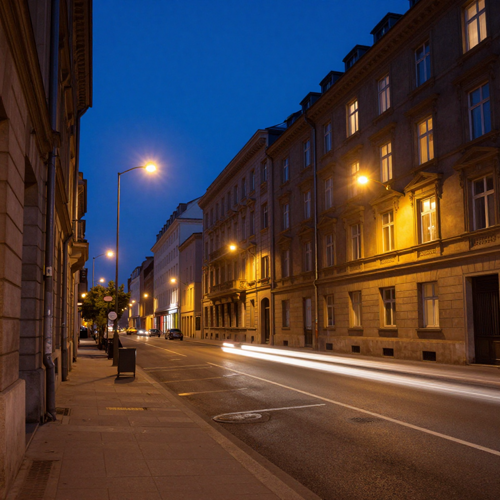
A Blue Hour Filter Lives in the Gap Between Sky and Streetlamp
Most cool presets just lay a blue layer over everything. A blue hour filter does the opposite, separating the cool sky from the warm lights already in the photo and deepening one without flattening the other. That duet is why a [golden hour filter](/image-tools/golden-hour-filter) reads as a different hour while this grade stays quiet and graphic. Compare both in the [image tools](/image-tools) hub.
Apply the Blue Hour FilterWhere a Blue Hour Filter Quietly Falls Apart
The blue is easy; what sits under it is not.
Build a Blue Hour Filter Look in Three Decisions
Three calls about light, then one look at the result. Nothing is stacked, installed, or exported.
Find the Warm Sources First
Scan the frame for every amber light already in it: a window, a streetlamp, a row of headlights. Those are the anchors a blue hour filter protects while everything else cools.
Tell the Blue Hour Filter What Stays Warm
Write one line describing a deep indigo sky, then note the lamps, windows, and faces that should keep their warmth. That line is the whole instruction.
Check the Sky, Then the Faces
Start with the sky: if the blue looks like a solid block, dial the cool cast back. A grey or cyan face means the temperature was pulled across the whole frame instead of held off the skin.
Inside a Blue Hour Filter: Three Jobs, Not One Tint
A tint treats every pixel alike. These three let a grade cool one part and protect the other.
City Lights, Still Water, and an Empty Sky
Three frames, one cool register. A blue hour filter answers whichever warm source the blue plays against: a lit skyline, a harbour, or one lamp on an empty road.
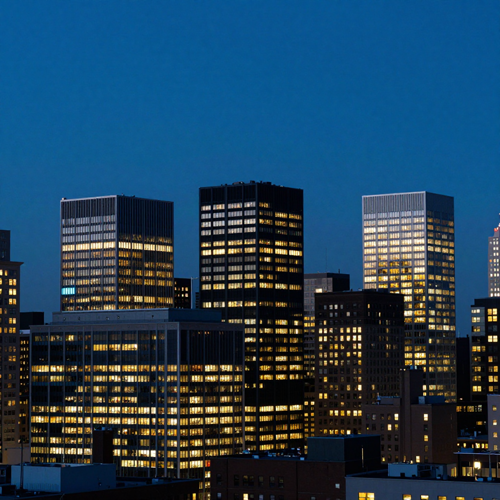
Skyline With Every Window Lit
Deep indigo overhead, amber office windows below. The blue holds the sky calm while the building lights carry the warmth, so neither side has to compromise.
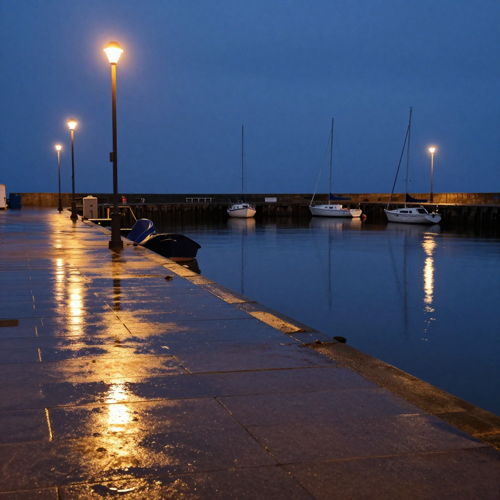
Harbour After a Short Rain
Wet quay stone doubles the palette: the sky reflects cool, the dock lamps gold. A blue hour filter leans on that mirrored contrast and keeps the water from going muddy.
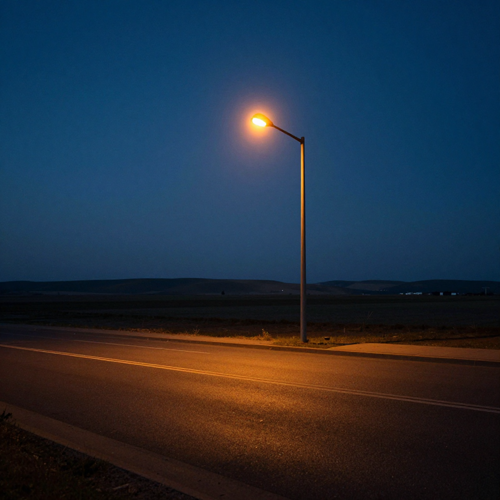
One Streetlamp on an Empty Road
One warm pool against a wide cold sky is the leanest version of the look. With barely any subject, the grade lives on the temperature gap between lamp and dusk.
Four Clues the Blue Hour Filter Reads in a Photo
A convincing dusk grade starts with what the picture contains. Four cues matter, in order.
Who Struggles Most Before Trying a Blue Hour Filter
Four kinds of photographer reach for this grade for the same reason: the composition held, the timing did not. Applied to footage, the same idea lives in the [video tools](/video-tools) hub.
City and Architecture Shooters
Skylines need the sky and the switched-on windows to hold equal weight. A blue hour filter rebuilds that balance after the blue has faded instead of just darkening everything.
Wedding and Event Photographers
A venue exterior shot ten minutes late loses its deep blue backdrop. Recovering the cool sky while keeping the marquee and string lights warm saves a frame the couple chose.
Travel and Landscape Creators
Harbours, bridges, and rain-slick streets carry two colour temperatures at once. One reusable description pulls a day's captures into one dusk without re-grading each file.
Portrait Retouchers Chasing a Quiet Mood
Cool, low-contrast evening light suits editorial portraits, but a blanket cool shift greys the face. Separating the background from the skin is the whole job here.
The Blue Hour Filter, Reduced to Four Facts
- Behance
- Unsplash
- Flickr
- 500px
Why a Blue Hour Filter Is Not Another Cool Preset
One temperature slider treats every pixel the same. A blue hour filter that splits sky from lamps changes what a flat cool shift cannot.
The Blue Hour Filter Reads Both Registers
A temperature slider cannot tell a cold sky from a warm shop window. A grade that locates the warm sources keeps them amber while cooling everything else.
One Cool Cast, Two Colour Temperatures
Cool the whole frame three ways and it collapses into slate. One cool register, applied once, leaves the amber lamps where they were.
Missed Timing Stops Being Final
A twenty-minute window is gone before you can reset the tripod. Working from the file means the shot you kept is still usable.
Describe the Contrast, Not Six Panels
One line about the cool sky and warm lamps replaces a stack of local adjustments nobody can reconstruct, and it hands off easily to a collaborator.
Sets That Finally Match Each Other
Apply one description across a full batch and the frames read as one evening. Hand-tuning each file drifts, since no two captures begin at the same colour.
One Screen, Two Things to Check
Check the sky, then the faces. If the blue is deep and faces keep their warmth, stop — no need to export three candidates and compare them.
Three Editors on Getting the Night Back
“I kept losing the sky in my evening skyline shots — by the time the streetlamps looked right the whole frame had gone flat grey. Describing a deep blue sky and asking the lamps to stay amber brought the two halves back in one pass.”
“A full set of waterfront frames shot ten minutes apart never matched; some were warm, some muddy. One description of cool twilight with warm window glow pulled the whole series into the same dusk without touching each file.”
“My portraits kept turning cyan whenever I cooled a frame for that quiet evening mood. Separating the cool background from the face fixed it — the skin stayed warm and the background finally read as night.”
Questions People Bring to a First Twilight Edit
Timing, colour, limits, and rights — answered plainly.
What exactly is blue hour in photography?
Blue hour is the short twilight after sunset or before sunrise, when the sun sits roughly four to eight degrees below the horizon and the sky turns deep blue. A blue hour filter borrows that cool light for a frame shot at any other hour.
How long does the real blue hour last?
Most guides put it at about twenty to forty minutes, though latitude, season, and weather move the window. A blue hour filter exists for frames shot just outside that gap, recovering the register without a reshoot.
Blue hour filter or golden hour filter — which one fits my photo?
Different hours, not two strengths of one effect. A [golden hour filter](/image-tools/golden-hour-filter) is warm, low, directional sunlight for portraits; a blue hour filter is cool, even twilight for cityscapes, architecture, and water, especially with lamps in frame.
Is a blue hour filter the same as a moonlight or cool tone filter?
No. Moonlight is cool silver, overhead, and shadow-heavy, while a plain cool filter just shifts the whole frame's white balance; a blue hour filter keeps a deep blue sky and holds lamps warm, so two temperatures coexist.
Can a blue hour filter rescue a photo taken at noon?
It can re-grade colour and contrast, but not the short hard shadows midday sun bakes in. Frames with a sky, a window, or a reflective surface give the cool cast somewhere to sit; flat flash gives it nothing.
Why does skin turn grey or cyan in my cool edits?
A single global temperature drop cools the face along with the sky, and skin loses its warmth first. Hold faces on the warm side of the split and lift their luminance, so a blue hour filter keeps skin lit rather than cyan.
Do I need a tripod or special settings to shoot real blue hour?
For location work the field advice is manual or aperture-priority, f/5.6-f/8, ISO 100-400, and white balance near 4000-5000K, with a tripod for long exposures. Those are shooting tips, not editor claims; a blue hour filter works on the file, not the camera.
What should a photo contain for this grade to look believable?
A legible sky or bright window, one warm source such as a streetlamp or headlights, and ideally wet pavement or water. With those cues a blue hour filter plays cool sky against warm practicals; a uniformly dark frame has nothing to hold.
Will a blue hour filter work on indoor or portrait shots?
Window-lit portraits start well, with cool daylight on one side against a warm interior lamp. Rooms lit only by overhead bulbs have little sky signal, so a blue hour filter stays subtle there.
Who owns the edited image, and can I use it for client work?
Only grade photographs you are allowed to modify, and treat the result as carrying the same limits as the source. For client delivery the contract sets the terms; for a friend's portrait get permission before publishing, since a blue hour filter changes colour, not ownership.
Bring the Cool Dusk Home
Open the frame you already have, name the deep blue sky and the warm lamps worth keeping, and check the faces before you save. A blue hour filter works on Textideo directly in the browser, with no downloads, no account, and no preset library to keep track of.
No card required - no account - nothing to install - the photo stays yours