
Realistic Selfie Generator: Make Selfies That Pass as Real Phone Photos
A realistic selfie generator turns one clear photo of you into a new selfie that reads as an ordinary, unedited phone picture. It keeps your face, skin tone, age, and hairline while rebuilding the camera, the light, and the scene around them. Pores, named light sources, and slight sensor noise stay in; beauty filters and studio glow stay out.
Rated on the two things that decide a selfie: whether the face holds, and whether the photo reads as a phone take No credit card required - no sign-up to browse - failed runs never cost a credit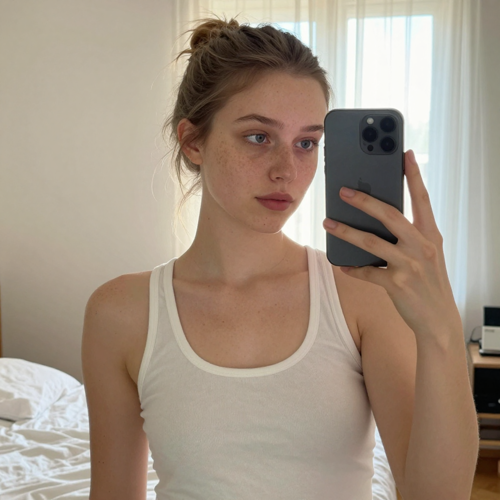
A Realistic Selfie Generator Built Around One Clear Photo
Skip the photoshoot. Upload a single photo where your face is fully visible, name the shot you want — mirror, car, flash, or 0.5 — and download a selfie in the shape your feed already uses. Every take keeps your features instead of inventing a prettier stranger, and a failed run never costs a credit on Textideo.
Make My Realistic SelfieThe Hard Part With Realistic Selfie Generators
Most AI photo tools fail at the exact two things this one has to get right.
Your First Realistic Selfie Generator Run in Three Steps
No shoot, no crew, no editing timeline. Three moves take you from an ordinary photo to a phone-true selfie you would post yourself.
Upload One Clear Photo
Pick a photo of you where the whole face is visible, roughly facing the camera, in even light. Sunglasses, heavy filters, hats that hide the hairline, and group shots all cut the likeness — an ordinary phone photo works fine, and it does not need to be a selfie.
Name the Shot and the Light
Type the scene the way you would describe it to a friend. A copy-paste starting point: "iPhone front-camera mirror selfie in a bright bedroom, oversized cream sweater, phone covering part of the face, morning window light, slightly messy hair, visible pores, a little sensor noise, true-to-life colour, no beauty filter." Edit any word, then generate.
Review, Rerun, and Download
Look at the hands, background text, and small details first — they give a generated take away before the face does. Rerun the same scene for another take, keep the one that holds, and download it in the shape you picked.
What You Can Control on Every Take
Three levers decide whether a selfie passes as real: the camera it implies, the light it names, and the imperfections it keeps.
Realistic Selfie Generator Styles People Actually Post
Every style below is a scene you can name in one line. The face holds; the camera, light, and framing change around it.
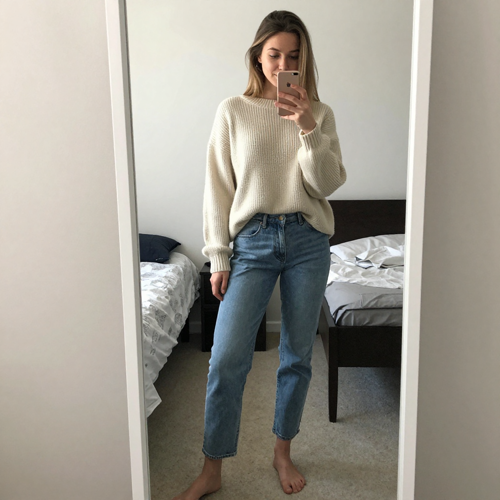
Mirror Outfit Check
The phone shows in the mirror, the whole outfit is in frame, and the pose is the ordinary one you make before leaving the house. Bedroom mirrors, gym mirrors, and fitting rooms all work from the same one-line scene.
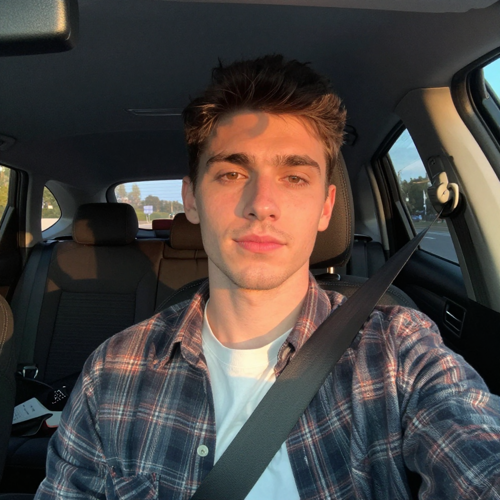
Golden-Hour Car Selfie
Driver's seat or passenger seat, daylight or low sun through the windshield, seatbelt visible, dashboard in frame. The light comes from the window, never from a studio you cannot see.
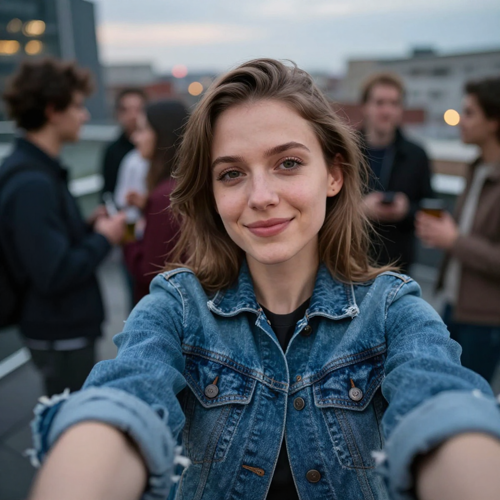
Realistic Selfie Generator Take: the 0.5 Look
The ultra-wide front camera held low stretches the edges, the framing lands slightly off-centre, and the whole photo is a bit soft — imperfect on purpose, exactly the trend take people post between posed shots.
Where These Selfies Belong
A realistic selfie earns its place where the viewer checks the face against the person they know. These are the spots a realistic selfie generator gets used most.
Who Struggles With Only One Good Photo
The best photo of you was taken by someone else. The realistic selfie generator exists for the shot you never took — same face, new moment.
Solo Brands and Founders
You need a current photo for the about page, the pitch deck, and the conference badge, and there is no photographer on the team. One upload covers the set.
People Who Hate Being Photographed
Posing on demand produces stiff, unnatural shots. Rerunning a familiar scene — your own kitchen, your usual commute — gets a relaxed take without an audience.
Daters Refreshing a Profile
The selfie is the profile. A believable set across settings and outfits beats one overused photo from two years ago.
Creators Between Shoots
When the content calendar needs slice-of-life material and the light outside will not cooperate, a named scene and one photo keep the grid moving.
At a Glance
- TikTok
- YouTube
- Snapchat
Why a Realistic Selfie Generator Beats an Airbrushed AI Portrait
The market is full of tools that smooth, glow, and idealise. The point here is the opposite: a photo of you that a friend would scroll past without a second look.
Your Face Is the Contract
Every run carries one instruction behind the scene: keep the face shape, eyes, skin tone, age, and hairline of the uploaded photo, and do not beautify or slim them. If a take drifts, rerun the same scene and keep the one that holds.
Realistic Selfie Generator Output Is Imperfect on Purpose
Real skin texture, light from something in the scene, a little grain, and normal phone depth of field are requested on every generation. No beauty filter, no glowing studio light, no cinematic grading — the exact habits that make AI portraits look generated.
Named Shots Steer the Camera
Write mirror selfie, front camera in the driver's seat, flash at a party, or 0.5 held low, and the framing follows: the phone appears in the mirror, the arm runs out of frame, the wide angle stretches the edges.
Consent Is the Boundary
Upload your own photo or one from a person who agreed to it. Celebrity likenesses, strangers, and pictures meant to mislead — fake travel proof, fake presence — are out of scope on Textideo.
One Photo, Not a Training Set
No model training on twenty uploads and no waiting queue. A single clear portrait is the whole input, which keeps the likeness close and the turnaround short.
Batch Sets Without the Studio
Need a dating-app spread or a month of story backgrounds? Rerun the scene with small edits — a different light, outfit, or landmark — and the set still reads as one person across every take.
What Creators Say About the Realistic Selfie Generator
“The mirror take passed as a real outfit check — my group chat asked where I bought the sweater, not which app I used.”
“I stopped recycling the same dating photo. Five takes, five settings, and every one still reads as me.”
“The 0.5 party shot was the first AI photo my friends did not interrogate. The grain does the work.”
Realistic Selfie Generator Questions, Answered Plainly
The ten questions people actually ask before their first run, from likeness and realism to consent and prompt wording.
What is a realistic selfie generator?
A realistic selfie generator makes a new selfie of a real person from an existing photo of them, in a place, outfit, and light you choose, so the result looks like a phone photo someone actually took. It is not a way to invent a person.
How realistic are the results?
They are built to pass as ordinary phone photos: real skin texture instead of airbrushing, light from something in the scene, a slight front-camera angle, and a little grain. What usually gives one away is small — a hand or background text — so check those before posting.
Will a realistic selfie generator output really look like me?
The generator keeps face shape, features, skin tone, age, and hair colour from your photo. It is a new photograph rather than an edit, so small details such as a mole or the exact shape of your teeth can come out slightly different; a clear, front-facing photo and one rerun fix most drift.
What photo works best as input?
A clear photo of just you, face fully visible, in even light, looking roughly at the camera. Avoid sunglasses, strong filters, hats that hide the hairline, and group shots. It does not need to be a selfie or a professional picture — an ordinary phone photo works well.
How do I make a mirror, car, or 0.5 selfie with a realistic selfie generator?
Name the shot in the scene. "Mirror selfie" puts the phone in your hand and shows it in the mirror; "front-camera selfie in the driver's seat" takes the angle and seatbelt framing; "0.5 selfie with the ultra-wide front camera held low" gives the stretched, slightly soft trend look.
Can I make a selfie of a celebrity or someone else?
No. Use only your own photo or a photo of a person who has agreed to it. A realistic selfie of a real person is exactly the kind of picture that can mislead, so celebrity likenesses and runs without consent are refused every time.
What should a realistic selfie generator prompt say?
Cover four things: the camera, the place, the light, and one imperfection. A copy-paste example: "iPhone front-camera selfie in the passenger seat at golden hour, seatbelt on, warm sun through the windshield, natural skin texture, a little noise, no filter." Skip words like 8k and masterpiece — they push the result toward glossy and fake.
Is it okay to post realistic selfie generator images?
Posting a picture of yourself is your call, but do not use one to make people believe something false, such as being somewhere you were not. Some platforms ask you to label realistic AI-made images, and labelling is the safe default whenever you are in doubt.
How is this different from a text-to-image portrait tool?
Text-to-image tools invent a plausible face with no anchor to you. A realistic selfie generator constrains generation to your reference photo from the start, which is why the result is recognisably you rather than a generic, good-looking stranger.
Do I need many photos to train a realistic selfie generator?
No. One clear photo is the whole input — no training set, no waiting queue. That keeps the turnaround short and the likeness close, though a rerun helps when a scene changes your hair or outfit.
Ready to Run Your Own Realistic Selfie Generator Scene?
Upload one clear photo, name the shot and the light, and keep the take that holds your face. Your first scene is waiting on Textideo.
No credit card required - no sign-up to browse - failed runs never cost a credit