
A Cobalt Blue Photo Filter Should Stain the Room, Not the Face
A cobalt blue photo filter sets the dense blue of a cobalt pigment into a photograph without dyeing the faces in it. The grade lifts blue in the shadows, quiets competing greens and yellows, and keeps highlights clean. On Textideo it takes one line about what stays warm and one frame to judge.
Rated on the two things a pigment blue has to get right: whether white stays white, and whether skin keeps its warmth. No credit card required - no sign-up - no preset pack to install
A Cobalt Blue Photo Filter Reads as Pigment, Not a Tint
Most blue presets pour one cold layer across every pixel, and the face goes grey first. A cobalt blue photo filter starts from a fixed pigment hue near 215 degrees, bends the shadows toward it, and leaves warm skin, amber lamps and white fabric at their own temperature. That is the difference between a wash and a grade with a point of view.
Apply the Cobalt Blue Photo FilterThe Hard Part With a Cobalt Blue Photo Filter Is the Skin
Three places a flat blue edit usually breaks first.
Build a Cobalt Blue Photo Filter in Three Decisions
Three calls about colour, then one look at the frame.
Read the Warm Anchors First
Scan the frame for what is already warm: a face, a lamp, wood, a lit window. A cobalt blue photo filter protects those values while the ground cools.
Tell the Cobalt Blue Photo Filter What Stays Warm
Write one line naming the deep cool blue, the highlights to hold and the skin to protect. That sentence is the whole instruction.
Start With the Whites, Finish on Skin
Begin with anything white. If a shirt or wall has turned cyan, ease the blue back, rotate the face onto its own hue line, and stop.
Inside the Grade: Three Jobs a Tint Cannot Do
A tint treats every pixel alike; a cobalt blue photo filter separates cool ground from warm subject.
Three Frames That Hold the Blue Without Turning to Slate
One pigment register, pointed at three kinds of photograph. A cobalt blue photo filter changes which warm note the deep blue plays against.
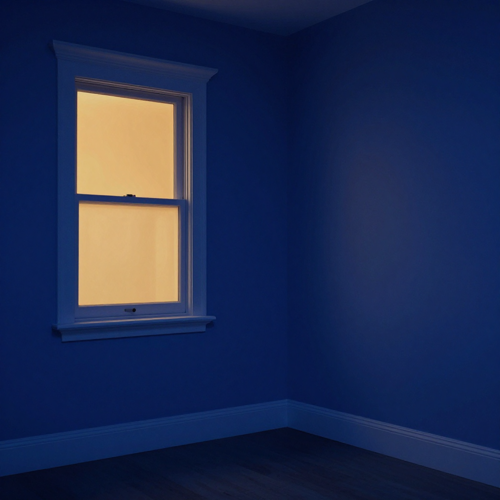
A Lit Window in a Cold Room
Deep cobalt settles into the walls and unlit corners while one amber window keeps its heat. The temperature gap is the subject, and the white trim never picks up a cyan edge.
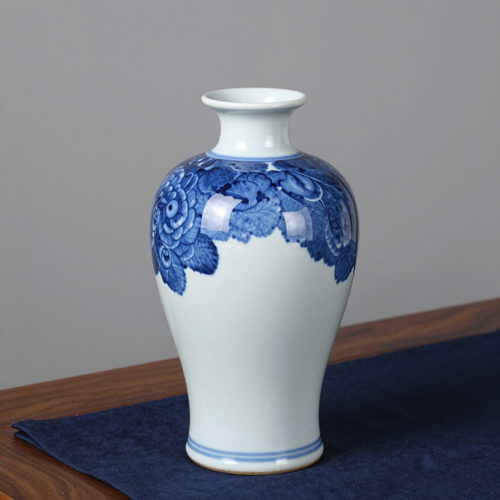
Blue-and-White Porcelain on a Dark Cloth
The pigment sits in the glaze itself. The edit deepens the blue, holds the white ceramic clean, and lets a warm wooden edge carry the contrast.

A Stage Under Cobalt Light
Blue streaks cross the background while the performer's face and warm practicals stay on the other side of the wheel: one cool field, a few warm accents, no cyan skin.
What a Frame Needs Before the Blue Has Somewhere to Sit
The grade reads what the photograph already contains. Four cues, in the order they matter.
Who Struggles With a Cool Cast That Greys the Face
Four kinds of photographer ask for the same thing: one saturated blue that does not swallow the subject.
Editors Chasing Cobalt Blue Photo Filter Depth
Fashion and editorial work keeps returning to a high-saturation blue. A cobalt blue photo filter adds pigment depth without flattening the model's skin into the set.
Night and Concert Photographers
Stage lights and city lamps already carry two temperatures. Deepening the blue field while keeping practicals amber pulls a noisy set into one register.
Still-Life and Ceramic Shooters
Blue-and-white porcelain, cobalt glass and glazed tile already contain the hue. Hold the white body clean and deepen the blue without tipping toward teal.
Portrait Retouchers After a Quiet Mood
A low-contrast cool frame suits an editorial portrait, but a blanket temperature drop greys the face first. Separating skin from background is the entire job.
A Cobalt Blue Photo Filter at a Glance
- Lightroom
- Capture One
- DaVinci Resolve
- Affinity Photo
- VSCO
Why a Cobalt Blue Photo Filter Beats a Flat Blue Overlay
A single slider cannot tell a face from a wall. These six differences start where that limitation begins.
A Cobalt Blue Photo Filter Reads Two Registers at Once
Cool the ground and shadows while the face stays warm. One global cast collapses both into slate; holding them apart keeps a portrait readable.
The Hue Stops at 215 Degrees
Cobalt is a specific pigment blue, not any dark blue. Teal-and-orange grades drag it toward green; this one keeps the cool lean and high saturation.
Competing Colours Get Quiet, Not Deleted
Greens and yellows are pulled back so the blue has room. Skin, wood and amber light survive as deliberate warm accents.
One Cobalt Blue Photo Filter Description, Reused
Write the grade once as a line about hue, highlights and what stays warm. Hand-tuning forty files drifts; one instruction keeps the set in one register.
Highlights Keep Their Detail
Deep blue grades tend to crush shadows into a black block. Rolling highlights off gently and lifting blue only in the lower tones keeps the weave in dark fabric.
Fewer Panels, One Check
A stack of local adjustments is impossible to reconstruct later. One written line replaces it, and the only review is whether white stayed white and skin stayed warm.
What Creators Say About the Cobalt Blue Photo Filter
“I kept chasing the blue of a glazed vase, and every preset turned the model's face the same cold grey. Once the skin was held on its own hue line, the whole set finally matched.”
“A concert set shot under mixed lamps used to need a different tweak on every file. One written line about the cool field and the warm practicals pulled them into one register.”
“The fix was naming what stays warm before touching any blue slider. White fabric stopped going cyan and the deep blue could actually be deep.”
Cobalt Blue Photo Filter Questions, Answered Plainly
Ten questions on hue, input photos, and usage rights, gathered before a first cobalt blue photo filter edit.
What exactly is a cobalt blue photo filter?
It is a colour grade built on cobalt blue pigment, hue near 215 degrees: saturated cool blue in the shadows and midtones, competing hues quieted, warm skin intact. It describes a look, not a piece of glass on the lens.
Cobalt blue photo filter, navy, teal, or a plain blue filter — which is which?
Navy is nearly black, teal sits between blue and green, and a plain blue filter shifts white balance until faces go cyan. A cobalt blue photo filter keeps a clean saturated mid-blue and aims it at the ground, protecting the face.
Why does skin turn grey or cyan in my cool edits?
A global temperature drop cools the face with everything else. Key the narrow red-to-yellow skin band back onto its own hue line, and check white fabric: a cyan shirt means the cast went too far.
Can it rescue a photo taken under flat noon light?
It can rebuild colour and contrast, but not the hard shadows midday sun bakes in. Pick a file with one cool region and one warm anchor; a flat flash frame gives the blue nothing to sit on.
What should a photo contain for this grade to read as believable?
A legible cool source such as a sky or window, one warm anchor like a lamp or face, and ideally glass or wet stone that reflects both. Without those cues a cobalt blue photo filter has nothing to work with.
Is this the same as a teal-and-orange cinematic grade?
No. Teal-and-orange pushes the cool side toward green-cyan and warms the highlights. This grade holds the pigment hue near 215 degrees, quiets greens and keeps highlights near neutral.
Does this grade work on product, food, or documentary shots?
Usually not. Product, food and documentary work depends on accurate colour; a saturated blue field misrepresents all three. Keep a neutral version alongside for comparison.
How is this different from a black-and-white image tinted blue?
A monochrome tint removes every other hue first, so skin, wood and lamp light all become one blue. This look keeps those warm hues and lets them contrast with the cool ground.
Can I keep a whole set of photos looking consistent?
Reuse one written description rather than re-tuning each file. Name the hue, the highlights to hold and the warm values to protect; hand-tuning forty files drifts, one cobalt blue photo filter instruction does not.
Who owns the edited image, and can I use it for client work?
Only grade photographs you are allowed to modify, and the result carries the same limits as the source. A cobalt blue photo filter changes colour, not ownership.
Try a Cobalt Blue Photo Filter on Textideo
One frame, one line about what stays warm, and a deep pigment blue that leaves skin alone. Start with a photo that already holds a cool source and a warm anchor, and judge the grade in a single pass on Textideo.
No credit card required - no sign-up - no preset pack to install