
Give Any Photo the CCD Photo Filter Look of a 2000s Compact
A ccd photo filter rebuilds the slightly-wrong charm of a 2000s CCD compact camera on any modern photo you already have. The look grew out of pocket cameras with charge-coupled device sensors, then returned when clean, AI-smoothed phone shots started to feel airless. Add hard flash, fine grain, a cool cast, blooming highlights and an optional date stamp, all on Textideo.
Rated on what a ccd photo filter has to get right: blooming highlights, a cool cast, fine grain, and an honest date stamp No credit card required - no sign-up - no uploads - works on your own photos
Imperfection Reads as a Real Moment
A ccd photo filter is not about making a picture sharper. It puts back what a modern phone works hard to erase: a hard flash that blows out the center, a cool cast in the shadows, fine sensor grain, and highlights that bloom instead of clipping flat.
Try the CCD LookThe Hard Part With a CCD Photo Filter Is Knowing When To Stop
Most failed edits come from pushing a single slider too far.
Three Steps That Make the Look Believable
A short, repeatable sequence. Each step of a ccd photo filter builds on the last, so stopping early is always an option.
Pick a Clean Source Photo
Start with one sharp, ungraded image, ideally a portrait, a daylight street frame or an indoor flash shot. A ccd photo filter adds imperfections, so less retouching in the source file makes the result more natural.
Add Flash, Grain and a Cool Cast
Raise the highlight bloom, lay down fine sensor grain and push the shadows slightly blue while the lit skin stays warm. This is where the CCD character appears, so ease off grain on faces and keep saturation moderate.
Stamp the Date and Export Full Size
Add an optional orange date stamp in a bottom corner and backdate it to the early 2000s, or leave it off for a cleaner frame. Export at full size so the grain survives a ccd photo filter.
What a CCD Photo Filter Actually Changes
Three controls that separate a convincing edit from a flat tint. A ccd photo filter is built from these, not one strength slider.
Three Setups, Three Kinds of Nostalgia
Three treatments of the same idea, each pushed a different distance. A ccd photo filter is a set of dials, not one button, so the mood shifts with the light.
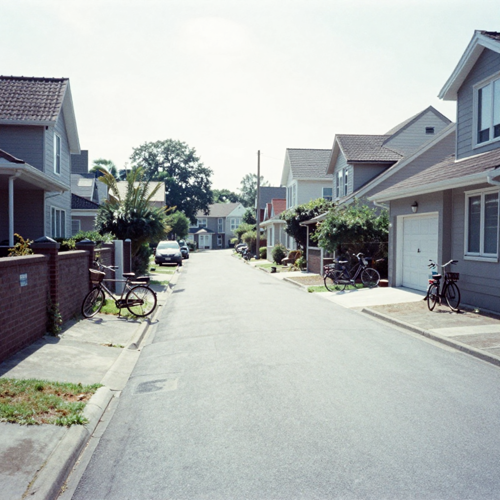
Cool Daylight CCD Photo Filter
Street shots in open daylight carry the coolest cast. Keep saturation moderate, push contrast a little, and let a faint color fringe sit on hard edges, because this is the light those small cameras were built for.
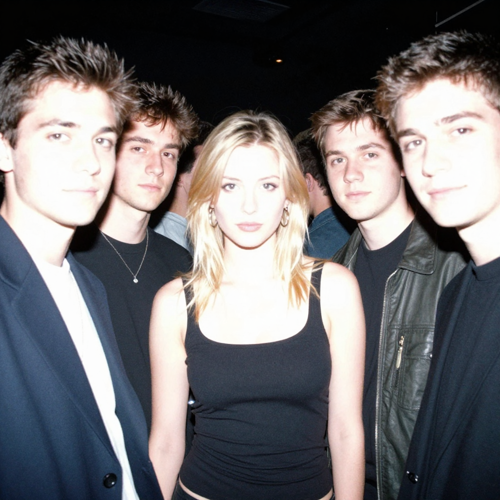
Hard Flash Party Frame
A direct on-camera flash brightens the middle of the frame and drops the background into near-black. Skin near the flash blows out, shadows turn crisp and a soft vignette appears, making this the loudest version for crowds and late nights.

Date-Stamped Travel Set
A whole trip treated in one pass reads like a single remembered camera. Add a small orange stamp, backdate it to the early 2000s and keep grain fine across every frame — restraint matters more to a ccd photo filter than any single slider.
Where a CCD Photo Filter Does Its Best Work
Input types, and what each one asks of the treatment. The ccd photo filter is additive, so a cleaner source leaves more room.
Who Struggles to Get a CCD Photo Filter Look Right
Four kinds of people who reach for this look, and what usually trips them up.
Phone Shooters Tired of Perfect Skin
Computational photography smooths every face and flattens every sky. These users want the slight wrongness back, and a ccd photo filter gives them a repeatable way to add it without a full color-grading suite.
Creators Building a Y2K Feed
A feed built on early-digital nostalgia needs consistency across dozens of posts. One preset applied to every frame keeps the cool cast and grain aligned, instead of a different edit on each upload.
People Who Skip the Used-Camera Gamble
Second-hand compacts are now costly, often with dead batteries and rare memory cards. Recreating the look on an existing photo is faster, cheaper and gives control over how strong each imperfection is.
Scrapbookers and Recap Makers
Trips, parties and year-end roundups read better as one remembered camera than as ten unrelated edits. A shared date stamp and a single grain level turn a folder of mixed shots into a coherent set.
A CCD Photo Filter At a Glance
- Photo Galleries
- Social Feeds
- Travel Journals
- Event Albums
- Print Scrapbooks
Why a CCD Photo Filter Beats Another Color Preset
Six reasons this treatment is a reconstruction, not a tint. A ccd photo filter rebuilds a small camera instead of shifting a few colors.
It Rebuilds a Camera, Not a Palette
A phone preset only shifts color, but here bloom, clipped whites, grain and flash falloff are separate dials. That is why the result reads as a different device.
The CCD Photo Filter Timeline Is Specific
Pocket CCD compacts ruled 2000 to 2010 before CMOS took over. A 2020s second-hand and social revival brought the flaws back, and phone filters plus AI presets made them reproducible.
It Beats Buying a Failing Compact
An old digicam means a bidding war, a dead battery and a rare memory card. Simulating the traits on a file you own removes the maintenance entirely.
Where Film Simulation and the CCD Photo Filter Part Ways
Film presets chase warm grain and soft analog halation. This look is digital and cool: blooming highlights, chromatic edges, low resolution and often a date stamp.
Your Photos Stay Yours
Processing stays on your device, so nothing is uploaded. Edit only images you hold the rights to, clear commercial and portrait permissions, and never disguise an edit as someone else's original.
One Preset Holds a Whole Set Together
Apply the same settings across a trip or party and the frames stop looking like separate edits. Nudge only the bloom per shot, and a ccd photo filter feels like one camera.
What Creators Say About the CCD Photo Filter
“I stopped hunting for a working old compact. One pass gives my party shots that hard-flash, slightly blue feel without chasing batteries.”
“The date stamp and fine grain are what sell it. My travel set finally reads like one camera from 2004 instead of ten unrelated edits.”
“I keep bloom gentle on portraits so skin stays believable, then push it on neon night shots. That control is the whole point.”
Questions People Ask Before They Edit
Real answers about what a ccd photo filter changes, which photos suit it, and the story behind the look, without the jargon.
What does CCD actually mean in a ccd photo filter?
CCD means charge-coupled device, the digicam sensor before about 2010. It shifts charge to one amplifier so highlights bloom, while a CMOS sensor converts at every pixel — a ccd photo filter copies the first signature.
Where did the ccd photo filter look begin?
It began with 2000s pocket CCD cameras and their harsh flash. A 2010 switch to CMOS, then a 2020s second-hand and social revival, led to phone filters and AI presets.
How is a ccd photo filter different from a film simulation?
A film simulation wants warm grain, light leaks and soft analog color. This look rebuilds a digital camera instead: cool cast, glowing highlights, sensor noise and often a date stamp.
Which photos work best with a ccd photo filter?
Clean, well-lit phone shots work best, especially portraits, party frames and night scenes with a bright light to bloom. Dark or heavily graded files give the treatment less to work with.
Can I use this look without buying an old camera?
Yes, and it is the simpler route. Used compacts now cost real money with dead batteries, while the treatment reproduces the cool cast, bloom and grain on a photo you own.
Is a ccd photo filter safe and legal to use?
Edit only photos you took or have the right to change, and never pass a treated image off as someone else's untouched original. Clear commercial and portrait rights before publishing.
Why do the highlights glow in this look?
That bloom is the defining trait. Bright pixels spilled charge into neighbours and cheap lenses scattered light, so the effect adds gentle halation around lamps and flash-lit skin.
Does a ccd photo filter work on portraits and skin tones?
It does, with a light touch. Ease off grain, lift the shadows and keep bloom gentle so skin stays believable, since too much warmth turns flash-lit faces orange.
Can I stamp a date on a ccd photo filter edit?
Yes. A small orange date stamp in a bottom corner reads instantly as an old snapshot, and years from 1999 to 2007 fit best, though the edit can stay stamp-free.
How do I keep a whole set of ccd photo filter shots consistent?
Apply one preset to every frame in a trip or party, then nudge only the bloom per shot. The edit reads as one camera when the cast, grain and date format stay fixed.
Give Your Next Photo the CCD Photo Filter Look
One clean image, a hard flash, a cool cast and a little patience are enough. A ccd photo filter brings back the slightly-wrong charm of a 2000s pocket camera without the dead batteries or the bidding war. Start with a photo you already own and stop as soon as it feels like a memory. The ccd photo filter is available on Textideo, with no credit card required.
No credit card required - no sign-up - no uploads - works on your own photos