A GTA 6 AI video generator builds a fan-made trailer from one still, with camera moves, synced sound, and a face that holds across cuts. You direct the shots and light instead of pasting a still onto a template. It runs in one browser tab on Textideo, with no editing timeline.
Rated on what decides a fan-made trailer: whether one face survives every cut and the light stays honest. No sign-up - label it as AI, no official tie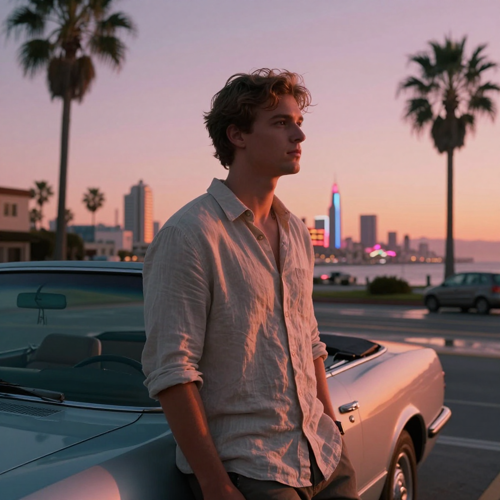
At the November 2026 console launch, short-video feeds filled with fan-made clips placing an ordinary face in a stylized sun-drenched crime-city. A GTA 6 AI video generator is the name for making one yourself, no console or crew.
Generate Your GTA 6 ClipThe clips look effortless until you try to keep them steady.
A GTA 6 AI video generator works in three short passes: bring a still, lock a shot list, then cut and check, with no editing timeline and each step re-runnable on its own.
Use a sharp portrait with the whole face visible, even light, and no heavy filter.
Name each beat, its camera move, and one sun direction, repeat the same hair and outfit every line, and close with an exclusion line on readable lettering and protected marks.
Play the first and last frame side by side, confirm the light agrees, add a caption calling it an AI-made fan edit, then export the vertical clip.
Three capabilities decide whether a GTA 6 AI video generator clip reads as a trailer or three unrelated shots.
A GTA 6 AI video generator is only as convincing as its shot list; these three setups hold one face, one sun direction, and one clean idea.
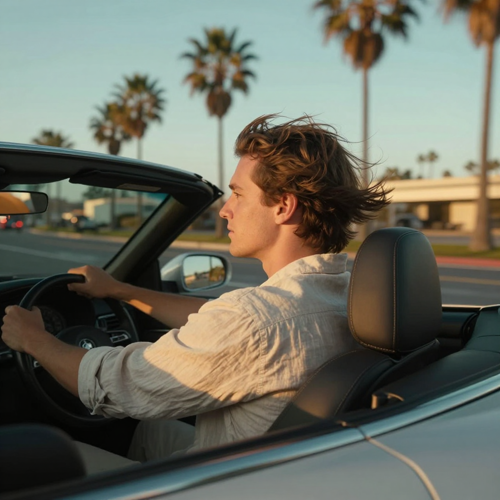
A low tracking camera beside a convertible, a dashboard view, then a slow aerial push at golden hour: three cuts, one outfit, one sun direction.
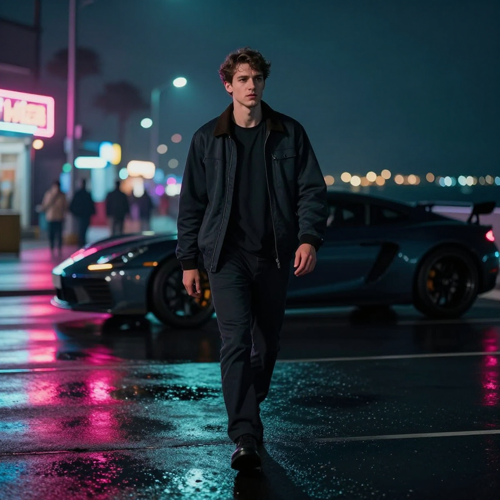
Wet streets under a teal-and-orange grade, a wheel-level tracking shot past a neon coastal strip, then a hard rooftop cut; the cool palette hides warping.
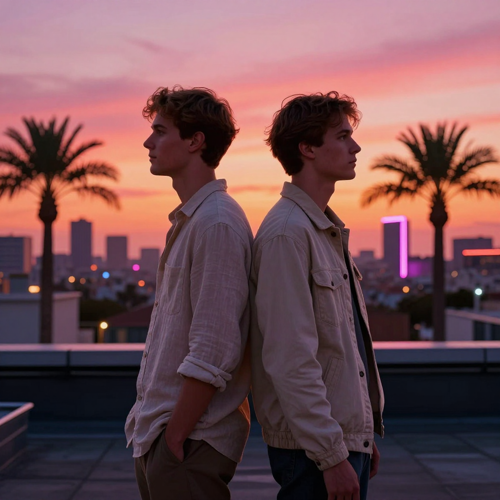
Two people arrive in one continuous move, then freeze on a full-body intro card. Solo, duo, and squad variants take one portrait each, so every face stays its own.
A GTA 6 AI video generator starts from any of these four; cleaner input means less face drift.
If a launch-week idea fell apart because the face changed on the second shot, that is exactly the problem a GTA 6 AI video generator is built around.
They want a launch-week moment without filming or learning a timeline; one upload and a shot list collapse production into one sitting.
This format has a shelf life of weeks, so they need a vertical clip the same evening and a look repeatable across posts.
Two real faces in one moving sequence is where quick attempts blend together; keeping both likenesses distinct, with both agreeing, is the job.
Community pages post launch-week clips because their audience expects the nod, and they need a labelled fan edit free of borrowed assets.
A one-tap template fixes the look; a GTA 6 AI video generator hands you the camera, the light, and the cut.
Identity is anchored to one reference still and rechecked at the last frame, so the person in the car stays the person on the street.
Low tracking shots, slow drone pushes, and dashboard views are described per beat, not left to chance; movement separates a trailer from a filtered still.
Deliberate clips use short beats and a single audio cue, not long dissolves; a simple rhythm hides warping a slow transition would show.
Vertical framing is chosen before generation, so the car, the skyline, and a second person stay inside the shot; reframing after export slices a clip in half.
Label a fan edit AI-made, never call it gameplay or a leak, and never hint at an official connection; clear captions keep a joke from reading as a fake.
A teal-and-orange grade, a low sun, and a neon coastal city are a look anyone can use; characters, emblems, and in-game assets are not, and only agreed photos enter a frame.
“Quick templates changed my face by the third shot; one front-facing still held the getaway together.”
“I burned evenings aligning light; one shot list with a single sun direction finished the duo clip.”
“Our page needed a launch-week post borrowing nothing; a labelled clip from our own footage was the first we published.”
Straight answers on the odd words, the timeline, sound, and the legal edges.
The acronym GTA marks a decades-old series of open-world crime games, VI is six as a Roman numeral, and AI video means a stylized model-built clip, not captured gameplay. A loading screen was the still artwork shown while a level loaded, which is why the first fan attempts were stills. A GTA 6 AI video generator borrows the coastal mood, not in-game frames.
It grew in four beats: in the run-up to the November 2026 launch, selfie-to-key-art prompt tutorials and one-tap reveal templates; on launch day, feeds of real faces inside a sunny fictional coastal city; within the first week, multi-scene duo, car-side, and bridge templates; by the following week, shot-by-shot relighting and retro low-poly re-renders.
Each shot is generated alone, so a side-on face drifts. Anchor to one sharp front-facing still, repeat the hair, outfit, and light every beat, and re-run only the slipped shot.
Pick 9:16 for vertical feeds, not 16:9, and lock it before generating, since reframing crops the car or a second person. A GTA 6 AI video generator holds the composition once the ratio is set.
One clean cut, one caption, one sound cue, not a long dissolve. Keep the sun on the same side every beat and let one engine note carry the cut; mismatched light reads as unrelated clips.
Ask for engine hum, sirens, or a synth beat in the same pass with no speech, or add a licensed track where you post. Plan one cue per cut and never lift a game song.
Both work. A photo starts simply, while a clip you filmed takes a video-to-video pass that re-lights each frame into one open-world game aesthetic. Use only footage or faces you own or have consent to edit.
A colour grade, a low sun, palm-lined streets, and a neon coastal city are a look nobody owns; characters, emblems, official lettering, and in-game assets are protected, so keep them out. A GTA 6 AI video generator stays safe: label it an AI-made fan edit, never call it gameplay or a leak, never hint at an official tie.
One still, one shot list, a caption that says AI. A GTA 6 AI video generator holds your face across cuts, adds sound, and hands back a clip to post on Textideo the same evening. No editing timeline, no crew, no in-game assets.
No sign-up - label it as AI, no official tie