94FBR template is a search term, not a file, and it names a look rather than a link. On Textideo a 94FBR template takes one clear photo and returns the beat-cut vertical edit people keep reposting, with your own face and your own light intact. Nothing gets installed and no link has to stay alive.
Rated on the two things that decide a trend edit: whether the face still reads as yours, and whether the cuts land on the beat. No credit card required - no sign-up - nothing to install - one photo is the whole input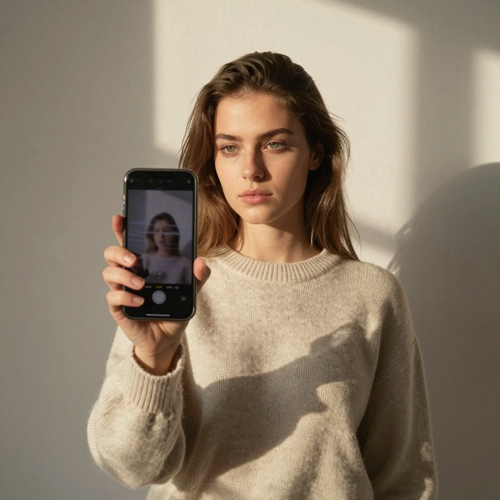
94FBR is older than every app that now borrows it. In the early 2000s it was a fragment of a Microsoft Office product key that circulated on software-key pages, and because the string was rare, people learned to paste it beside a program name to surface key lists. Template-link sites later adopted it as a brand, since it already read as the place where the thing lives, which is how a licence fragment became the prefix on a lot of CapCut template links. That is all the name is: a borrowed label. 94FBR template names no tool, no filter and no app, and the string produces no effect of its own. What people mean when they type it is simple: show me the edit that is going around, and let me put myself in it.
Start With A PhotoThe look is not the problem. Everything built around it is.
Photo in, description out, preview, export. The order matters less than the photo does.
Daylight, sharp face or product, one subject, plain background. If the photo is soft, fix the photo first; nothing downstream repairs it.
Write the beat structure in plain language: where the push-in starts, where the two cuts land, how long the last frame holds. This is the part of a 94FBR template you actually control.
Render, watch it on a phone rather than a laptop, then export 9:16. Audio goes on in your editor, cut against the downbeat, with the AI label kept on the post.
Three things, and none of them is a preset layout: your own material, pacing you can describe, and a frame that fits a phone.
The look everyone chases is a structure, not a preset: a hook frame, a beat-cut middle, a payoff you hold. One photo can carry all three, which is why a 94FBR template outlives the link it arrived on.
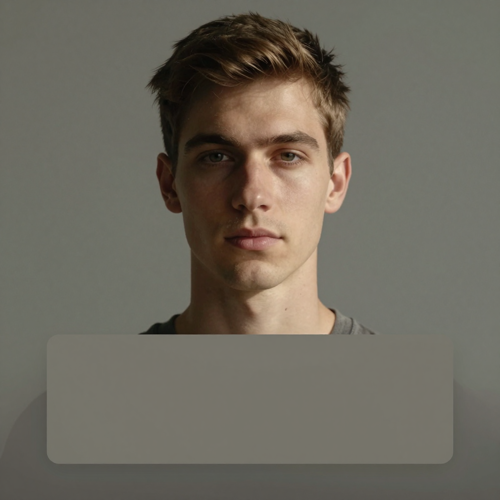
The first second does all of the work. Subject centred, eyes near the upper third, one bold line of text inside the middle band so the platform buttons never sit on a face.
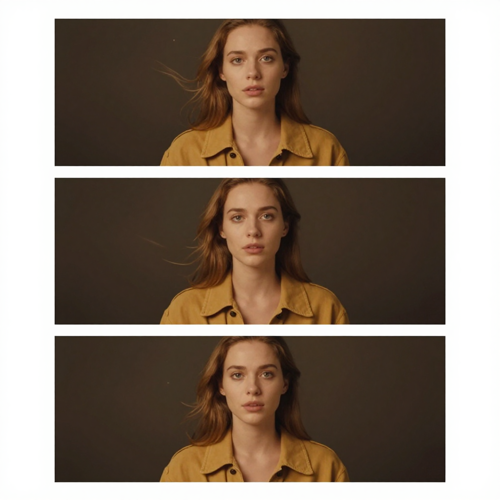
Two or three shutter cuts land on the downbeat, each a small reframe of the same subject rather than a new scene. Continuity is what keeps it readable when the cuts arrive fast.
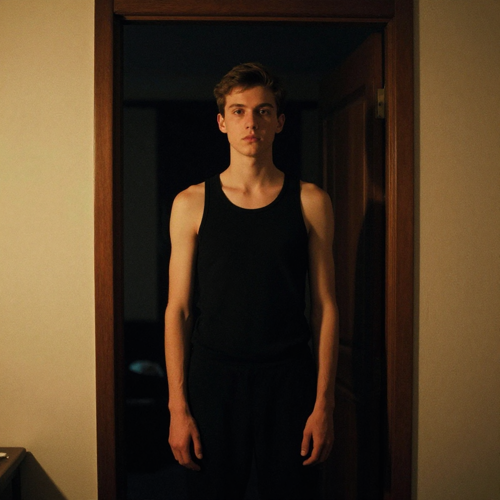
The final beat stops moving. A short hold on the finished look is the difference between an edit that ends and one that loops, and it is where the caption earns its keep.
There is no asset pack to hunt down, only one photo, and its light decides the result. These four uploads cover most 94FBR template attempts that go wrong.
The old way means chasing a link that has moved, expired or never existed. Four kinds of people hit that wall hardest.
You saved a template link last month and it opens a 404 or an ad wall. A 94FBR template on Textideo needs no link at all, only the photo already in your camera roll.
You have the shot and the audio picked; what you lack is a timeline. The structure is the part that eats the hours, so let the structure be the input.
One product photo or one founder photo is enough for a launch cut in the format people currently recognise. No crew, no studio, no second take.
Half the searches behind this phrase are really about software. This edit runs in a browser tab, so the phone keeps its permissions to itself.
A link gives you one cut, one order, one upload slot. The structure gives you the format.
Nothing expires, nothing redirects to an ad wall, and no host can pull down an edit you already posted.
The edit is built around your photo instead of a stranger's, so the result reads as your post rather than your turn with someone else's.
Keep the skeleton, vary the hook line, the light and the wardrobe, and the feed stops showing the same clip under a different name.
You say where the cuts land instead of accepting where a preset put them. That is the only real difference between a trend and a template.
No package, no re-signed build, no permissions granted at midnight. That removes the riskiest part of most trend guides on its own.
Photos of people who agreed to be in them, an AI label kept on the post, and no claim that the clip records anything real.
“I stopped saving links. Now I keep one sentence describing the cut, and the same photo gives me the same format whenever I need it.”
“My first attempt put my face somewhere it did not belong. Writing the light and the move myself fixed that faster than hunting another template.”
“We needed a launch cut from one product shot and no shoot day. Vertical, on the beat, one photo, done.”
Short answers, including the awkward ones about links, installs and who owns the photo.
It began as a fragment of a Microsoft Office product key that leaked into public circulation in the early 2000s. The string was rare enough that pasting it beside a program name surfaced pages of keys, so it became a search habit long before it became a label on template sites.
None of those. 94FBR is a search string that template-link sites later adopted as a brand. A 94FBR template is simply the phrase people type when they want the current trending edit, and the string itself generates nothing.
No. A link only works while the host keeps it up, and it forces your footage into someone else's order. Describing the structure and generating from your own photo gives you the same format without the dependency.
Upload a sharp daylight photo, describe the camera move, the light and where the cuts land, then generate and export vertical. Adding audio belongs to the edit stage, not the upload stage.
Use your own, or one you have explicit permission to use. Sharp focus, open eyes, even daylight, one subject and a plain background, with enough room around the body for the frame to move.
A track with an obvious downbeat and a clear drop. Land the second cut on the drop, hold the last frame through one beat, and use audio you actually have the right to publish.
Treat it as a security decision rather than a shortcut. Modified builds are re-signed by people you cannot audit, they often request accessibility or messaging access they have no use for, and on top of the licensing problem the payload can arrive weeks after install. Browser-based generation skips the question.
There is one further up this page. To adapt it, keep five slots in this order: subject and background, light direction, camera move, cut count and beat, then how long the final frame holds. Change the values, not the order.
Yes, if you generate vertical and keep the subject inside the middle third. The top and bottom bands belong to the interface and the caption, so leave them clear and watch the draft on a phone before posting.
Commercial use depends on what is in the frame: your own photo, your own audio, or rights you can show. Label the post as AI-generated, and never present a generated clip as recorded footage of a real event.
Pick the photo, describe the move, export vertical. A 94FBR template carried by your own image outlasts any link that might be gone by next month, and the AI label stays on the post.
No credit card required - no sign-up - nothing to install - one photo is the whole input