
Flash Fashion Effect: One Photo, A Full Runway Walk
Flash fashion takes one clear full-body photo and sends that person down a runway with a new outfit landing roughly every two seconds. The camera trails the walk and holds the face steady between punk, sleek chic, retro and avant-garde looks. Upload a portrait on Textideo and export a clip.
Rated on the two things that decide a runway clip: whether the face holds through every switch, and whether the walk reads as one take No credit card required - one clear portrait - export before you commit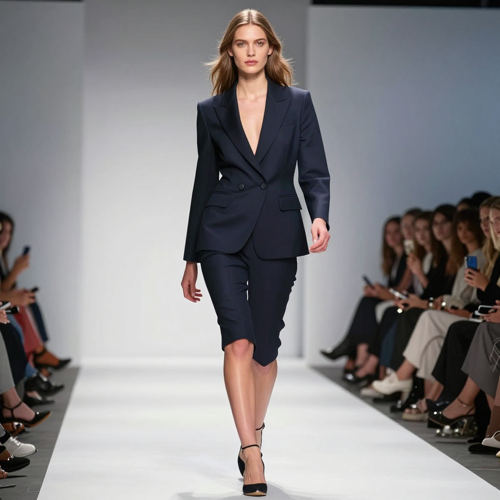
Turn One Portrait Into A Full Runway Clip
One clear photo is all flash fashion needs: it walks your subject down a runway while the outfit flips roughly every two seconds. Export the vertical cut straight to Reels, TikTok or Shorts.
Create Flash Fashion VideoThe Hard Part With Flash Fashion
Three things break it.
Build A Runway Clip In Three Steps
One upload, one set of choices and one export, with no timeline to open afterwards.
Submit One Clear Portrait
Upload a full-body shot of one person: standing, evenly lit, face visible and feet in frame.
Set The Walk And Styling
Choose the flash fashion runway preset, name your styling range, and pick vertical or wide before you generate.
Export The Finished Runway Clip
Review the walk, download the cut you want, and post it to the channel you composed it for.
What Flash Fashion Gives You
Three things decide whether a runway clip works: the cadence of the switch, whether the face survives it, and whether the styling range says something about you.
Flash Fashion Clips Worth Copying
Three ways creators put this to work: a daily outfit drop, a stylist portfolio piece, and a collection teaser that never needed a studio day.
A Week Of Outfits In One Take
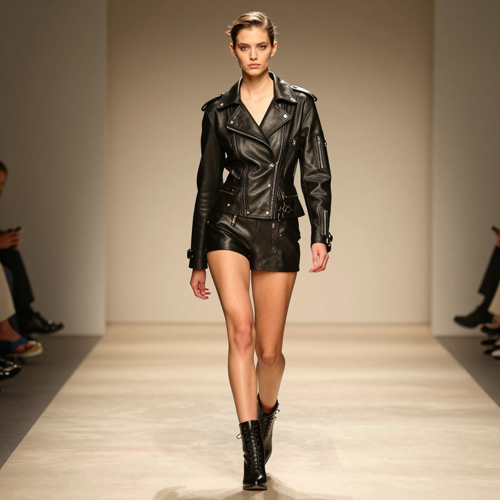
Post one photo and let the two-second cadence carry five looks. The clip loops cleanly, gives followers a reason to rewatch, and costs no rail of clothes.
A Stylist Reel That Shows Range
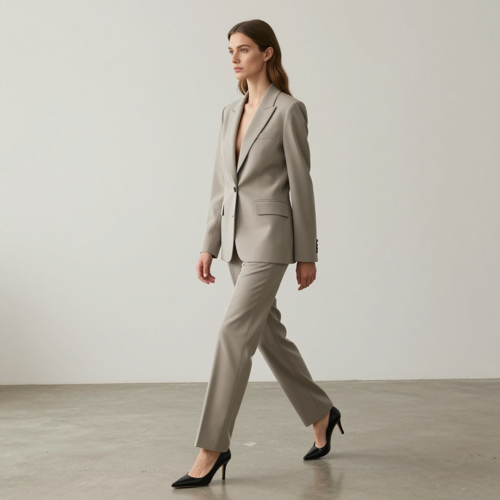
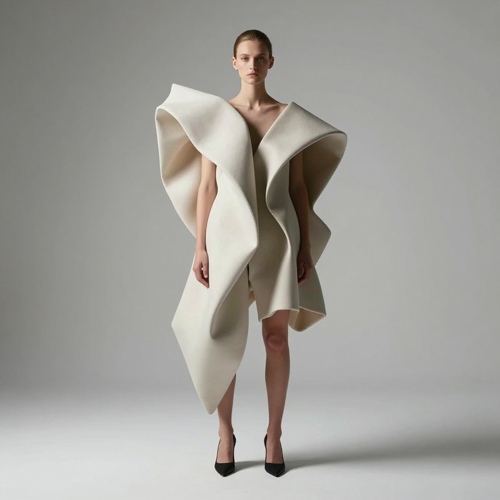
Contrast is the point. Punk leather into sleek tailoring into avant-garde shape tells a client what you can do faster than a grid of flat photos, and the moving camera shows how fabric behaves.
A Collection Teaser Without A Studio
Small labels tease a drop before samples exist. One model photo, one flash fashion walk, and the styling range carries the announcement, with a wide export for the page and a vertical cut for the feed.
The Styling Range Inside One Walk
Four inputs that behave differently once the walk starts: a standing portrait for the cleanest stride, a neutral-light head shot for identity, a plain base outfit for drape, and a lookbook page as styling reference.
Who Flash Fashion Is For
Built for anyone who needs catwalk motion and keeps hitting the same wall: a studio, a crew, a rail of clothes and a day to shoot them.
OOTD And Fashion Creators
Posting every day means shooting every day, and that is the part nobody keeps up. One portrait covers a week of looks with flash fashion, so the feed stays active while the camera stays in the bag.
Stylists And Portfolio Builders
A portfolio needs range, and range normally costs a studio day per look. One reel now shows tailoring, leather and avant-garde shape.
Small Labels And Boutiques
Drops get teased before samples arrive. A generated walk gives the announcement motion and pace, then exports wide for the page and vertical for the feed.
Agencies And Campaign Teams
Pitch decks need motion to compete with video-first briefs. A rendered catwalk from an existing model shot answers the question in a slide, and costs nothing until the concept is approved.
One Walk At A Glance
- TikTok
- Instagram Reels
- YouTube Shorts
- Lookbook pages
Why This Runway Effect Runs On Textideo
The effect, the camera and the export live in one place: upload a portrait, describe the styling you want, and take the finished walk to whichever channel needs it.
One Flash Fashion Photo Replaces A Shoot Day
One standing portrait carries the whole sequence, so a rail of clothes, a booking and a studio rental stop being entry costs.
The Camera Follows The Walk
The shot trails the subject instead of cutting between setups, so the walk reads as one continuous take rather than a montage stitched together in an editor.
The Styling Range Is Built In
Each switch lands in a different register, moving between punk, sleek chic, retro and avant-garde so consecutive looks contrast rather than blend.
A Two-Second Switch Sits On A Beat
The cadence is fast enough for a hook and slow enough to read, which is why the reveal works under a four-on-the-floor track.
Identity Holds Through Every Look
Face, head shape and hair stay stable while the garments change, so viewers follow one person down the catwalk, not four versions.
One Result Feeds Several Channels
Run the same photo again and export vertical for the feed and wide for a lookbook page, keeping the walk identical across both.
What Creators Say After The First Walk
“Posting daily meant shooting daily, and I never kept that up. One portrait now covers a week of looks, and the vertical export goes straight to my feed.”
“Clients want range, and range used to mean a studio day per look. One runway reel shows tailoring, leather and avant-garde shape in a single take I can send the same afternoon.”
“We tease drops before samples exist, so there was never anything to film. A generated walk gave the announcement pace and motion, then exported wide for the product page too.”
Flash Fashion Questions Creators Actually Ask
Straight answers on inputs, outfit rhythm, camera behaviour, music timing, export ratios and the rights you need before publishing a clip.
What is flash fashion?
Flash fashion is a photo-to-video effect built around a runway walk. You submit one clear full-body photo of one person, and the render sends them down a catwalk while the outfit changes roughly every two seconds, cycling through punk, sleek chic, retro and avant-garde. The camera tracks the walk rather than cutting, so the sequence reads as one take.
What kind of photo suits flash fashion?
A full-body shot of one person, standing, with the face unobstructed and evenly lit. Feet belong in frame, because the walk reads from the ground up. Group photos, heavy filters and cropped legs all give the model less to work with.
How many outfits appear in one clip?
The switch lands roughly every two seconds, so a short clip holds a handful of looks: enough for a hook, a mid-clip turn and a final pose. For a longer show, generate several clips from the same photo and cut them together.
Can I choose which outfits appear?
The preset cycles through a curated mix, typically moving between punk, sleek chic, retro and avant-garde so each look contrasts with the one before it. That contrast is deliberate: tailoring into leather reads far stronger on a phone screen than three versions of the same dress.
How does the camera keep the face consistent?
The camera is instructed to trail the walk rather than swing around it, holding the subject at roughly the same height and distance while the garments change. Steady framing is what stops the face drifting between looks. Naming the face and hair in your own note helps where a prompt is accepted.
What music works with a two-second outfit change?
Pick the track before you generate, then let the switch carry the beat. A four-on-the-floor track suits a two-second cadence, since each change lands on a downbeat; slower music asks for fewer looks and longer holds. Where a clip exports silent, drop in a track you have cleared.
Should I export 9:16 or 16:9?
Use 9:16 for TikTok, Reels and YouTube Shorts, where a vertical frame suits a full-length walk. Use 16:9 for a lookbook page, a website hero or a YouTube cutaway, where the stride has somewhere to travel. Decide before generating, so the walk is composed for the frame.
The switches feel too fast. What should I change?
Two seconds is a beat, not a glance, but a fast sequence still feels rushed when every look arrives at the same weight. Where your tool allows it, ask for a slower cadence, or hold the strongest outfit for the final pose.
Is it safe to run this on a photo of someone else?
Only animate a photo you own or have written permission to use, and only of an adult who agreed to appear. That applies to client work too: a runway clip is commercial content, and rules on synthetic media keep tightening. Music is a separate licence, so keep the certificate.
How is flash fashion different from an outfit transition?
An outfit transition is an edit: several clips shot or rendered separately, then cut on the beat in a timeline. Flash fashion does the same job inside one generated shot, camera moving and garments changing in a single take, so there are no seams to hide. A hand-cut transition still wins when you need control over each look.
Make Your Flash Fashion Clip Tonight
Bring one clear full-body portrait, name the styling range you want, and let the camera carry the walk. Flash fashion hands you a runway clip with the face intact, ready for the channel you picked.
No credit card required - one clear portrait - export before you commit