A what if you fly ai video turns one front-facing photo into a short clip that drops through a desk, catches fire, and glides low over the sea. The fixed sequence needs no prompt. Upload a photo you may share, then review the render on Textideo.
Rated on whether the fall still reads as a fall, and whether the face holds through the wide flight shot instead of drifting into a stranger. No prompt to write - no green screen - only use a photo you have permission to share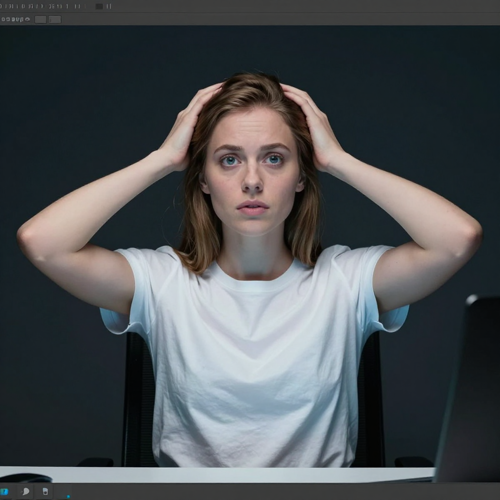
A what if you fly ai video starts with one chest-up portrait and a fixed sequence: a late-night webcam desk, a floor that gives way, a drop into morning sky, then a low pass over the sea. Start from a portrait you own, then check the finished clip on Textideo.
Try What If You Fly AI VideoA fixed one-photo effect has one honest standard and three familiar ways to miss it.
One photo, one fixed effect, one review. A what if you fly ai video stays short enough to repeat across captions.
Pick a single front-facing, chest-up portrait in even light, with the face visible and no hat or sunglasses. Use only a photo of yourself or someone who agreed.
The image model places you at the webcam desk, the video model runs the drop and the flight, and a motion reference locks the captions and cut points. No prompt needed.
Check the face in the wide shot, the flame, and the lip sync at full size, then export the MP4, add or mute the sound, and mark it as AI-generated.
Sequence, origin, and output. Three things that explain why the format works and where a render goes wrong.
A what if you fly ai video is a fixed one-photo sequence, not an open-ended prompt box. The reference supplies the desk, the collapsing floor, the dawn sky, the sea, and the cloud line; your photo supplies the face, hair, and clothes. It reproduces a chain of events rather than a written description of a flight, which is why the timing holds across attempts.
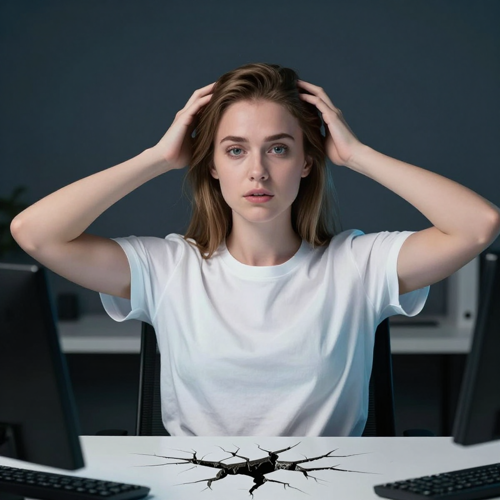
One consenting adult sits chest-up facing a webcam, chair tipped back, hands lifting toward the head as the floor cracks. Cool blue monitor light, a dark plain room, centered medium shot.
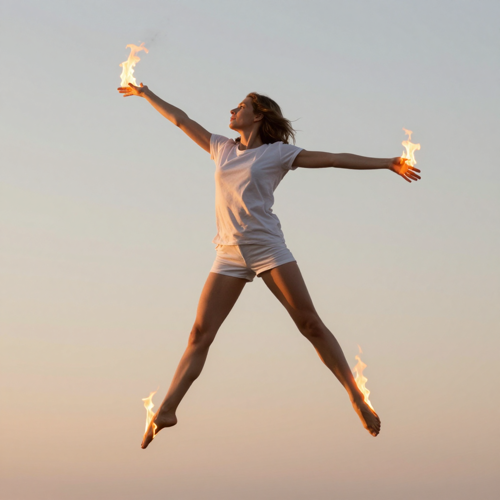
The same person drops into pale morning sky, orange flame streaming off both hands and feet as the body lifts. Warm sunrise light, vertical full-body mid-shot, face still recognizable.
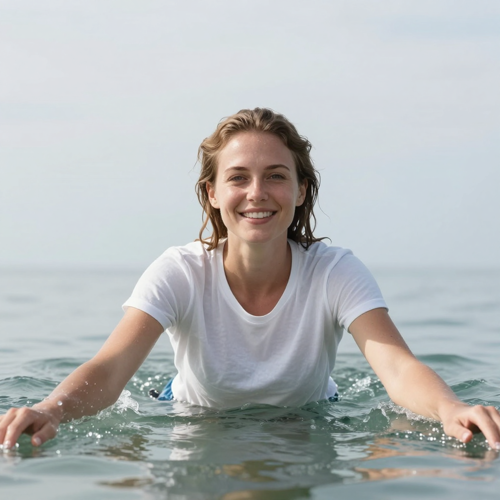
The figure glides low above a calm sea, rises above the cloud line, then the camera pushes in on a smiling face. Bright high-altitude daylight, low horizon, tight front-facing portrait.
A fixed effect reads a small set of inputs. A what if you fly ai video takes one portrait, an optional pet shot, and a sound choice, then leaves the scene-building to the template.
The common thread is wanting a recognizable fall-to-flight clip without a camera, a green screen, or a stunt.
Posters who want a clip that reads in two seconds: one photo, one upload, one review.
Reaction accounts live on a reversal; the desk-to-sky switch is setup and punchline in one shot.
A group chat or a pet clip is a low-stakes way to try a what if you fly ai video, if everyone agreed.
A one-person team rarely has a camera, a rig, and a location on standby.
The appeal is subtraction: one photo, one fixed sequence, one honest review. Home-made attempts read as generic skydives.
Timing, the floor crack, and the cut points are locked by a motion reference, so there is no wording to get wrong.
One still photo replaces a night shoot, a collapsing-floor rig, and a dawn-sky location.
Desk, drop, fire, and sea arrive in a fixed order, so the reversal reads as one motion.
Wide aerial shots can lose the face; knowing that up front makes the review faster.
Animals sometimes grow human features, and a few photos are refused. Compare before sharing.
Check likeness, flame, and lip sync at full size, then keep the take that holds together.
“I skipped every flying trend because I could not stage a collapsing floor or hold a straight face in midair. One clear portrait later, the desk drop and the fire lift were one clip, and I only had to check that my face held in the wide shot over the clouds.”
“Our reaction page used to splice three clips together for a setup and a reversal. Now the fall and the lift are a single continuous take, so I write the caption and watch the flame and the cut points instead of rebuilding a stunt.”
“We are a one-person team with no camera and no rig, so we were always a week late on these effects. One approved headshot and one review changed that - we still compare every render at full size, but the whole shoot is gone.”
Plain answers on the origin, the fall-and-fly wording, the photo and steps, the sound, the failure modes, and the consent and rights limits.
It grew from a motivational couplet about falling and flying that had circulated for years as a caption. The AI version arrived in dated steps: on 2026-11-06 an AI filmmaker posted the first short and shared its prompt the same day (roughly 368K views and 64K likes); on 2026-11-08 twin creators answered with a reply that passed a million views; daily copies followed under names like fall then fly and what if you fall twin; on 2026-11-11 a 16-second variant opened with a person talking to camera; by 2026-11-16 the main hashtag held around 1,100 videos and 3.9 million views.
Fall is the fear asked at the desk; fly is the reversal that answers it. The clip makes both literal: a person drops, then is lifted into flight. Names like fall then fly, fire flight, and the twin or bro variants are search labels, not an official title anyone owns.
Use one sharp, front-facing, chest-up portrait of a single adult in even light, with no hat, sunglasses, or heavy filter. An image model places that person into the webcam desk shot, a video model generates the drop and the flight, and a real trend clip acts as a motion reference to lock the caption timing, the floor crack, and the cut points. You export an MP4 and write no prompt. A pet version takes one animal framed head and chest.
A what if you fly ai video ships with three short spoken lines over a rising orchestral cue. You can swap in the platform's own copy of the same sound, or mute it and post in silence. Keep the AI-generated label your platform asks for.
Wide aerial shots are the hardest: a small distant face is easy for the model to lose over the clouds. Hair can tangle, shirt lettering can warp, and a pet clip may grow human hands. Compare the render with your source at full size and, if the far shot slips, retry with a closer portrait.
Use only your own photo or one from a person who clearly agreed, never a celebrity, a stranger, or a child. The flames are a generated glow, not real fire, and nobody from the original post appears in your clip. The original sound belongs to its rights holders and the tool grants no rights to it; check platform rules before any ad or paid promotion, and label the result as AI-generated.
The fall reads, the lift lands, and the face is yours. Run one clear photo through a what if you fly ai video on Textideo, compare the clip with your original, and keep the version whose likeness, flame, and cut points hold up at full size.
No prompt to write - no green screen - only use a photo you have permission to share