
Charme Dance AI Generator: Put One Photo in the Rio Clip
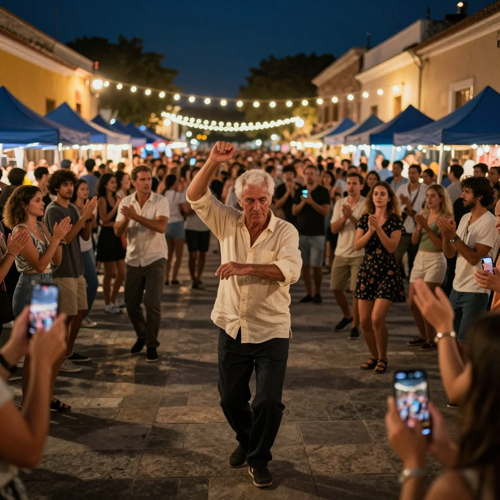
Charme Dance AI takes a single photo of you and drops it into the baile charme clip everyone is remaking: a packed stone square, rows of blue market tents, a crowd filming on their phones, and a slow synchronized charme routine caught in one handheld take. Your face, hair and outfit are carried over from the photo, so the dancer in the middle of the circle is still you — no prompt to write, no choreography to learn, and your clip is ready to post in a few minutes on Textideo with no watermark.
No dance or editing experience needed · Only upload photos you have the right to use
The Charme Dance AI Problems This Generator Fixes
The clip looks effortless when it is finished. Getting there by hand is the part that eats an evening.
You generated a dancer who is not you
Describing a scene to a general video model gives you a stranger. Casting your photo as the reference for the dancer keeps the face, hair and outfit you actually uploaded.
You are stitching the scene in an editor
A do-it-yourself version means generating the square, generating the dance, then cutting them together and hoping the timing survives. A pre-directed routine skips the timeline entirely.
The clip falls apart on the tells
Viewers spot AI dance clips by static backgrounds, unstable shadows and faces that hold still while the body turns. A moving crowd, handheld camera and consistent likeness are what make the clip survive a second watch.
You uploaded a photo that fights the effect
Group shots, sunglasses and heavy filters starve the model of the details it needs. One person, front-facing and evenly lit is the whole checklist before you generate.
How to Make a Charme Dance AI Video in 3 Steps
Pick one photo, choose a shape and length, and let the generator dance the routine. Most clips are ready in a few minutes.

Upload One Clear Photo
Use a single front-facing photo of one adult with even light and nothing covering the face. Show as much of the outfit as you can, because the clothes are carried into the clip.

Choose Portrait or Landscape
Pick 9:16 for TikTok, Instagram Reels and YouTube Shorts, or 16:9 for a wider cut, then choose your clip length and resolution before you generate.

Download and Post
Your charme dance AI video is saved to your history as an MP4 with sound. Add the trending song inside TikTok or Instagram, and label the post as AI-generated.
Charme Dance AI Videos for Every Kind of Post
The format travels. Change who is in the photo and the same routine works for family posts, trend pages and music accounts.
Family and Grandparent Posts
The trend started with an older dancer who out-dances the whole floor, so a photo of a grandparent is the most on-trend casting there is, and the version that gets forwarded fastest in a family chat.
Birthday and Anniversary Clips
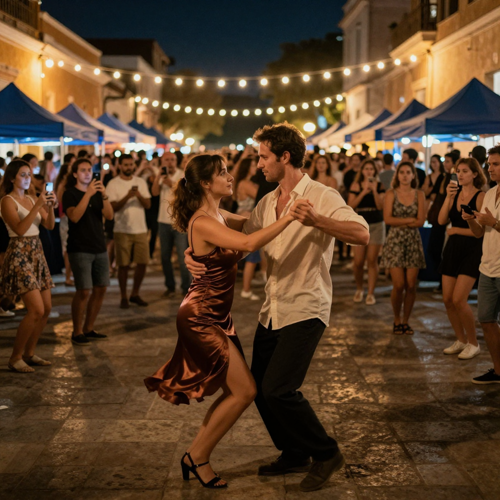
Two people dancing the same step is a birthday post that does not need a caption. Cast a couple, keep both faces clear, and the routine does the talking.
TikTok and Reels Trend Pages
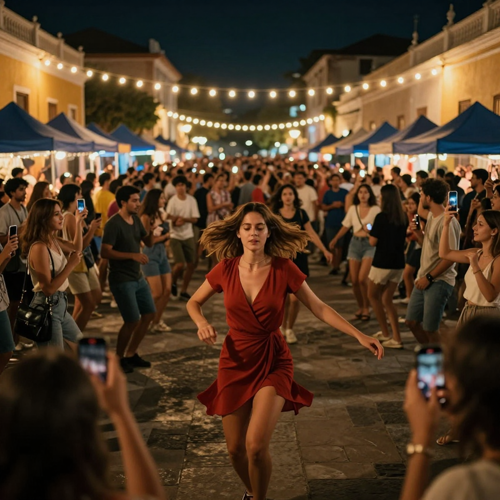
Trend accounts live on speed. Generate the charme dance AI clip, add the sound inside the app and post while the audio is still climbing.
Brazilian Music and Dance Pages
Charme grew out of Rio's soul and R&B nights, so pages built around that music get a clip that fits the feed instead of a generic dance loop.
Who Makes Charme Dance AI Videos
Anyone holding one clear photo can make one. These are the creators who get the most out of the format.
Short-Form Creators
Trend pages and Reels creators who need to post while the audio is still rising. One photo and a shape choice is the entire workflow, which is the difference between posting today and posting next week.
Families and Grandparents
The clip that started the trend starred an older dancer, so a photo of a parent or grandparent is both the most faithful version and the one audiences react to most.
Couples and Friend Groups
Charme is danced together. Put two people in and the synchronized step turns into a birthday, anniversary or just-because post.
Music and Dance Communities
Accounts built around R&B, soul and Rio baile culture get a routine that matches the music they already post, rather than a generic dance loop.
Features Built for a Charme Dance AI Video
Three things decide whether a charme dance AI clip lands: whether you are still recognisable, whether the routine has room to breathe, and whether the file is ready to post. Those are the parts handled for you.
Your Face Survives the Charme Dance AI Video
The photo is treated as the reference for the dancer rather than a starting suggestion, so the likeness holds through turns, arm movement and the crowd brushing past. Clear, evenly lit, front-facing photos give the strongest result; group shots, hats and sunglasses weaken it.
A Routine Already Directed
The entrance into the circle, the slow synchronized step, the turn and the final pose are laid out on a fixed timeline, so your charme dance AI clip spends its seconds dancing instead of stalling on a first frame.
Ready to Post the Moment It Lands
Your finished charme dance AI video comes back as a vertical MP4 with sound, at the resolution you picked, with no watermark and no editing pass afterwards.
Charme Dance AI Clips You Can Make
The same photo can end up in very different roles at the same baile charme. Here is what a Charme Dance AI render looks like in practice.
The Solo Lead in the Circle
The shot everybody recognises: one dancer in the middle of the packed square, arms loose, the crowd clapping along and filming from every side, all caught in one handheld take.
A Couple Dancing the Same Step
Two people facing each other and moving as one, which is what charme actually looks like at a baile. A second photo slot keeps both dancers recognisable.
Leading the Crowd
Centre frame, weight on one leg, hair and dress caught mid-motion while the circle around you reacts. This is the version that reads best as a vertical loop.
What Creators Say About Their Charme Dance AI Clips
Sofia M.Reels creator, 61K followersI tried the DIY route first and lost a night to matching cuts that never lined up. With the charme dance AI effect I uploaded one photo and had a clip before my coffee went cold. The part that sold me is that the crowd keeps moving, so it does not read like a sticker pasted onto a still frame.
Paulo R.Wedding videographer, LisbonI know how hard it is to keep a face stable while a body turns, so I expected the usual drift. My mother-in-law's clip kept her face and her cardigan from the first step to the last, and the family chat has not recovered since.
Nina & Andres C.Dance school owners, MadridWe posted the couple version before our Thursday class and used it as an icebreaker all weekend. The step actually looks like charme, slow and together, instead of the same bounce every other AI dance video uses.
Why Use This Charme Dance AI Generator
A charme dance AI clip lives or dies on one detail: is the person dancing still the person in your photo? Everything here is built around protecting that.
One Photo, One Recognisable Dancer
Your photo is read as the reference for the whole clip instead of a loose hint, so the face, hair and clothes you uploaded are what stay on the dance floor from the first step to the last.
The Whole Square Comes With the Effect
You are not dropped onto an empty background. The effect carries the crowd, the market tents, the string lights and the handheld camera move that make a charme dance AI clip look like it was filmed at a real baile charme.
Steps Timed to a Slow Charme Routine
Charme is a slow, synchronized dance built on R&B and soul: loose arms, soft hips, a turn on the beat. The routine is already directed, so you never have to describe a single move.
Vertical, With Sound, No Watermark
You get a 9:16 MP4 with party noise and music already mixed in, ready for TikTok, Reels and Shorts, plus a 16:9 cut for when YouTube is the destination.
Outfit and Hair Kept From Your Photo
The clothes you are actually wearing in the photo are what follow you onto the floor, which is why a clear photo that shows the outfit beats a tight headshot every time.
Nothing to Install, Nothing Lost
It runs in the browser on your phone or laptop, and finished clips stay in your history so you can come back, re-watch and re-download them whenever you want.
Charme Dance AI FAQ
Straight answers to what people ask before making their first charme dance AI video, from what charme actually is to which photo to upload.
What is Charme Dance AI?
Charme Dance AI is a photo-based video effect that puts one person into the baile charme clip that went viral from Rio: a packed night square, a crowd filming on their phones and a slow synchronized charme routine shot in one handheld take. You upload a single clear photo, the effect reads your face, hair and outfit from it, and the finished clip keeps the square, the crowd and the camera while you take over the dancing.
Charme Dance AI, baile charme AI, the grandpa dance clip — are these the same thing?
They all point at the same trend. The original is a 27-second vertical clip of an AI-generated older dancer performing charme at a Rio street party, and the remakes keep his square, his crowd and his camera while changing who is dancing. Charme Dance AI is the generator side of that trend, baile charme AI is the same effect named after the party itself, and the grandpa clip is simply where it started.
How do I make a charme dance AI video from one photo?
Upload one clear, front-facing photo of one adult, pick a vertical or landscape shape with the length and resolution you want, and generate. The entrance, the slow synchronized step and the turn are already directed, so there is nothing to prompt and nothing to edit. Your finished charme dance AI video downloads as an MP4 with sound.
What photo works best for a charme dance AI video?
A sharp photo of one person, facing the camera, evenly lit, with the face unobstructed and enough of the body to show the outfit. You do not need a dance pose or a party in the background. Avoid tiny faces, heavy filters, sunglasses, hats and group photos, and check the hair, accessories and clothing in the result before you share.
Will the dancer still look like me?
That is the whole point of the effect. Your face, hairstyle and clothes stay as the reference for the dancer from the first frame to the last. No result is pixel-perfect, so watch the whole clip, especially the turns and the moments the crowd passes in front of you, and re-generate if a detail drifts. A clearer source photo usually gives a steadier likeness.
What is charme, and where does the baile charme dance come from?
Charme is a Rio de Janeiro dance style that grew out of American soul, funk and R&B in the 1970s and 1980s. It is danced slowly and in sync, with loose arms and soft hip movement, and the night parties where it lives are called baile charme. The viral clip is set at exactly that kind of party, which is why the crowd around the dancer matters as much as the steps.
How long is a charme dance AI video, and what shape should I export?
Most versions of the trend run between 10 and 28 seconds, which is enough room for the entrance, a full pass of the routine and the closing pose. Export 9:16 vertical for TikTok, Instagram Reels and YouTube Shorts, and pick 16:9 when the clip is going to YouTube.
Do I need a CapCut template or a written prompt?
No. Doing it by hand means finding or rebuilding the square, generating the dance separately, stitching the two in an editor and hoping the timing lines up. Charme Dance AI has the scene, the crowd and the routine built in, so one photo and a shape choice is the entire workflow.
Can I use a photo of someone else?
Only with their permission, and only for photos you already have the right to use. Avoid photos of strangers, public figures or minors, and label the finished clip as AI-generated when you post it so nobody mistakes it for a real recording of a real event.
What should I know about the music in my clip?
The sound you hear in the example or in the trend does not automatically clear the track for every use. The safest habit is to add the song inside TikTok or Instagram from each platform's own licensed library when you publish, and keep the clip labelled as AI-generated.
More Ways to Make a Charme Dance AI Video
Keep the same photo and try the effect the next trend is built on.
Make Your Charme Dance AI Video in Minutes
One photo in, one directed vertical clip out. Charme Dance AI brings the square, the crowd, the camera move and the routine, then hands you a 9:16 MP4 you can post while the trend is still running on Textideo.
Create Your Charme Dance AI VideoNo credit card required to start · Label your post as AI-generated