
Plug Walk Filter: Make Any Photo Hit the Plug Walk
Drop in one clear photo and the Plug Walk Filter puts the bounce, the knee turn and the arms-overhead finish onto your subject. There is no choreography to learn, no tripod to set up and no edit to stitch together. Export a vertical clip and post it while the sound is still climbing.
Create Your Plug Walk VideoThe Plug Walk Filter Problems This Fixes
You know the move but cannot land it
The Plug Walk looks simple until you try it. The knees rotate out and back in, one leg lifts into an L with the sole turned out, the heel bounces on every plant, and the arms finish overhead in line with the shoulders, all on the beat. Most people land two of those four and post it anyway.
You typed 'dance' and got random movement
A generic image-to-video prompt has no idea which dance you mean. What comes back is a torso that sways and arms that flail, which reads as AI movement rather than the Plug Walk dance anybody would recognise.
The face stopped looking like them
Motion transfer can drift, and once the eyes and jawline slide, the joke is gone. The clip turns into a stranger wearing your friend's haircut, and likeness is the entire reason the format works.
You do not want to film yourself
Clearing a room, propping a phone and rehearsing a dance you have not learned is a lot of effort for a ten-second clip. One photo skips all of it.
How to Make a Plug Walk Filter Video in 3 Steps
One upload, one shape choice, one download. Most Plug Walk Filter videos are finished inside a couple of minutes.

Upload One Clear Photo
Use a single-person photo where the head, torso and legs are visible and evenly lit. A front-facing shot with arms slightly away from the sides gives the Plug Walk dance room to start.

Pick 9:16 and Generate
Choose the vertical shape for TikTok, Reels and Shorts, then start the render. The bounce cycle is already dialled in, so there is no movement to describe.

Download and Post
Save the clip and pair it with the trending sound the move belongs to. The visual carries the hook and the audio is what carries the reach.
Where a Plug Walk Filter Video Fits
The format is short, recognisable and easy to remix, which is why it turns up in so many places. These are the four that get the most use.
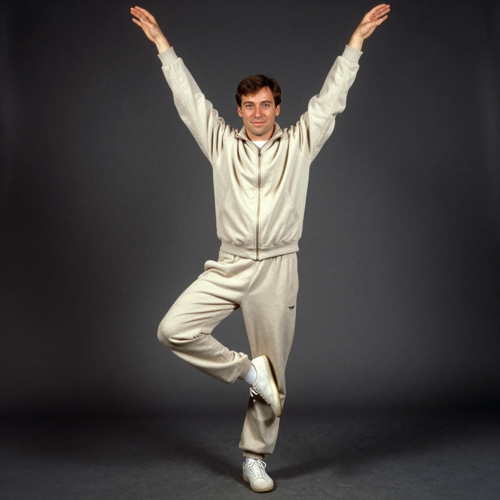
Reaction Replies
A clip answers a message better than a paragraph does. Drop a Plug Walk Filter video into a group chat when someone says something that deserves more than an emoji.
Birthday and Party Posts
Turn the birthday person's photo into the move and post it at midnight. It lands harder than a photo dump, because the Plug Walk dance is doing something a static picture cannot.
Throwback Photo Revivals
Family albums and school pictures are the strongest source material. A clip built from a photo nobody has looked at in years gets forwarded for the sheer wrongness of it.
Creator and Fan Edits
Trend windows are short. A move that renders in minutes lets a creator post the same day the sound starts climbing, and lets fan editors run a character through the Plug Walk dance without keyframing anything by hand.
Who Makes a Plug Walk Filter Video
Anyone with one photo and a bit of timing can make one. These four groups get the most out of the effect.
Trend Chasers
You saw the Plug Walk dance on the timeline and want your version up before the sound cools. Speed is the whole requirement, and one photo is the only thing you need to supply.
Group Chat Posters
The point is the reply, not the production. The clip is short enough to send in a chat and silly enough to get forwarded into three others.
Short-Form Creators
Feeds reward a recognisable silhouette and a fast hook. A still photo that suddenly breaks into the Plug Walk dance is a pattern interrupt you can make in one sitting.
Character and Fan Editors
Illustrations, mascots and stylised models work too. The fixed move means a fan editor can put a character through the Plug Walk bounce without building the choreography from scratch.
Features Built for a Plug Walk Filter Video
Three things decide whether the clip lands: whether the move reads as the Plug Walk, whether the person still looks like themselves, and whether the file is ready to post. All three are locked in before the render finishes.
The Plug Walk Move Comes Back Intact
The bounce sits on a short cycle: knees rotate out and back in, one leg lifts with the shin parallel to the floor and the sole turned outward, the heel bounces on every plant, and the arms finish straight overhead in line with the shoulders. That sequence is fixed inside the effect rather than left to a prompt, so the silhouette reads as the Plug Walk dance from the first frame.
Your Face Survives the Movement
Your picture is treated as a face reference across the whole clip rather than one frame to copy. Eyes, jawline, hairline and skin tone stay anchored through the knee turns and the arm raise, so the Plug Walk Filter result looks like the person in the photo and not a stranger wearing their haircut.
Ready to Post the Moment It Lands
Pick the vertical 9:16 shape, generate, and download a clip already framed for TikTok, Reels and Shorts. There is no crop pass and no editing detour between the render finishing and the post going up, which is what matters while the sound is still climbing.
Plug Walk Filter Videos You Can Make
The same move, three different subjects. Pick the version that fits the joke you are making.
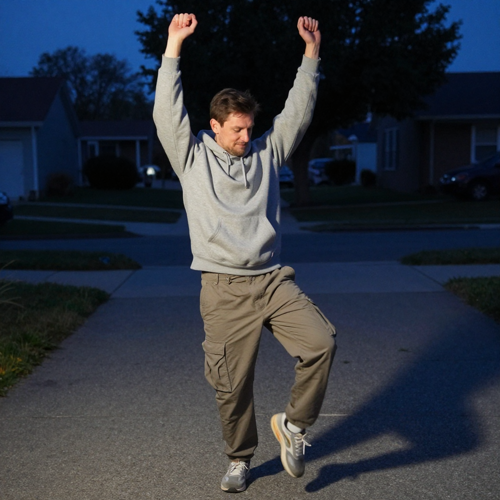
The Driveway Bounce
A streetwear shot taken at blue hour on the driveway, hoodie up, one leg lifted into the L and both arms overhead. This is the version most people post first, because the dark background makes the silhouette of the move read instantly.
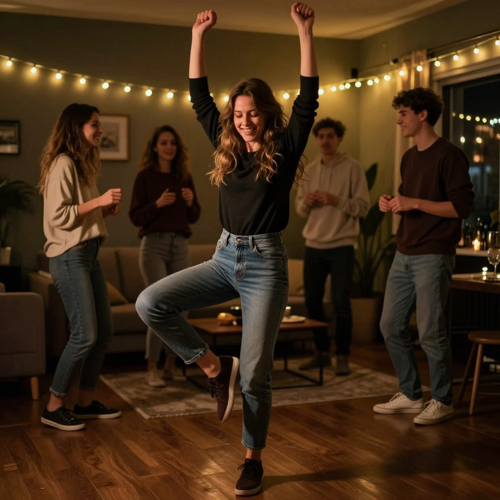
The Birthday Living Room Cut
String lights, a crowded room and a subject who did not agree to dance. The contrast between a straight-faced photo and the Plug Walk bounce is the joke, and it lands harder the more ordinary the original picture looks.
The Throwback Photo Revival
A scanned 1990s snapshot with faded colour and visible grain, set moving. Old photos are the most shared version of the Plug Walk Filter because the format looks impossible for a picture that old.
What Creators Say About Their Plug Walk Filter Videos
Devon C.Group chat adminI tried to learn the Plug Walk for a week and kept losing the leg lift on the beat. With this I upload a photo of my brother, pick vertical and the bounce is already there. The part that sold me is that his face still looks like him halfway through the knee turn.
Hannah L.Reels creator, BristolBefore this, my dance posts needed an afternoon: find a spot, set the phone, shoot six takes. Now it is one photo from my camera roll and the clip is done before the sound peaks. I post the same day instead of the week after.
Marek R.Fan editor and 3D artistI animate stylised characters for fun, and hands are always where a dance render falls apart. Keeping the clip short and feeding it a clean front-on model fixed it. I ran four variations in the time one hand-keyed loop used to take.
Two Plug Walk Filter Videos, Two Sides of the Feed
The Group Chat Reply
The Throwback Post
Why Use This Plug Walk Filter
Plenty of tools can animate a photo. What decides whether a Plug Walk Filter video works is whether the move still reads as the Plug Walk, whether the face still reads as the person, and whether the file is ready to post. Those are the parts handled here.
One Photo Is the Whole Input
There is no reference clip to hunt down and no motion slider to guess at. Drop in a single front-facing picture and the Plug Walk Filter supplies the choreography.
The Move Is Already Choreographed
Knees turning in and out, one leg lifted into an L, the heel bounce and the arms finishing overhead are built into the effect. You do not have to describe them in a prompt and hope.
The Face Stays Theirs
Likeness carries the joke. Frames are pulled back toward the eyes, jawline and hairline in your photo, so the Plug Walk dance lands on the person you uploaded instead of a generic dancer.
Timed to Loop, Not to Random Motion
A generic 'make them dance' request comes back as flailing. This effect runs on a fixed cycle that repeats cleanly, which is what makes a short clip worth rewatching.
Made for Vertical Reposts
Export the 9:16 shape TikTok, Reels and Shorts expect, at a length that suits a loop, so the video drops into a feed without a reframe.
Nothing to Install
The whole Plug Walk Filter runs in a browser tab. Upload, generate and download from a phone or a laptop, with no plugin and no export queue.
Plug Walk Filter FAQ
Answers to the questions people ask before they upload a photo: what the Plug Walk Filter is, what kind of picture works, why some renders warp, and how the effect differs from a generic AI dance generator.
What is a Plug Walk Filter?
A Plug Walk Filter is a video effect that puts the Plug Walk dance onto a still photo. The Plug Walk is the hip-hop bounce built around Rich the Kid's 2018 track: feet shoulder-width apart, knees rotating in and out, one leg lifted with the shin parallel to the ground and the sole turned outward, a heel bounce on every plant, and both arms finishing straight overhead in line with the shoulders. The effect supplies that choreography, so one photo is enough to produce a recognisable Plug Walk dance video.
How do I make a Plug Walk Filter video from one photo?
Upload one clear photo, choose the vertical 9:16 shape, and start the render. The Plug Walk Filter handles the knee rotation, the lifted leg, the heel bounce and the arm raise, so there is no motion prompt to write. Download the clip and pair it with the sound the dance belongs to.
What kind of photo works best for the Plug Walk Filter?
A single-person shot with the whole body visible, taken front-on in even light, with arms slightly away from the sides. A plain background helps the effect separate the subject. Skip group photos, side profiles, heavy motion blur and tight head crops, because there are no limbs left for the dance to move.
Do I need to know the Plug Walk dance to use the effect?
No. Learning the move is the part most people get stuck on, since the knee rotation, the L-shaped leg lift and the arm placement all have to line up with the beat. The Plug Walk Filter ships that sequence already built, so the dance works whether or not you can do it in real life.
Why do knees, hands or feet sometimes look wrong in a Plug Walk Filter render?
Extremities are the hardest part of any motion transfer, and the move asks a lot of them. A cropped, dim or blurry photo gives the model less to track, so it guesses and the joints drift. Re-upload a sharper full-body shot, or keep the clip short, before assuming the effect is at fault.
Can I use a group photo for a Plug Walk Filter video?
Not for a clean result. The effect needs to know which subject to animate, and a group photo leaves that ambiguous. Crop down to one person, or run each subject through the effect separately and cut the clips together.
Can I put a friend, a character or a mascot into a Plug Walk Filter video?
Characters, mascots and illustrated subjects work well, because a fixed move transfers cleanly onto a stylised body. For a friend or anyone else, use a photo you have permission to use. The safe rule is your own picture, or one from somebody who said yes.
Is there a free way to try the Plug Walk Filter?
Most AI video tools in this category offer free credits or a limited trial so you can test an effect before paying, and higher tiers add resolution, length and commercial use. Check the generate button on the effect page for the exact credit cost of your run.
What length and aspect ratio should I export for a Plug Walk Filter video?
Vertical 9:16, which is the shape TikTok, Reels and Shorts are built around, and short enough to loop. Short clips hold up better than long ones because there are fewer frames for the joints to drift, and a loop invites a second watch.
Is the Plug Walk Filter the same as a generic AI dance generator?
Not quite. A generic AI dance generator usually asks you to describe the movement or supply a reference clip, and the result depends on how well that prompt lands. The Plug Walk Filter is preset to one specific routine, from the knee rotation to the lifted leg, the heel bounce and the arms overhead, so the output stays consistent instead of approximated.
More AI Video Effects for a Plug Walk Filter Video
Make Your Plug Walk Video in Minutes
One photo in, one vertical clip out. Upload the picture, start the render and post it while the sound is still hot, all on Textideo. Nothing to install, no timeline to fight with.
Create Your Plug Walk VideoNo choreography to learn. No editing timeline. One photo is the whole input. · Label your post as AI-generated