
AI Tropical Vacation Photo Generator: A Beach Memory Without the Flight
An AI Tropical Vacation Photo Generator turns one everyday portrait into a sunlit shoreline scene without a plane ticket. You pick the water, the hour, and the mood, and the scene rebuilds itself around the person already in your photo. The result reads like a candid travel snapshot you can actually post, available on Textideo.
Rated on whether the face holds steady, and whether the light across the sand and water agrees with the light on the skin. No credit card required - no sign-up - your original portrait stays yours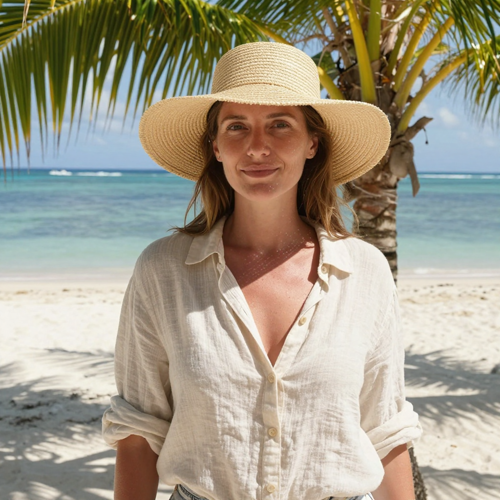
Why an AI Tropical Vacation Photo Generator Beats Waiting on the Next Trip
A real beach trip costs airfare, time off, and a photographer who happens to be free. An AI Tropical Vacation Photo Generator starts with one ordinary portrait and builds the shoreline around it, so the memory exists before any booking does.
Create Your Vacation PhotoThe Hard Part With an AI Tropical Vacation Photo Generator
A beach scene is easy to invent and surprisingly hard to make believable.
Three Steps With an AI Tropical Vacation Photo Generator
The whole path is short enough to finish in one sitting.
Upload One Clear Portrait to the AI Tropical Vacation Photo Generator
Start with a photo where the face is sharp, evenly lit, and not hidden by a hand, a hat brim, or heavy shadow. Avoid a heavy filter on the original, because it hides the skin detail the edit has to hold onto.
Name the Shore, the Hour, and the Look
This is where the copy-paste prompt earns its place. Two or three anchors are enough; a list of ten usually argues with itself.
Generate, Compare, and Download
Produce a first image, then change exactly one variable and generate a second. Put the two side by side and check the face first, the light direction second, and the horizon last. The AI Tropical Vacation Photo Generator keeps the identity stable across the repeats. Reusing one instruction is also what stops a set of four images from drifting into four different faces.
What an AI Tropical Vacation Photo Generator Gives You
Three capabilities do most of the work behind a convincing shoreline portrait.
Three Vacation Looks Worth Trying First
An AI Tropical Vacation Photo Generator can place the same portrait in very different kinds of paradise.
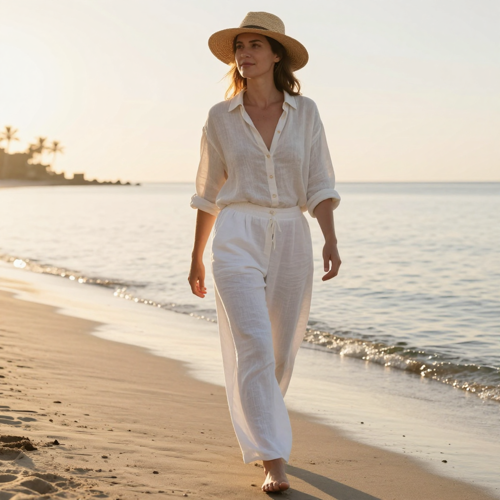
Golden Hour Shoreline Walk
Low afternoon sun puts a warm rim on the subject and stretches a long shadow across wet sand. Ask for the sun behind the subject so the hair catches a thin rim of light.
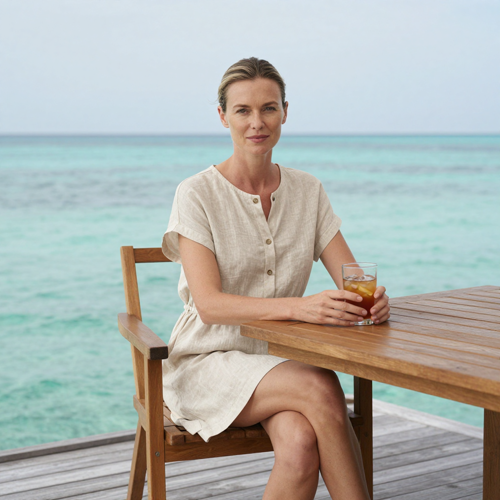
Overwater Resort Stillness
Turquoise shallows, a wooden deck, and a horizon with almost no waves give this version its quiet luxury feel. Keep the deck lines horizontal, or the whole frame quietly tilts.
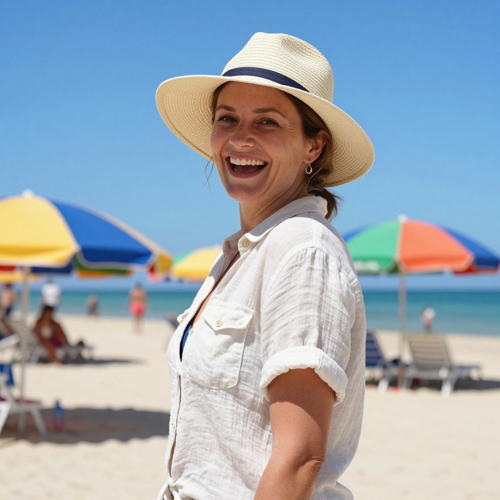
Bright Midday Island Candid
Hard overhead sun, vivid blue sky, and a laughing half-turn make this direction feel like a phone snapshot grabbed between swims. A slightly crooked horizon reads as more candid than a perfectly levelled one.
What You Can Feed an AI Tropical Vacation Photo Generator
Different starting images lead to different kinds of vacation photo, and knowing which one you have saves a second round of edits.
Who Struggles to Get a Tropical Vacation Photo Without Travelling
The people searching for this tool are rarely trying to deceive anyone.
Creators Planning a Summer Feed
A content calendar often needs beach visuals months before the weather cooperates. An AI Tropical Vacation Photo Generator lets a creator build and schedule that warm-weather library in one afternoon, then compare which light and colour direction fits the rest of the grid before committing to a real shoot.
People Who Cannot or Prefer Not to Fly
Cost, mobility, caring duties, or a simple dislike of airports keep plenty of people inland. The keepsake is about the light, not about claiming a passport stamp.
Couples Previewing a Honeymoon Look
Before booking a resort, two people often want to see how a destination will actually photograph them.
Small Shops and Marketers on a Budget
A seasonal campaign needs summer imagery long before a production day is affordable.
AI Tropical Vacation Photo Generator at a Glance
- Canva
- Lightroom
- Google Photos
Why Choose Textideo for an AI Tropical Vacation Photo Generator
Plenty of tools can paste a palm tree behind a face.
An AI Tropical Vacation Photo Generator That Keeps the Same Face
Identity drift is the fastest way to spot a synthetic image. Check the eyes first, then the hairline, then the jaw.
One Consistent Light Direction Across the Frame
Warm sun should hit the face, the sand, and the water from the same angle.
Repeatable Directions, Not One-Off Surprises
Naming a look once and reusing it matters when a feed needs a matched set. A matched set reads as one trip rather than four unrelated experiments.
Copy-Paste Prompts You Can Actually Reuse
A good prompt describes the subject, two or three physical anchors, the hour, and a realism cue.
An AI Tropical Vacation Photo Generator in One Browser Tab
There is no layer mask, no colour grading panel, and no export preset to learn.
Boundaries You Can Explain to Anyone
A generated holiday photo should be shared as a creative image, not as proof of a trip you did not take. Saying so in the caption costs nothing and keeps the frame honest.
What People Notice Once the Light Lines Up
“I kept putting off a summer feed because every stock beach image looked like someone else's holiday. Once I could put my own face into a shoreline scene and repeat the same light across three posts, the grid finally looked planned instead of borrowed.”
“We wanted to see how a resort would photograph us before paying the deposit. Two people, one shared beach frame, and a warm evening palette settled the question faster than a dozen browser tabs of hotel galleries.”
“Clients kept asking which tropical destination we had shot in, and the honest answer was nowhere. Now I show an AI Tropical Vacation Photo Generator frame as a mood board first, then book the real location with the light and colours already agreed.”
Questions People Ask About an AI Tropical Vacation Photo Generator
These are the questions that come up before someone uploads a first photo.
What is an AI tropical vacation photo generator?
It is a browser tool that takes one portrait or a written description and composes a warm-weather travel scene around it. It behaves more like a photo editor than a blank canvas, because the person in frame is the fixed point everything else is built around.
Do I need a full-body photo to get a beach scene?
No. A tight crop simply narrows how much shoreline can be composed around the shoulders, which is fine when a portrait is the goal.
Will the generated person still look like me?
Keeping the face, hair, and skin tone is the central check. Comparing the eyes first, then the hairline, catches drift before you spend time refining a scene you will discard.
What should an AI tropical vacation photo generator prompt include?
Name the subject, two or three concrete anchors, the hour, a simple outfit, and one realism cue. Concrete anchors such as wet sand or a leaning palm give the model something physical to place instead of a mood word.
How is an AI tropical vacation photo generator different from a general AI image maker?
A general image maker creates a new scene from scratch and often invents a stranger. An AI Tropical Vacation Photo Generator is built around keeping one specific person and transforming the setting, so the identity lock and the light direction matter more than pure imagination. That identity constraint is why one AI Tropical Vacation Photo Generator instruction can be reused across a whole matched set.
Can two people appear in the same vacation photo?
Yes, a couple or small group shot can be carried into one shared shoreline. Asking for a third person who was never in the upload is usually where a group scene stops making sense.
Can I change the destination without starting over?
Yes. Keep the identity line and the lighting line untouched so only the scenery moves between versions.
Is it honest to post a generated vacation photo?
Treat it as a creative image and label it as such when the context could mislead. A short caption naming the image as generated removes the ambiguity before anyone has to ask.
What are the privacy basics before I upload a portrait?
Use your own photo or one you have permission to edit, check where the source image is stored, and avoid uploading a picture of someone who has not agreed. A portrait of a friend or a child needs a clear yes before it becomes any kind of edit.
Why does my first result sometimes look like a collage?
The usual cause is conflicting light. Once the hour is fixed, the sand, the water, and the skin finally agree on a single sun.
Build One Shoreline Portrait, Then Check the Light
The face holds, the hour is set, and the original photo is still yours. Create an AI Tropical Vacation Photo Generator image on Textideo, compare one changed variable at a time, and share the result as the creative holiday portrait it is.
No credit card required - no sign-up - your original portrait stays yours