
Flag Maker That Stays Readable When Shrunk
A flag maker built for vexillology turns a short brief into flat artwork with clean divisions and one clear symbol. Name the background, the stripes, and the main charge instead of drawing every star by hand. Describe your idea on Textideo, generate a candidate, and download a flag that holds its proportions.
Rated on whether the symbols stay readable at thumbnail size, and whether the colors still separate when the flag is shrunk. No credit card required - no sign-up - your original brief stays editable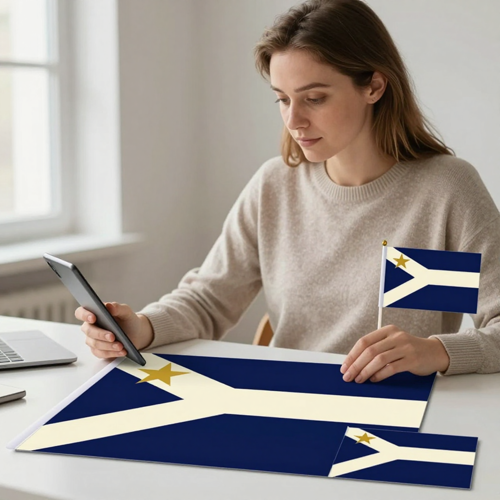
Describe a Flag, Keep the Rules Built In
A flag maker is not a graphics app with a flag template. The useful ones are built for vexillology: standard proportions, a heraldic symbol library, and palettes that keep a dark charge off a dark field. On Textideo the same rules apply — name the background, the divisions, and one symbol, and they are already in play.
Try Flag MakerThe Hard Part With Flag Maker Projects
One professional standard, three common ways to miss it.
Three Steps Take an Idea to a Finished Flag
One brief, one flat design, one review before download. Everything below can be copied straight into the prompt box.
Write the Brief or Attach a Reference
Words alone are enough: state the background, the divisions, and the single main charge. A sketch or emblem is optional — crop it tight and say what role it plays.
Set a Flag Maker Ratio and Copy a Prompt
Pick a horizontal canvas for a rectangular flag, or a square one; 2:3 is the safe default, with 1:2 and 3:5 also common. Copy this prompt verbatim: Design a flag for a fictional coastal republic: deep navy background, a wide cream diagonal band running from lower left to upper right, and one gold eight-pointed star in the upper-left canton. Full rectangular flag, solid flat colors, no flagpole, no fabric folds, no surrounding scene.
Generate, Review, and Export
Generate, then verify: count repeated symbols, walk the stripe order, inspect edges. Revise the prompt, or reuse the image as a reference for one focused change. Confirm the exported canvas size before the file enters your layout.
What a Good Flag Maker Gives You
Three capabilities decide whether a design holds up outside the editor.
Flag Maker Examples You Can Read at a Glance
Three directions built from plain-language briefs. In each, the colors and one symbol carry the expression, not fine detail.
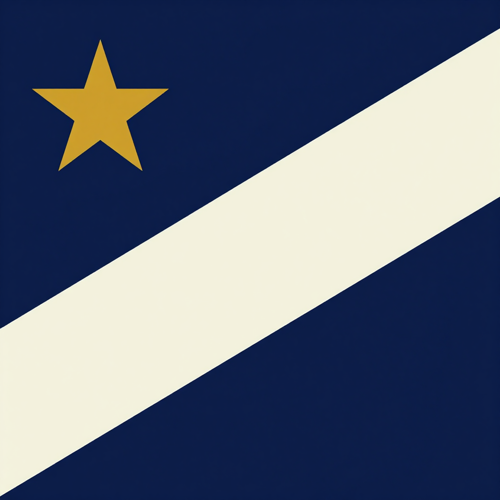
Fictional Republic With a Diagonal Band
A navy field, a wide cream diagonal band, and one gold star in the canton. Related nations share the motif but differ in color, hinting at shared history.
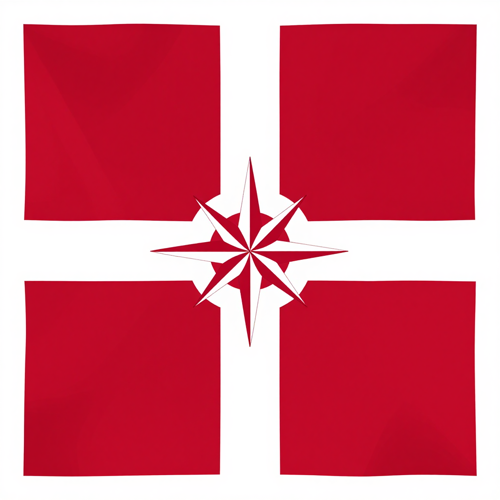
Game Faction Banner With a Nordic Cross
A crimson field, an off-center white cross, and one compass rose at the intersection. High contrast and a bold charge keep it legible on a recruitment card.
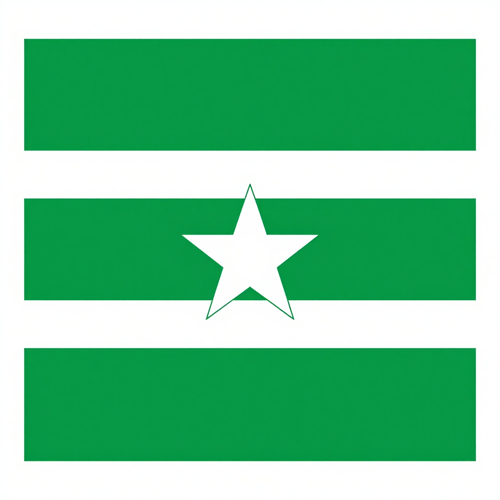
Classroom Flag of an Imagined Island
Three horizontal bands in green, white, and green with one white star centered. Simple enough to redraw, and easy to explain in a short color-and-symbol key.
Input Types a Flag Maker Reads in the Brief
Four inputs cover the requests that show up most often.
Who Struggles Most With Flag Design
Four groups keep arriving at the same blank rectangle. Each needs a flag that reads at a glance.
Worldbuilders and Novelists
Flags for fictional countries and setting guides. Related houses share a motif but differ in color, giving readers a cue to political ties. Add the image to profiles and maps.
Game Masters and D&D Groups
Faction banners for guild recruitment cards, roleplay servers, and tabletop handouts. A mercenary company, a trading alliance, and an adventuring party each need a distinct emblem.
Teachers and Geography Students
A flag of an imagined island or a fictional settlement. Put it on a slide with a short key explaining each color and symbol, then let classmates compare the choices.
Teams, Clubs, and Event Organizers
A flag concept for a sports team, hiking club, volunteer group, or neighborhood festival. Start with colors members already know, share a few designs, then use the chosen one in announcements.
Flag Maker at a Glance
- Discord
- Roll20
- Inkscape
- Behance
Why a Dedicated Flag Maker Beats a General Canvas
Three alternatives compete here: a general design suite, a template editor, and a print shop selling finished cloth.
A Flag Maker Built Around Vexillology, Not Logos
General design software treats a flag as another poster: you draw every star and align every stripe by hand. A dedicated flag maker treats the field, divisions, and canton as first-class objects, so geometry follows flag conventions.
Contrast Rules Survive the Thumbnail Test
The rule of tincture does the quiet work: never set dark against dark, and let white or yellow separate them. Two or three contrasting colors and one simple symbol stay legible at chat-avatar or 16-pixel map-marker size.
Star, Stripe, and Cross Generators Replace Hand-Drawing
Rather than tracing shapes, you pick from stripes, bars, Nordic crosses, saltires, cantons, star fields, crescents, suns, and heraldic charges, then adjust count and color. Template libraries of national and historical flags offer a starting point.
One-Element Revisions Keep the Rest Intact
Keep the design you like as the reference and change one thing: narrow a band, drop a star, or swap a crest for a silhouette. Name the parts to retain, generate the variant, and compare.
A Flag Maker vs a Template Editor vs a Print Shop
A general suite gives control but no flag defaults; a template editor gives speed but shallow edits; a print shop gives cloth at a fixed fee. The flag maker path keeps the file editable up to export.
Original Work, Clear Rights Boundaries
Use your own original designs. Skip logos or emblems protected by copyright or trademark, and treat real national flags with care — many places have flag codes. Verify local rules before you publish.
What Creators Say About Flag Maker
“My novel needed flags for three rival houses that still looked like they belonged to one world. I wrote one brief with a shared diagonal motif and swapped only the colors, and a flag maker on Textideo gave me three versions I could compare side by side instead of redrawing each from scratch.”
“Our table wanted a banner for every faction, but none of us can draw. Describing the crimson field, the white cross, and one compass rose was enough, and the flat output dropped straight into the campaign handout without any surrounding scene to cut out.”
“For a geography project I had to explain why each color and symbol was on the flag. Keeping it to three bands and one star made the key easy to write, and the design still read clearly when I shrank it onto the class slide.”
Flag Maker Questions, Answered
Real questions people ask before committing to a design, answered directly. Several answers include copy-paste prompts.
What is a flag maker, and how does it compare with a general design app?
A flag maker is a vexillology tool. Unlike a general graphics app, it starts from flag proportions, a heraldic library, and contrast-calibrated palettes. Describe the field, divisions, and one charge. A flag maker on Textideo works this way.
Do I need a reference image, or is a text description enough?
A written flag description is required; a reference image is optional. Attach a sketch, emblem, or silhouette only if it clarifies the layout.
Which proportions should I choose for my flag?
2:3 is the most common national-flag ratio and a safe default; 1:2 is common in Commonwealth traditions; 3:5 appears on many 3-by-5 flags. Pick the ratio first — stretching later distorts the canton, and the canvas keeps you honest.
Can you give me a copy-paste prompt for a fictional country flag?
Copy this one verbatim: Design a flag with three equal horizontal bands, forest green, white, and forest green, one white five-pointed star centered on the middle band. Two or three contrasting colors, one simple main symbol, legible at thumbnail size. Render a flat rectangle: flat fills, no pole, no folds, no scenery.
What prompt should I use to change just one part of a flag I already like?
Copy this one: Take this flag as the reference and make the cream diagonal band narrower. Keep the navy background and the gold star exactly where they are. Ask for a flat, straight-on rectangle with plain fills — nothing else added. Review it before another change.
Is there a copy-paste prompt for a game faction or guild banner?
Copy this one: Design a guild banner for a trading alliance — crimson background, an off-center white Nordic cross, a black compass rose at the intersection. Two or three contrasting colors, one clear main symbol. Keep the output a full rectangle of flat fills: skip the pole, the wrinkles, the scenery.
Why does my design turn into mush when I shrink it?
Fine detail is the culprit. Detailed seals, lettering, and thin outlines dissolve at thumbnail size or on moving cloth. Follow the rule of tincture, keep two or three contrasting colors, and choose one bold symbol. Squint and simplify whatever disappears.
What should I check before sending a flag to a printer?
Check pixel dimensions first and keep the original proportions when resizing. PNG suits screens; SVG or a print-ready PDF keeps edges clean. Match the provider's size and bleed requirements — the export is only as good as that review.
How does a flag maker compare with a template editor or a custom print shop?
A template editor is fast but shallow: you swap preset colors and stop. A print shop sells finished cloth per order. A flag maker keeps the geometry editable — country, faction, or pennant all start from the same brief.
Can I use a real country's flag, a brand logo, or a club crest in my design?
Use your own original work. Avoid copying protected logos or emblems, and never reuse extremist symbols. Real national flags carry flag codes, and some insignia cannot appear on commercial goods.
Design a Flag That Still Reads Small
The colors work, the divisions work, and the one symbol carries the meaning; only the fine detail gets in the way. Write a flag maker brief on Textideo, generate a flat design, compare the versions, and keep the flag that still reads when it is the size of a postage stamp.
No credit card required - no sign-up - your original brief stays editable