
Outstanding Tiny Desk AI: A Desk-Side Set From One Photo
Outstanding Tiny Desk AI builds a cramped, lamp-lit desk session around a single portrait, with a band packed in behind you. You name the room and the lineup; the render handles faces, hands, and the clutter that makes a live room feel lived in. No crew, no booking, no shoot day.
Rated 4.8/5 by 2,300+ creators and small label teams building desk-session clips No credit card required - one free clip - silent export included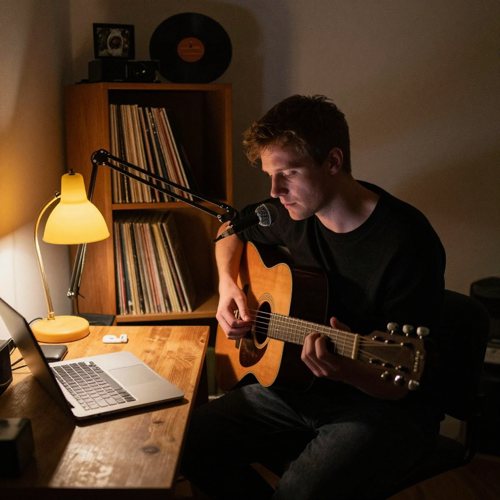
Outstanding Tiny Desk AI Turns One Portrait Into A Whole Session
Outstanding Tiny Desk AI builds the worn desk, the shelf of records, and the four-piece band that used to need a booking and a free afternoon. Feed it one clear portrait and get back a vertical clip with a close-up, a horn break, and a last chord the band leans into. Post it before the idea cools.
Create Your Desk-Side ClipThe Hard Part With Outstanding Tiny Desk AI
The desk-session look is easy to recognise and much harder to fake.
Make Outstanding Tiny Desk AI Clips In Three Moves
One portrait, one room description, one render. The rest is choosing which beat to keep.
Bring A Portrait And Describe The Room
Use a sharp, evenly lit, front-facing photo, then name the desk, the shelf, and the lamps in plain words.
Let Outstanding Tiny Desk AI Cut The Session
The effect stages the band, holds your face across each beat, and returns a vertical clip with a close-up already in place.
Swap One Beat Or Take It Whole
Re-render only the shot that missed, attach your own audio to the silent export, and post before release week ends.
What Outstanding Tiny Desk AI Gives You Backstage
Three controls decide whether a desk session reads as a real room: the set you describe, the coverage you steer, and the detail that sells the take.
Three Ways Outstanding Tiny Desk AI Changes The Room
Three uses of the same effect: a quiet song given a room, one moment that carries the whole cut, and a set you can return to.
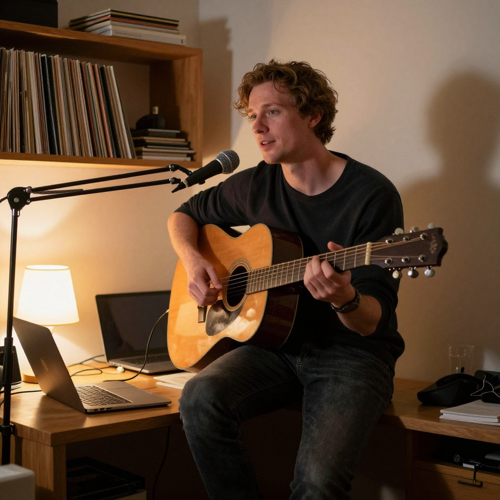
A Quiet Single, Played At A Desk
No drum kit, no drop, so the clip leans on the room: one lamp, a laptop pushed aside, a guitarist seated at the desk edge. The frame holds long enough for a lyric to land, then cuts tight on the last line.
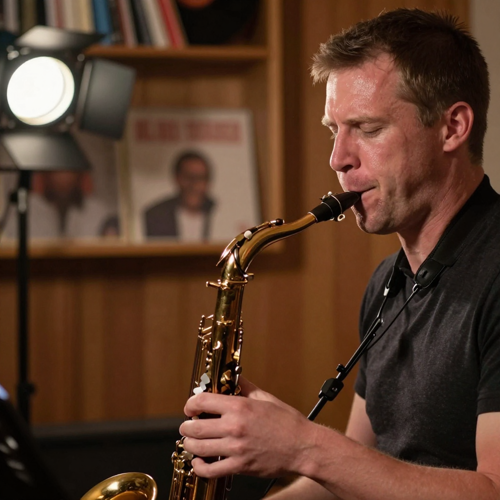
The Break That Carries The Cut
Every desk session has four seconds viewers replay, and here it is the horn player leaning into the mic. Outstanding Tiny Desk AI schedules that break early enough to give the clip a spine, then returns to the wide shot for the final chord.
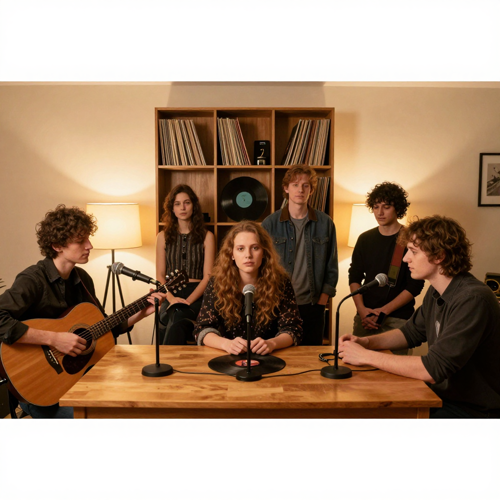
Same Room, Six Weeks Later
The second release reuses the first clip's room, band, and lamp color, so the two videos read as episodes rather than separate campaigns. Keep the room description, change the shirt, and the audience knows the set before the first bar.
Which Room Should Outstanding Tiny Desk AI Build
The room decides more than the band does. Four setups cover most requests, from a warm lamp-lit corner to a crowded five-piece session.
Who Struggles With Outstanding Tiny Desk AI, And Who It Fits
Four groups get the most from the effect because each is missing the same thing: a room, a band, and a camera.
Independent Artists Between Releases
You have a finished song and no budget for a shoot. The effect gives the single a visual that looks deliberate rather than improvised, and cuts to the exact length a pitch email needs.
Songwriters Who Never Book A Stage
Some writers perform only in a bedroom and hold no footage of themselves playing at all. Outstanding Tiny Desk AI produces the thing they lack: a believable performance frame without a venue or an operator.
Small Labels Managing Outstanding Tiny Desk AI Runs
A roster of six artists cannot each get a shoot day. A manager can produce matching session clips across the roster, hold one room for a campaign, and hand artists usable material for press kits.
Creators Chasing The Session Look
Not everyone here has a song out. Some want the desk-side performance look applied to a joke, a cover, or a character they have been building. The format survives being used for fun.
Outstanding Tiny Desk AI At A Glance
- TikTok
- YouTube Shorts
- Instagram Reels
- Spotify Canvas
- Apple Music
Where Outstanding Tiny Desk AI Beats A Generic Video Tool
Six differences that decide whether a clip feels like a room or a template.
Outstanding Tiny Desk AI Skips The Shoot Day
No venue, no crew call, no four-hour load-in for a ninety-second clip.
One Portrait Is The Entire Input
A sharp front-facing photo is enough; no multi-angle reference set required.
The Same Face Through Every Cut
Each beat re-anchors to your portrait, so close-up and wide shot agree.
Vertical First, Wide Without A Rebuild
Phone cut and wider frame come from one take instead of two projects.
Outstanding Tiny Desk AI Rewards Series Work
Save a room recipe and the tenth clip still looks like the same show.
Audio Rights Stay With You
Silent export by default, so you attach a take you already control.
What Creators Say About Outstanding Tiny Desk AI
“I had a finished song and no footage of myself playing it, so every pitch email went out with a lyric card instead. The first Outstanding Tiny Desk AI render gave me a desk, a band, and a close-up that actually looked like me.”
“Our old workflow was one sweeping cinematic shot per artist, and every clip on the roster looked like the same video with a different face. Now each artist gets a room and a shot list, and the campaigns finally read as separate projects.”
“I write at a desk and had never performed on camera, so I assumed a performance visual was out of reach. Outstanding Tiny Desk AI gave me the one thing I was missing: a believable frame with a body in it, not just a waveform.”
Questions About Outstanding Tiny Desk AI, Answered Plainly
Direct answers on faces, rooms, band lineups, audio rights, and series planning before you render a single clip.
What exactly is Outstanding Tiny Desk AI?
It is a photo-to-performance effect: one clear portrait goes in, and a short vertical clip of that person fronting a band at a desk comes out. Outstanding Tiny Desk AI generates the desk, the shelves, the lamps, and the players to match the room you describe. It is a look-alike format for promo and social video, not a recording of a real session.
How does it work from a single photo?
Your portrait is treated as an identity anchor, and the clip is rendered as five staged beats rather than one static pose: opening wide, band settling in, tight close-up, instrument break, final group hit. Each beat is its own generation, so the face is re-anchored at every cut instead of drifting.
Will my face stay the same in every shot?
A face anchor is applied per shot, and the close-up is scheduled early so likeness is confirmed before the widest frames arrive. Very small faces in a wide shot are the weakest point of any video model, so the format leans on medium and tight coverage. If one beat looks off, you re-render that beat alone.
Can I change the band lineup and the room?
Yes. Call a two-piece acoustic setup, a keys-and-vocals corner, or a full five-piece with horns, and describe the room as a book-cluttered office, a lamp-lit back room, or a bare studio. Lamp color and clutter level set the mood more than furniture names do.
What length and shape do I get?
A short vertical clip built for phones, in the range short-form feeds reward, plus a wider frame from the same take. A silent download is always available, which matters when a platform mutes audio or when you plan to lay your own mix underneath.
Is it connected to any broadcast show or label?
No. Outstanding Tiny Desk AI is not affiliated with, endorsed by, or licensed by any broadcaster, program, label, or artist, and it reproduces no real performance or recording. Desk-side camera work is a long-standing convention in music film; this effect works inside that convention as a descriptive style, not a branded show.
Whose audio do I put underneath the clip?
The clip ships silent, and any audio you add stays your responsibility. Rights to a commercial recording are not granted by the effect, so the safe path is your own take, a licensed instrumental, or a cleared session. That is why the silent export exists.
Can I build a series instead of one clip?
That is the strongest use. Keep the same band, desk, and lamp, then change the song or the season, and the clips read as episodes rather than one-offs. Because the room is generated from your description, a saved room recipe holds the set across a whole run.
How is this different from a music video generator?
Most music video tools aim at one sweeping cinematic shot and leave the rhythm to chance. This one fixes a believable room, follows a shot list with real cuts, and spends detail on a foot tapping or a mug nudged aside. The restraint is the effect.
Can I try it before paying?
Yes, a first clip can be rendered before committing to a paid run, which is the right way to test whether your portrait survives the close-up. Bring a sharp, evenly lit, front-facing photo and a room description that names the light.
Start With Outstanding Tiny Desk AI Tonight
Bring one clear portrait and describe one room. Outstanding Tiny Desk AI handles the band, the cuts, and the lamp light, and you keep the silent cut for whatever audio you already own.
No credit card required - one free clip - silent export included