
Halloween Dance Video Generator: Your Costume Does The Dancing
A Halloween dance video used to mean learning eight counts in a cold garage and hoping the phone caught it. Here one costume photo and a named routine are enough, and the clip lands on the beat instead of chasing it. Render vertical, post before the 31st, and let people ask which studio you booked.
Rated by seasonal creators and party hosts - one photo in, a dancing costume out No credit card required - silent export - your audio rights stay yours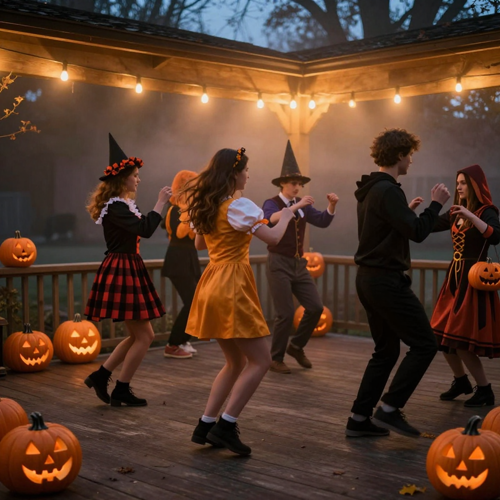
Halloween Dance Video Clips Only Get One Month A Year
October hands short-form creators a fixed deadline, and dance is the format that fills it. A Halloween dance video can run as a daily series, a party invitation, or the recap nobody sees coming. Bring one photo in costume, name the routine and the light, and post before the season closes. The effect sits alongside the rest of the seasonal video effects on Textideo.
Create Your Halloween Dance VideoThe Hard Part With Halloween Dance Video Is The Routine, Not The Costume
The outfit is the easy half. Getting it to move on the beat is where October plans stall.
Make A Halloween Dance Video In Three Moves
One photo, one routine, one render. Everything after that is choosing which take to keep.
Bring One Costume Photo
Full body or knees up, front-facing, both arms visible. Even light beats dramatic light at this stage.
Name The Halloween Dance Video Routine
Pick one style, one setting and one light. Charleston, hip-hop, line dance and robot each read clearly to the model.
Keep The Take Or Re-Roll One Beat
Run two or three versions, export vertical, then add captions and sound in your own editor.
What You Actually Control In A Halloween Dance Video
Three controls decide whether a routine reads as a performance or as a wobble: The pose you start on, the moves you name, and the light you set.
Three Halloween Dance Video Ideas That Travel
One routine, three jobs: A solo dancer, a whole friend group, and a setting you can come back to next week. Each one starts out of the same costume photo and ends as a vertical loop.
Skeleton Line Dance On A Foggy Porch
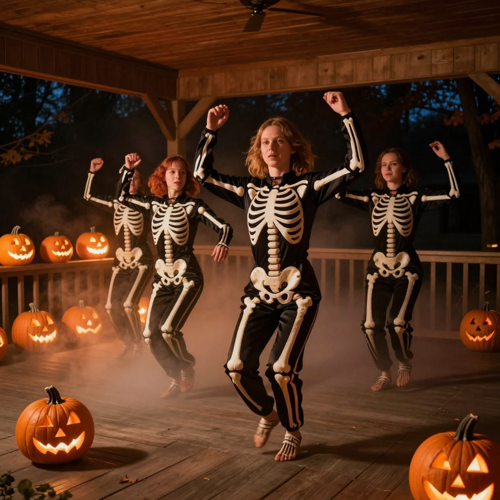
Five dancers, one beat, Jack-o'-lanterns burning along the rail. A Halloween dance video built like this works because the unison is the joke and the loop is tight enough to replay twice before anyone scrolls.
The Group Take Everyone Is In
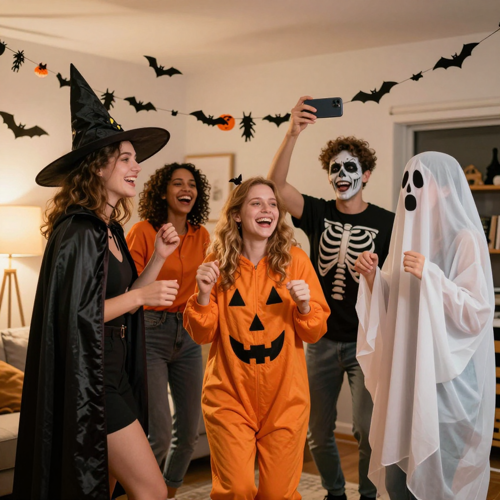
The costume-party photo nobody ever printed becomes the clip all of you appear in. Group Halloween dance video takes travel further than solo ones. It doubles as the invitation and the recap.
Same Routine, Three Different Nights
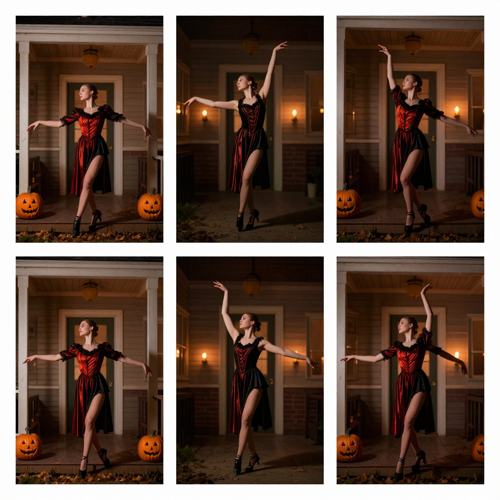
Hold the dance and the light, change the setting and the costume, and three clips read as a series rather than as three separate posts. This is the cheapest way to fill an October calendar out of one idea.
Which Halloween Dance Video Setting Fits Your Clip
The setting decides more than the routine does. Four setups cover most October requests, beginning at a foggy graveyard and ending in a warm indoor party.
Who Struggles With Halloween Dance Video Ideas Every October
Four groups get the most out of the routine because each is missing the same thing: Time, dancers, or a camera that holds still.
Short-Form Creators On A Daily October Schedule
Seasonal channels need one post a day and cannot rehearse for any of them. A saved Halloween dance video routine turns a single prompt template into a month of output.
Friend Groups Planning The Costume Party
The group photo already exists on someone's phone. One clip made out of it does the job of an invitation, a recap and the thing that keeps getting sent back into the chat for a week afterwards.
Pet Accounts Holding One Good Photo
No animal holds a pose on command, which is why filming was never going to happen. One sharp picture with the whole animal and its markings in view is the entire setup a Halloween dance video needs.
Small Venues And Campus Event Teams
Bars, gyms and student unions want a seasonal promo without booking dancers. A Halloween dance video clip gives the night a visual for the cost of one render, and it can be reused across posts all month.
Halloween Dance Video At A Glance
- TikTok
- YouTube Shorts
- Instagram Reels
- CapCut
- Snapchat
Where A Halloween Dance Video Beats A Costume Selfie
Six differences decide whether the clip gets shared or scrolled past.
Halloween Dance Video Without A Rehearsal
No eight counts to learn badly in a garage. The routine gets described or transferred, so the clip exists on the same evening the idea does.
One Photo Carries The Whole Clip
A sharp front-facing shot in costume is the entire setup. Face, hair and outfit stay anchored across every beat instead of being reinvented each second.
Halloween Dance Video Loops Instead Of Drifting
Short routines that end on the opening pose replay cleanly, and replays are what keep a ten-second clip alive in a feed.
The Camera Holds Still, The Dancer Moves
Static full-body framing keeps arms and legs readable. Fast spins and swinging cameras are where limbs usually break.
Post A Series, Not A One-Off
Skeleton on Monday, zombie on Wednesday, costume version on Friday. One saved routine produces a month of posts with no extra shoot.
Halloween Dance Video Exports Stay Silent
Nothing is baked into the file, so you attach a sound you already own rather than fighting a takedown later.
What Creators Say About Halloween Dance Video
“I spent the first week of every October learning a routine badly and then deleting the footage. The costume always looked fine; the movement never did. The first Halloween dance video I made took one photo and an evening.”
“Our venue needed a Halloween promo and had neither dancers nor a budget. The static poster we ran last year got a shrug, and a group Halloween dance video cut out of last year's party photo got passed around group chats we are not even part of.”
“My dog will not hold a pose for a camera, so filming was never going to work, and every October I posted the same photo of him in a pumpkin sweater. One sharp picture and he is up on his hind legs doing the shuffle, and it is the most-shared thing on that account.”
Questions About Halloween Dance Video, Answered Plainly
Direct answers on length, framing, group clips, costume drift, music rights and platform labels before you render anything.
What exactly is a Halloween dance video?
It is a short vertical clip in which a costumed character performs a named routine: A skeleton line dance, a zombie shuffle, a witch turning in a cape. Two routes produce it. You describe the dance and the scene, or you copy the movement out of a reference clip you already control. Both routes live inside the same effect on Textideo.
Do I need to know the dance to make a Halloween dance video?
No. Naming a style is enough: Charleston, hip-hop, line dance, robot. The routine is generated or transferred, so nobody has to rehearse it.
How long should a Halloween dance video be?
Ten to twenty seconds is the range short-form feeds reward. A tight loop that ends on the opening pose gets replayed, and replays are what carry reach.
Can I put myself in a Halloween dance video instead of a skeleton?
Yes, and it is the most common request. Upload a full-body photo of yourself in costume, then name the routine or supply a reference clip. Face, hair and outfit all come out of your photo, so friends recognise you before they work out how it was made.
Will my costume stay the same through the whole clip?
Mostly, and the failures are predictable. Give a costume change two or three seconds and then hold it fixed; stretch the change across the whole clip and the outfit drifts. Make sure the full costume is visible in the still, because the motion can only copy what the photo shows.
Why do arms and legs look strange in my Halloween dance video?
Fast complex moves and a moving camera are the usual causes. Use a static full-body shot, name a simpler dance, and pick a reference with all four limbs visible and unobstructed. Spins and crossed arms are the two things every video model handles worst.
Can a group of friends appear in one Halloween dance video?
Yes. A group shot in costume produces a unison clip, and unison is what makes it shareable. Crop the photo so each person is fully in frame, keep the beat simple, and the group take usually travels further than a solo one.
What music goes under a Halloween dance video?
Generate the clip silent, then add the sound inside the platform you post to. Licensed in-app libraries keep a post eligible for audio features and avoid the takedown risk that comes with baking a commercial track into the file.
Do I have to label a Halloween dance video as AI-generated?
Yes if it looks realistic. TikTok asks for the AI-generated label, YouTube asks creators to disclose realistic altered or synthetic content, and Instagram applies its own labels. A caption or a sticker is enough, and disclosure on its own does not limit a video's reach.
Can I try a Halloween dance video before committing to a run?
Test whether your photo survives the close-up: Bring a sharp, evenly lit, front-facing shot in costume, run one clip, and only then scale up. Every Halloween dance video improves on a second attempt at the beat that missed.
Make The Halloween Dance Video Before The 31st
Bring one photo in costume and name one routine. The Halloween dance video comes back vertical and silent, so you attach a sound you already control and post while the season is still running.
No credit card required - silent export - your audio rights stay yours