
Makeup Timelapse Turns One Photo Into a Full Glam Routine
Makeup timelapse compresses a whole routine into one accelerated shot, so a bare face reaches full glam without a camera locked on a tripod for two hours. The stages land in the order you pick: base, contour, eyes, lips, then the reveal at the end. Run the whole routine on Textideo, export a vertical clip, and post it where your audience already watches.
Rated by creators as the shortest path from a bare face to a finished reveal on Textideo No credit card required - no tripod - no editing timeline - export a vertical clip before you commit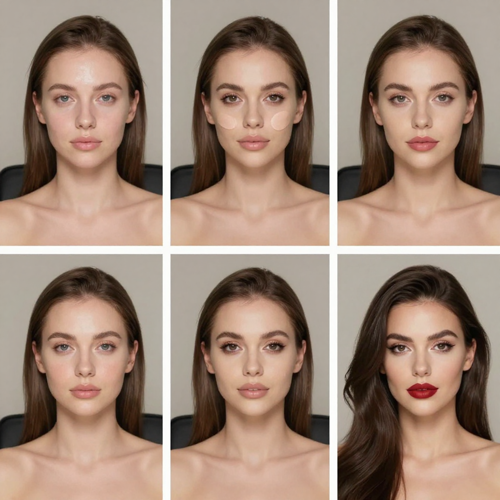
Makeup Timelapse Without the Two-Hour Shoot
Filming a real transformation means a tripod, locked light, hours of footage and an edit you still have to speed up by hand. A generated routine skips the shoot entirely: one photo in, one continuous before-and-after out.
Create My Makeup TimelapseThe Hard Part With Makeup Timelapse Is Everything Before the Reveal
Filmed routines punish you twice: hours under a locked camera, then an edit to compress it.
A Makeup Timelapse Takes Three Steps, Not Three Hours
Three moves take you from a bare-faced photo to a finished reveal. No intervalometer, no frame sequence, no timeline to speed up afterwards.
Upload One Bare-Faced Photo
Pick a clear, front-facing photo with even light. A no-makeup starting frame gives the routine the most visible distance to travel.
Choose The Order Of The Stages
Say which steps arrive and in what sequence, and whether the routine builds forward or rewinds back to bare skin.
Export The Reveal And Post It
Download a vertical clip with the finished look held long enough to read, then publish it to Reels, Shorts or TikTok.
What a Makeup Timelapse Gives You
Three things decide whether the result looks convincing: whose face it lands on, the order the stages arrive in, and whether the reveal is held long enough to read.
Makeup Timelapse Examples Worth Posting
The formats that travel: a bare face building to evening glam, a soft everyday routine, and a rewind that takes the look back off again. Every one of them starts from a single photo and ends on a held reveal.
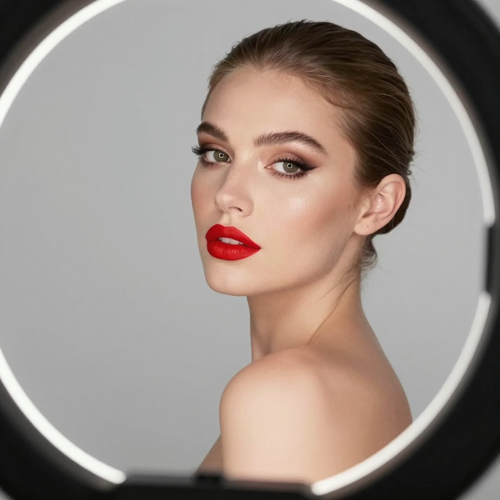
Bare Face to Evening Glam
The most requested version: base, sculpted contour, smoky eyes, lashes, then a bold lip and a final turn to camera. The contrast between the first frame and the last is strong enough to stop a scroll in the opening second.
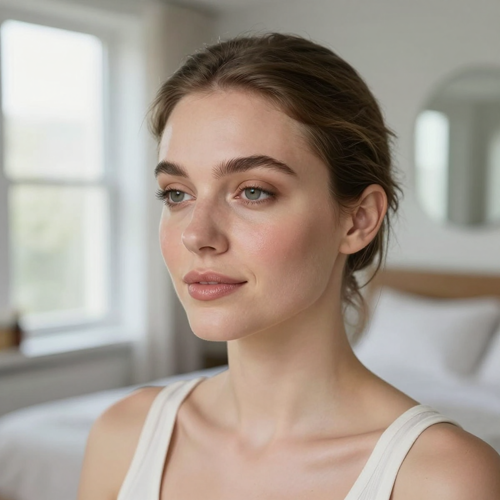
A Five-Minute Everyday Routine
A quieter take for weekday content: concealer, brows, a wash of shadow, blush, balm. It reads as a real routine rather than a costume change, which suits profile grids and save-heavy tutorial audiences better than full glam.
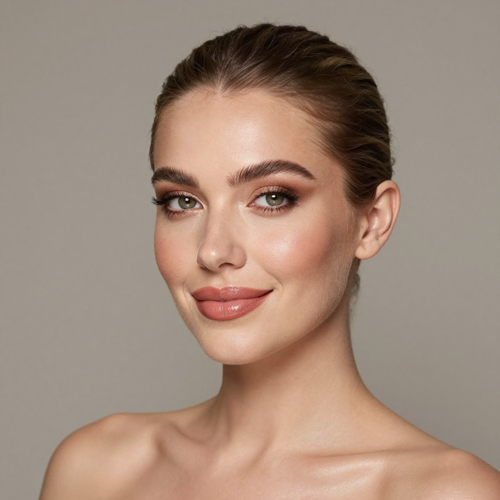
The Makeup Timelapse Reveal, Held
Too many transformations cut away before the payoff lands. This version spends the back half of the clip on the finished look, with a turn or a wink, so viewers get time to register the change instead of guessing at it.
Makeup Timelapse Inputs That Hold Up
Input quality decides most of the result. These four photo types behave differently once the routine starts, and knowing which is which saves a regeneration.
Who Struggles With Makeup Timelapse - and Why
Four groups hit the same wall for different reasons: the shoot takes too long, the edit takes longer, or there is no camera setup to begin with.
Beauty Creators on a Posting Schedule
Cadence is the whole game, and a routine filmed in real time eats an afternoon. One generated routine turns a photo into a weekday post without booking a shoot or blocking out a room.
Makeup Artists Without Filming Time
Client work is the proof, but you cannot film all of it. Staging one from a before photo fills the gaps between bookings and keeps a portfolio grid moving during quiet weeks.
Product Teams Testing a Makeup Timelapse
A launch needs before-and-after assets long before samples ship. Running the routine on a single model photo gives the team a rough cut to test the product story against.
Beginners With No Camera Setup
No tripod, no ring light, no intervalometer, no editing software. One photo taken on a phone is enough to start, which is what makes the format reachable at all.
Makeup Timelapse at a Glance
- TikTok
- YouTube Shorts
- Snapchat
Why Makeup Timelapse Beats Speeding Up Raw Footage
Speeding up real footage still needs the footage. A generated routine starts from a photo, which removes the shoot, the storage and the timeline in one move.
No Shoot To Schedule
A filmed routine needs a tripod, a locked frame and two hours you do not get back. One photo removes the setup, the storage and the reshoot entirely.
Makeup Timelapse Runs At Any Pace
Fast snapping or a slow smooth build: the pace is a choice you make, not a side effect of how long the application actually took on the day.
Your Face Stays Yours
Features, skin tone and face shape carry through from the upload, so the finished look sits on you rather than on a face swapped in from somewhere else.
Reverse Works Too
The same routine can rewind: lips, eyes, base, bare skin. A build and a rewind cut together give the before-and-after both directions without a second shoot.
A Makeup Timelapse Export Ready For Vertical
Vertical output sized for Reels, Shorts and TikTok, with the finished look held long enough for viewers to actually read it before the clip loops.
No Editing Timeline After Makeup Timelapse
No frame sequence to assemble, no speed ramp to set, no colour matching across hours of footage. The routine arrives as one finished clip you can export.
What Creators Say About Makeup Timelapse
“I used to lose a whole Sunday to one transformation: tripod, ring light, two hours of footage, then an afternoon speeding it up. Putting a bare-faced photo through a makeup timelapse got me a postable clip before the coffee went cold.”
“Client makeovers are my portfolio, but I cannot film every one of them. Running the routine from a before photo fills the gaps between bookings, and the stage order still shows the technique instead of hiding it.”
“We needed before-and-after assets before the samples even landed. One model photo and a generated routine gave the team something to test the launch story against, without booking a studio day for it.”
Makeup Timelapse Questions People Actually Ask
Short answers on inputs, stage order, pacing, reverse runs, and what to expect on the first pass.
What is a makeup timelapse video?
A makeup timelapse compresses a whole routine into one short accelerated shot: a bare face builds through base, contour, eyes and lips until the finished look lands. Instead of filming for hours and speeding the footage up afterwards, the stages are generated from a single photo. The result is a before-and-after that reads in seconds.
Do I need to film anything first?
No. One clear photo is the input. There is no tripod, no intervalometer, no hours of footage and no speed ramp to apply afterwards, and skipping the shoot is the main reason people move away from filmed routines.
What photo gives the best result?
A front-facing photo of one person, evenly lit and with no makeup on. Bare skin gives the routine more visible distance to travel, front light keeps shadows off the eyes and nose, and head-on framing keeps every stage aligned.
Can I choose the order the makeup steps appear in?
Yes. Name the sequence you want: foundation, brows, eyeshadow, liner, lashes, lips. The routine plays out in that order, either as one smooth continuous build or as distinct steps that snap in one at a time.
Can the routine run in reverse?
Yes. Ask for the finished look to lift away in reverse order: lips first, then eyes, then blush and base, until the face is bare again. Pairing a rewind with a build gives the before-and-after both directions.
How is this different from speeding up a video?
Speeding up footage needs the footage first, which means a locked camera, consistent light and hours of storage. A generated routine starts from one photo, so the pacing is chosen rather than inherited from how long the application actually took.
Is a makeup timelapse the same as a transition or a filter?
A filter changes a face in one jump and a transition cuts between two clips. A makeup timelapse shows the routine arriving stage by stage under a steady camera, which is why the change feels earned rather than switched.
Will the finished look still look like me?
Face shape, features and skin tone carry through from the photo you upload, so the finished look sits on your own face. What changes is the makeup itself: contour, eye definition, lashes and lip colour.
Where does a makeup timelapse perform best?
Vertical short-form feeds. Reels, Shorts and TikTok reward a visible change in the first second and a reveal held long enough to register. Beauty creators also use the format as a portfolio piece and as a product before-and-after cut.
Do I need editing experience to make one?
None at all. The makeup timelapse is generated from the single photo you upload rather than cut together from hours of filmed clips, so there are no gaps to patch and nothing to retime by hand afterwards. Choose the stage order, preview the result and export the clip on Textideo.
Run One Makeup Timelapse Today
One photo in, a full routine out. Pick the stage order, hold the reveal, and export a vertical clip you can post tonight. Available on Textideo.
No credit card required - no tripod - no editing timeline - export a vertical clip before you commit